

By 2026, the cybersecurity risk will be continuous and distributed, and directly connected to the pace at which organizations are shipping software. Cloud-native designs, API-based integrations, third-party dependencies, and remote access models have significantly increased the attack surfaces beyond any reasonable limits of periodic manual testing, where Automated Risk Assessment Tools become critical.
Security teams do not have a fixed number of assets to work with, which change either once or twice a year. Frequently (weekly or even daily), new releases, configuration changes, integrations with a vendor, and updates to access occur. Within such an environment, the use of spreadsheets, annual audits, or ad hoc review forms creates blind spots that attackers actively use.
Modern cyber risk is large enough to support the necessity of constant evaluation. The industry statistics indicated that, on average, a data breach in 2025 cost USD 4.44 million globally, indicating the rate and severity of successful data breaches worldwide.
Why Automated Risk Assessment Tools Are Now a Business Necessity
Tools such as automated risk assessment tools can be used to address this gap by giving continuous insight into security exposure. They do not take a point-in-time snapshot but instead monitor risks in applications, infrastructure, cloud environments, and third-party connections and identify, analyze, and rank them continuously. This transformation to ongoing evaluation of the reviews has turned into a minimum of contemporary cybersecurity programs.
The technical impact of the business is equally important as the technical one. Business enterprises are increasingly feeling pressure to prove risk knowledgeability to clients, regulators, and partners. The assessment of security risks is not just a matter of internal hygiene anymore. It has an effect on vendor trust, readiness to comply, availability of cyber insurance, and vendor preparedness to respond to the incident.
The risk assessment tools have ceased to be a luxury as increasing automation of cyber threats has made them highly targeted and automated. By 2026, most organizations will not be deciding whether to use automated risk assessment, but which tools offer valuable risk information instead of drowning teams in findings of low priority.
This guide discusses the best automated risk assessment tools in 2026 and how an effective cybersecurity risk assessment plan that balances automation, accuracy, and reality on the ground can incorporate them.
What Are Automated Risk Assessment Tools?
Automated risk assessment tools are security platforms that locate, assess, and rank cyber risks on a continuous basis in the digital landscape of an organization. These tools continuously monitor, unlike manual or point-in-time evaluations, to initiate vulnerabilities, misconfigurations, exposure points, and third-party risks as they arise.
Pragmatically, automated risk assessment software gathers and matches data across various components of the setting, such as applications, cloud infrastructure, network, endpoints, and external integrations. This information helps identify in which areas a security control can be vulnerable and which are the risks are most likely to be compromised.
Key capabilities of automated risk assessment tools include:
- Constant surveillance of assets, settings, and exposure points.
- Vulnerabilities and security gaps are discovered automatically.
- Prioritization of risks depending on the exploitability and business impact.
- Cybersecurity risk assessment and the third-party risk assessment workflow.
- Combination with security assessment tools, automatic testing tools for security, and penetration testing tools.
It is important to distinguish risk assessment tools from related security solutions:
- Vulnerability scanners focus on identifying known vulnerabilities.
- Penetration testing tools mimic an actual attack.
- These signals are collected and put into perspective by automated risk assessment tools.
This wider perspective will enable the security teams to deal with not only what is at risk, but also what is posing the most significant risk to the organization.
The bigger the organization utilizes cloud services, implements SaaS solutions, and depends on outside vendors, the more automated risk measurement is required to ensure that it ensures visibility in the multi-faceted environment. It allows regular security risk evaluation, expedited decision-making, and the replacement of reactive reviews with constant risk recognition.
Top 10 Automated Risk Assessment Tools for 2026
The list of tools, shown below, is a cross-section of the way in which organizations will approach automated risk assessment in the year 2026. The tools focus on various areas of security risk assessment, including scanning for vulnerabilities on a large scale, third-party risk visibility, and the validation of exploits. There is no universal tool, and this is the reason it is important to know the strengths and limitations.
1. Qualysec
Best applicable to: SaaS companies, enterprises, and regulated organizations that require risk validation outside of automated detection.
Basic automated features:
- Application, API, cloud, and infrastructure risk discovery.
- Weaving of automated discovery and manual penetration testing processes.
- Scale: Web applications, API, cloud applications, internal infrastructure.
Strengths:
- Verifies automated discoveries by exploitation.
- Good compliance with enterprise security reviews and requirements.
- Emphasis should be placed on risk confirmation rather than scanning volume.
Limitations:
Not developed as a self-serve-only scanning site.
Best application: Organizations with existing automated security testing tools are also required to have assurance of actual breach risk and audit-ready evidence.
Book a consultation with Qualysec’s security experts today!
2. Qualys VMDR
Best applicable: Large companies with large infrastructure and endpoint settings.
Basic automated features:
- Real-time vulnerability identification and discovery of assets.
- Threat intelligence-based prioritization, Automated prioritization based on exposure and threat intelligence.
- Coverage area: Cloud workloads, network assets, endpoints, and servers.
Strengths:
- Wide-ranging infrastructure visibility.
- Good vulnerability lifecycle management.
Limitations:
Poor understanding of the application logic and chaining.
Best-case scenario: Organizations with heavy infrastructure consumption that are oriented to managing vulnerabilities at a large scale.
3. Tenable One
Best applicable to: Organizations that are interested in consolidated exposure management.
Basic automated features:
- Exposure scoring and vulnerability scanning.
- Risk visualization Asset-based.
- Coverage area: Networks, cloud assets, identities, applications.
Strengths:
- Cohesive perception of exposure in environments.
- Sophisticated vulnerability intelligence.
Limitations:
Concentrates on detection and not exploit validation.
Ideal application: When security departments are interested in exposure visibility but not in attack simulation.
4. Rapid7 Insight Platform
Most appropriate to: Security teams that are to be provided with intelligence of detection and response combined.
Basic automated features:
- Vulnerability scanning is automated.
- Prioritization of risk based on the threat context.
- Applications, cloud infrastructure, endpoints: coverage area.
Strengths:
- Combined threat intelligence.
- Scales in hybrid environments.
Limitations:
High-impact findings often need manual validation.
Best application: Mid and large organizations with developed SOC operations.
5. Wiz
Most appropriate: Cloud-native security companies.
Basic automated features:
- Cloud security posture management.
- Cloud attack path analysis.
- Coverage area: Workloads and public cloud infrastructure.
Strengths:
- Full visibility of cloud misconfigurations.
- You can clearly visualize the paths of attack.
Limitations:
Poor coverage in non-cloud environments.
Best practice: Complex cloud estates with cloud-first organizations.
6. Orca Security
Most applicable in: Cloud architectures that need agentless monitoring.
Basic automated features:
- Risk discovery and prioritization without the use of agents.
- Cloud workload assessment
- Coverage: Workloads and cloud infrastructure.
Strengths:
- Rapid deployment
- Low operational overheads.
Limitations:
Reduced emphasis on the risk of application-layers.
Best practices: Agents are not needed. Agents are not necessary in teams that are interested in quick cloud risk visibility.
7. Vanta
Should fit best: SaaS compliance-driven companies.
Basic automated features:
- Automated control of compliance.
- Integrations of risk indicators.
- News coverage: Cloud accounts, user access, integrated tools.
Strengths:
- Powerful compliance automation.
- Easy integration ecosystem
Limitations:
Uses external tools to do deep risk validation.
Best-fit application: Startups and SaaS companies revolving around audit preparedness.
8. Secureframe
Ideally applicable to: Organizations that deal with compliance and vendor risk.
Basic automated features:
- Fully automated evidence collection.
- Vendor Risk Assessment.
- Coverage area: Compliance controls, 3rd party systems.
Strengths:
- Makes the governance and reporting easier.
- Risk documentation in a centralized place.
Limitations:
Minimal level of technical profundity in the absence of external testing tools.
Best scenario: Teams that focus on compliance visibility and not technical exploitation analysis.
9. LogicGate
Ideally applicable to: Firms with operational and third-party risk.
Basic automated features:
- Risk workflow and automation of governance.
- Vendor risk assessment
- Coverage area: Third-party relations, enterprise security assessment.
Strengths:
- Good governance and control procedures.
- Flexible risk frameworks
Limitations:
Not made to be technically vulnerable.
Optimal application: Risk and compliance groups instead of security engineering groups.
10. Archer IRM
Ideally suitable cases: Mature GRC programs of large organizations.
Basic automated features:
- Co-ordinated risk management processes.
- Audit reporting and compliance.
- Coverage area: Enterprise risk and compliance functions.
Strengths:
- Enterprise-grade governance
- Massive reporting functions.
Limitations:
Several heavy configurations and inadequate technical testing.
Best practices: Risk management at a governance and policy level of organizations.
How Automated Risk Assessment Tools Work
Automated risk assessment software which is automated is used to continuously test the security stance of an organization by assessing the results of scanning, analysis, and risk scoring in context. These tools work in the background and update risk insights as environments evolve, unlike manual reviews, which are based on periodic checks.
On a large scale, the majority of automated risk assessment tools have a comparable workflow.
1. Asset discovery and environment mapping
It begins with a process of identification of assets throughout the organization. These are cloud infrastructure, applications, APIs, endpoints, third-party integrations, and, at times, user identities. Constant finding will make sure that new or updated assets are not disregarded.
2. Automated security testing and data collection
After identifying the assets, the tools conduct automatic security tests, including:
- Application vulnerability scan and infrastructure scan.
- Security best practices and compliance configuration checks.
- API and integration testing revealed attack paths.
- External sources of third-party risk information.
This phase is the basis of automated security testing, which gathers scaled raw risk signals.
3. Risk analysis and correlation
Raw findings are not useful by themselves, and context needs to be put into them. Semi-automatic risk assessment tools match vulnerabilities with factors such as:
- Asset criticality
- Exposure to the internet
- Known threat activity
- The reliance on third-party services.
Such correlation assists in differentiating high-impact security risks and low-priority issues.
4. Risk scoring and prioritization
According to the analysis, the tools allocate the risk score, which is determined not only by the technical severity but also by the business impact. This will enable security teams to prioritize remediation efforts on risks that may realistically contribute to causing breaches, downtimes, or data exposures.
5. Continuous monitoring and reassessment
Automated risk assessment is not a one-off exercise. Risk is re-assessed by tools as:
- New weaknesses reveal themselves.
- Changes in code or infrastructure take place.
- Modifications and additions of vendors or integrations.
This will make risk insights up to date rather than outdated in the near future following an assessment.
6. Reporting and integration with workflows
Lastly, automated risk assessment systems display results in dashboards, notifications, and reports. Most of them integrate with ticketing systems, CI/CD pipelines, and security operations workflows in a way that allows for fast and reliable remediation.
To conclude, automated risk assessment tools operate by substituting the manual and fixed reviews with constantly visible reviews. They automate discovery, testing, analysis, and prioritization to ensure that security teams not only know about the vulnerabilities present, but also what risks they must address as an urgent matter.
Know more: Cybersecurity Risk Assessment Report: What It is?
Types of Automated Risk Assessment Tools in Cybersecurity
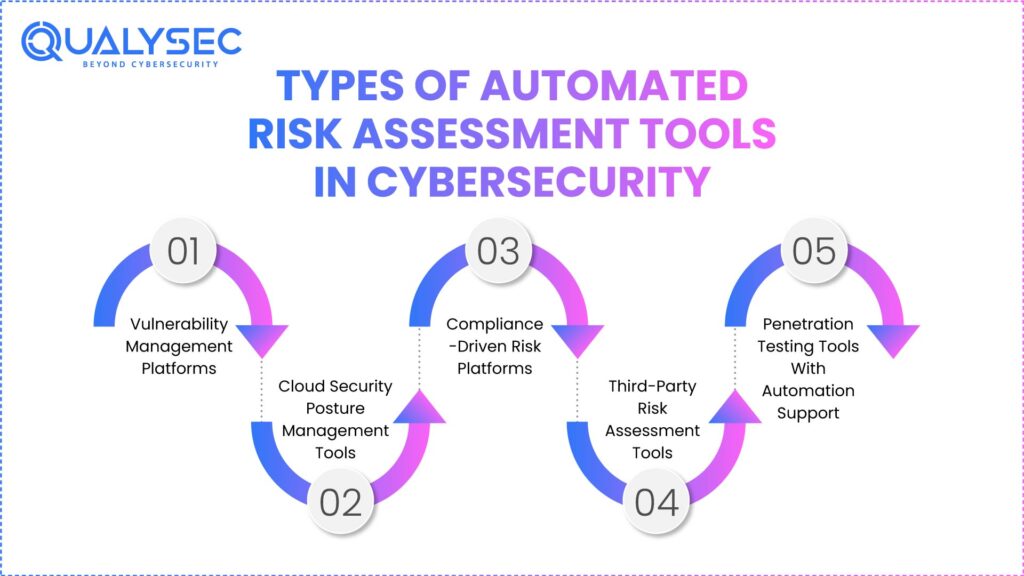
There is no single type of risk assessment technology that is automated. Practically, organizations combine various security tools, each of which is programmed to deal with various levels of cyber risk. The concepts of these categories are essential to consider before considering individual vendors or platforms, particularly in 2026, when the nature of security environments has become more hybrid and interconnected.
The main categories of automated risk assessment tools applied in the current cybersecurity programs and risks that they best address are listed below.
1. Vulnerability Management Platforms
The management platform used in vulnerability management aims at identifying the known vulnerabilities in applications, networks, and infrastructure. Such tools are based on constantly updated vulnerability databases to identify missing patches, outdated components, and insecure settings.
They are commonly used to:
- Monitor familiar vulnerabilities on a large scale.
- Track exposure on large inventories of assets.
- Support base security risk assessment activities.
Vulnerability management platforms, though effective in the identification of known issues, do not ensure whether or not the vulnerability is exploitable under real-life situations. They should apply as a feed into more comprehensive automated risk assessment policies, and not a solution on their own.
2. Cloud Security Posture Management Tools
Cloud security posture management instruments can evaluate risks that occur because of mistakes in the setup of clouds, such as public cloud infrastructure, containers, and identity settings.
These tools are normally targeted at:
- Cloud configuration drift
- Too much freedom and exposure to identity.
- Poor storage, networking, and access policies.
CSPM tools are crucial in automated cybersecurity risk assessment as organizations increase their use of clouds by identifying risks that changes in the infrastructure bring about. They mostly, however, consider configuration state and not application-level attack paths.
3. Compliance-Driven Risk Platforms
Risk platforms that are compliance-based automate risk assessment through mapping security controls to regulatory or industry standards, including ISO 27001, SOC 2, PCI DSS, or HIPAA. They are mainly established so that someone has some visibility on control coverage and audit readiness.
The tools usually have the following uses:
- Monitor compliance lapses and control position.
- Elaborate on the automation of evidence collection.
- Internal and external audit support.
Although useful in governance and reporting, compliance platforms can frequently gauge the presence of control, as opposed to the actual exploitability. Consequently, they can use them in security risk assessment, but they do not substitute for technical risk validation.
4. Third-Party Risk Assessment Tools
Third-party risk assessment tools are aimed at the risks put in place by vendors, partners, and external service providers. With the increased use of SaaS services, API, and outsourced services by organizations, third-party risk assessment has become an essential part of the cybersecurity initiatives.
These tools aid organizations:
- Assess the security position of vendors.
- Monitor exogenous risks.
- Measuring third-party exposure changes.
Third-party risk tools are valuable ways to see the risk inherent in the supply chain, but they are not typically subject to testing.
5. Penetration Testing Tools With Automation Support
There are also penetration testing tools that use automation to enable scalable testing of applications and their environments. These tools are characterized by automated discovery and test methods accompanied by minimal simulation of the exploits.
They are typically used to:
- Determine application and API attack paths.
- Value: Assessments between manual pen testing.
- Expand extended automated security testing.
Although automation is more thorough and efficient, even toolstrokes that penetrate the system in an automated way need human supervision in order to satisfy the real effect. They work best when applied in a stratified risk assessment strategy and not as completely independent solutions.
Key Capabilities to Look for in Automated Risk Assessment Tools (2026 Buyer Checklist)
All automated risk assessment tools are equally visible or decision supportive. By 2026, the disconnection between noise-producing tools and tools that lead to actual security improvements has increased. To help determine the appropriate platform, it is necessary to consider the efficiency with which it can convert into practical risk understanding.
The following are the essential functionalities that the security leaders are supposed to consider when comparing automated risk assessment tools.
1. Accuracy and False Positive Management
The automation of scale can also be useful only when the findings are also reliable. The tools with a high false positive rate slacken the remediation process and diminish faith in risk data.
Powerful automated risk assessment tools ought to:
- Correlate findings instead of using single-signal detection.
- Tune in according to the context of the environment.
- Distinctly separate confirmed risks and informational alerts.
There is a direct relationship between accuracy and the ability of the teams to act on the results of the security risk assessment.
2. Coverage Across Modern Attack Surfaces
In 2026, risk does not live in one place. Effective tools must assess exposure across clouds. There is no locality of risk in 2026. The tools should be able to measure exposure in the cloud infrastructure, applications, APIs, and supporting services.
Look for tools that cover:
- Risks in web and application-layers.
- Exposure to API and integration.
- Threats to cloud configuration and identity.
- Weaknesses in the infrastructure and network level.
The coverage also has limits, which cause blind spots that compromise the worth of automated risk assessment.
3. Risk Prioritization Logic Beyond Severity Scores
The raw severity scores are insufficient. The tools must focus on ranking risks based on probability, exposure, and the possible impact of the risk to the business, rather than merely technical ratings.
Rigid prioritization takes into account:
- Exposure and position on the attack surface (Internet).
- Criticality of assets and sensitive data.
- Relying on third-party services.
- Reputed attacker against similar environments.
Prioritization is useful in focusing the security teams on what is most important rather than in trying to pursue long lists of vulnerabilities.
4. Integration With Development and Security Workflows
The automated risk assessment tools must integrate into the current workflow and not work as an isolated system. Integration facilitates quicker recovery and elevated responsibility.
Integrations that should be key are:
- The early risk detection CI/CD pipelines.
- Remediation tracking ticketing.
- Cloud providers and identity providers.
- Monitoring tools and security tools.
The process of workflow integration defines whether risk assessment is going to be action-oriented or a reporting activity.
You might like to explore: Top 20 VAPT Testing Tools For 2026.
Balance Between Compliance Mapping and Real Risk Insight
Nonetheless, many tools stress compliance alignment, whereas compliance coverage does not necessarily indicate the effective threat of breach. The customers need to analyze whether the tools give more emphasis on real-world exposure in addition to regulatory mapping.
Effective tools:
- Compliance reporting Support without lowering the risk assessment to checklists.
- Point out gaps that are important outside the audit criteria.
- Let teams see risk without the 1controls of the framework.
Automated risk assessment should comply with the compliance objectives in 2026 without forgetting the actual attack paths.
Learn more about Compliance Security Audit.

Limitations of Automated Risk Assessment Tools
Automated risk assessment tools are a necessity in a current security program, but they cannot work alone. Their limitation is also an important factor in making informed decisions and not having a false sense of security.
1. Automation Does Not Validate Real-World Exploitability
The majority of automated risk assessment tools detect possible weaknesses in terms of known patterns, signatures, and configurations. What they usually fail to validate is the fact that the weaknesses are indeed exploitable in an actual attack.
Examples include:
- Can two or more issues of low severity link to a critical breach?
- Failure of access controls in given conditions of logic or sequence.
- How well can it withstand partial access by an attacker?
This loophole arises due to the fact that automation is based on detection and not on adversarial behavior.
2. Limited Visibility Into Business Logic and Workflow Abuse
Technical misconfigurations and known vulnerabilities are good to be detected with the help of automated tools. They have challenges with risks that are dependent on the design or usage of an application.
Common blind spots include:
- Application workflow abuse.
- Business role authorization weaknesses.
- Unstable assumptions in multi-step processes.
- Payment, onboarding, or data access edge cases.
These problems usually need the power of human intellect and the state of mind of an attacker, and automation cannot simulate them.
3. Overreliance on Severity Scores Without Context
Numerous automated systems of risk assessment are based on standardized scoring schemes. Although practical in respect of consistency, these scores are not necessarily a measure of real risk.
Challenges include:
- Severity: High-severity results that cannot be reached in practice.
- These are issues of medium severity that are highly exploitable because of exposure.
- Absence of correlation between technical severity and business impact.
Unless there is a contextual validation of risks, the teams might focus on the wrong risks.
4. Compliance Alignment Does Not Equal Breach Resistance
The automated tools usually focus on compliance coverage that will give one a false sense of security. Checks that are mapped to frameworks are not a sure way of protection against actual attack methods.
This loophole is seen to appear when:
- Policy requirements are met by systems, but fail adversarial testing.
- Paper controls are practiced, but not as an effective control.
- Risk tests are coverage-oriented as opposed to exploit-oriented.
Assessment and real-world security are similar, though not identical, in that compliance is required.
5. Automation Still Requires Human Oversight
Automated risk assessment saves manpower; however, it does not take over the expertise. It still needs human examination to:
- Confirm high-impact results.
- Interpret complicated attack scenarios.
- Choose the business case remediation priority.
In the absence of this layer, automation may produce volume in an unintelligible manner.
With the growing use of targeted and flexible attack methods, organisations that use automated risk assessment tools are at risk of overlooking the vulnerabilities of the most important importance. Automation gives visibility and validation results in confidence.
This is the reason why well-developed security programs consider automated risk assessment a starting point rather than the endpoint.
Automated Risk Assessment vs Penetration Testing: What’s the Difference?
Automated risk assessment tools and penetration testing are used interchangeably, although they have different applications in a cybersecurity risk assessment program. This mixing causes coverage holes, false assumptions, or unrealistic security tooling expectations.
Risk Identification vs Exploit Validation
The automated risk assessment tools are concerned with the identification and prioritization of potential threats. They investigate environments to identify vulnerabilities, misconfigurations, exposed assets, and risky dependencies. The result is the ranked risk inventory based on the degree of severity, exposure, or possibility.
The emphasis of penetration testing is to confirm the possibility of exploitation of those risks. It does not list the weaknesses; rather, it answers questions such as:
- Is it possible to chain these problems together by an attacker?
- Is this vulnerability the actual access to data or privilege elevation?
- What is the extent to which an attacker can travel after gaining initial access?
Summarily, automated tools point to the areas where risk might be present, and penetration testing is used to determine what actually can be caused by the risk.
Know about Penetration Testing Process: A Step-by-Step Breakdown.
Automation vs Adversarial Testing
The automated security testing tools work based on predetermined rules and signatures. They are scale and consistency effective, particularly in fast-moving environments. Nonetheless, they fail to use creativity to adapt to defenses and business logic.
Penetration testing is antagonistic in nature. Testers act as attackers and adapt their methods according to their responses, the behavior of the system, and trust relationships. Specifically, it is necessary to:
- Business logic flaws
- Weaknesses of authentication and authorization.
- Multi-system multi-step attack paths.
Automation is excellent in breadth. Penetration testing is very deep-capable.
Where Automated Tools Stop
Risk assessment tools (which are automated) usually halt at:
- Positively known vulnerability detection.
- Policy analysis and configuration.
- Static risk scoring models
They usually cannot:
- Authenticate functionality in the real world.
- Evaluate the effect of weaknesses chained.
- Confirm expectations concerning segmentation boundaries or access.
This does not lessen their value. It defines their role.
Where Penetration Testing Begins
Where automation leaves uncertainty, penetration testing starts. It is employed most effectively when it is used to:
- Confirm high-risk results of automated tools.
- Test important business processes.
- Facilitate enterprise review and audit.
- Eliminate actual cases of breach ahead of attackers.
The automated risk assessment and penetration testing combine to create a stratified practice. There is constant visibility of automation. Penetration testing helps in assuring that critical risks have been comprehended, proven, and tackled.
Mature security programs do not decide between the two in the year 2026. They apply automated risk assessment to keep the awareness and to ensure reality through penetration testing.
Discover: Complete Penetration Testing Checklist for 2026.
How Qualysec Complements Automated Risk Assessment Tools
Risk assessment tools applied in the automated mode are effective when it comes to identifying possible security exposure, but they fail to determine the behavior of the risks in real attack conditions. Qualysec fills the gap between automation and validation, context, and assurance at this point.
Qualysec does not substitute automated risk assessment tools, but it makes them work together. The emphasis is laid on justifying and ranking the risks that automation brings.
Some of the crucial ways through which Qualysec supplements automated risk assessment are:
1. Non-scanner risk validation
Automated tools identify vulnerabilities in signatures and configurations. Qualysec proves that emulating actual attack paths through applications, APIs, identities, and infrastructure can actually exploit those findings.
2. Manual exploitation and impact confirmation
Real-life ascertains the impact of risks identified in Qualysec. This will assist the security teams in knowing what issues may result in the exposure of data, escalation of privileges, or the disruption of services, rather than depending on severity scores only.
3. Risk prioritization based on context
Scanner scores tend to be out of context withthe business. Qualysec is based on the priorities of risks in terms of exploitability, asset sensitivity, and business impact, enabling teams to remediate where they most need it.
4. Complex attack scenarios coverage
Automated tools are frequently unable to see logic flaws, chained vulnerabilities, or workflow abuse. Qualysec attempts to fill these gaps with human testing, which represents the actual workings of attackers.
5. Compliance and enterprise security review support
Qualysec offers evidence ready to audit that supplements the results of automated risk assessment. This involves the definition of scope, validation of attacks, remedies instruction, and retesting outcomes, which favor conformity and purchaser security audits.
The integration of automated risk assessment with the validation-based approach to risk assessment used by Qualysec enables organizations to transition between risk identification and risk confidence. This combined approach will make sure that mature cybersecurity programs in 2026 are not based on assumptions, but proven exposure, which is the key to such decisions.
Get real-world attack validation beyond scanners-talk to Qualysec today.
Conclusion
Computer-based risk assessment instruments are vital factors to keep abreast with the speed and magnitude of the contemporary setting. They come to light rapidly, monitor transition, and assist security staff so they do not run in the dark. The tools are not what choose what to act on. People do.
The distinction in 2026 is not in the number of risks that you can identify, but in the clarity of the way that you can comprehend the effect. The successful organizations are those that do not just stop at finding raw data, but continue to the validated and business-focused risk. That demands being aware of which of the issues are theoretical, which may be exploited, and which may have a material impact on customers, revenues, or trust.
A good risk assessment plan is one that is a combination of automation and expertise. Breadth and speed come with automated tools. Professionally oriented validation is rich in details and assurance. They can both help security teams prioritize and be confident, convey risk, and make decisions that pass inspection by leadership, customers, and regulators.
In case you would like to leave automated alerts behind and attain actionable risk visibility, then Qualysec may assist you in justifying what it is that really counts.
Schedule a risk validation consultation with Qualysec and strengthen your security decisions for 2026.
FAQs
Q: What are automated risk assessment tools?
A: Automated risk assessment tools are security systems that can continually discover, evaluate, and rank cybersecurity hazards in applications, infrastructure, cloud systems, and third-party interdependencies. They substitute manual reviewing at some periodic interval with continuous exposure to security threats.
Q: How do automated risk assessment tools work?
A: These tools identify assets, perform automated security scanning like vulnerability and configuration scanning, match results to context, including exposure and asset criticality, and give risk ratings. The outcomes are updated continuously with the evolving environments.
Q: Why are automated risk assessment tools important in 2026?
A: Attack surfaces vary too often that manual evaluations are no longer than yearly in the year 2026. Automated risk assessment assists businesses in keeping awareness alive, third-party risk management, and aids in rapid decision-making in cloud- and SaaS-based architecture.
Q: What types of risks can automated tools detect?
A: Automated tools generally identify technical vulnerabilities, misconfigurations, exposed services, old components, compliance gaps, and some of the third-party risks. They excel when it comes to recognizing familiar and unfamiliar patterns of risk.
Q: Who should use automated risk assessment tools?
A: Automated risk assessment methods apply to SaaS businesses, enterprises, regulated businesses, or simply a team at risk of working in complex or dynamically changing environments. They are particularly useful in the case of organizations that have a cloud infrastructure, APIs, and multiple vendors.
Q: Are automated risk assessment tools compliant with regulations?
A: There are regulatory and standards framework mapping tools mentioned in the standards, like ISO 27001, SOC 2, PCI DSS, and HIPAA, that many automated risk assessment tools facilitate. Nevertheless, adherence remains subject to interpretation, validation, and correction of findings.
Q: What are the benefits of using automated risk assessment tools?
A: Major advantages are the ability to have continuous visibility into the security posture, faster identification of new risks, enhanced prioritization, less manual work, and enhanced support to the process of cybersecurity risk assessment and third-party risk management.