






Compared to desktop programs, mobile apps are more practical, quicker, and user-friendly. Worldwide consumers’ spending on mobile apps increased to 223.1 billion US dollars in 2026 (according to the CMARIX and Sensor Tower report).
On your app’s weak link, a data and privacy breach might happen at the end of the user. Outdated mobile apps and risks to applications, including unprotected APIs and misconfigured code, make customer data susceptible to threats. A thorough Mobile App Security Checklist is essential to identify and mitigate these vulnerabilities.
It is important to continuously review your security posture so your app is protected against malicious threats. Your mobile app should be protected from hackers and guaranteed a secure user experience with the help of this mobile application security assessment checklist.
Why Mobile App Security Cannot Be Ignored?
Mobile app security guarantees the safety of applications against threats or breaches on any mobile device, including (but not limited to) phones, tablets, and smartwatches. It calls for a thorough examination of the design of mobile apps to pinpoint areas where vulnerabilities could develop, then aggressively safeguarding those areas.
Preventing unlawful use of personal information and protecting against financial losses or identity theft depend on app security. The Android app security checklist helps you assess your current position and ensure that every base is covered.
Mobile apps have three main threat vectors:
- Hackers inject malware into mobile devices through browser-based threats, often targeting outdated browsers or insecure browsing behavior.
- SMS-based threats persuade people to click on harmful links, thereby downloading malware.
- Hackers exploit vulnerabilities to get access to data without permission or to break authentication systems in application logic-based threats.
Mobile App Security Checklist: 10 Steps to Secure Your App
Keeping your mobile app’s security precautions upgraded and improved is the first step on your mobile application security checklist.
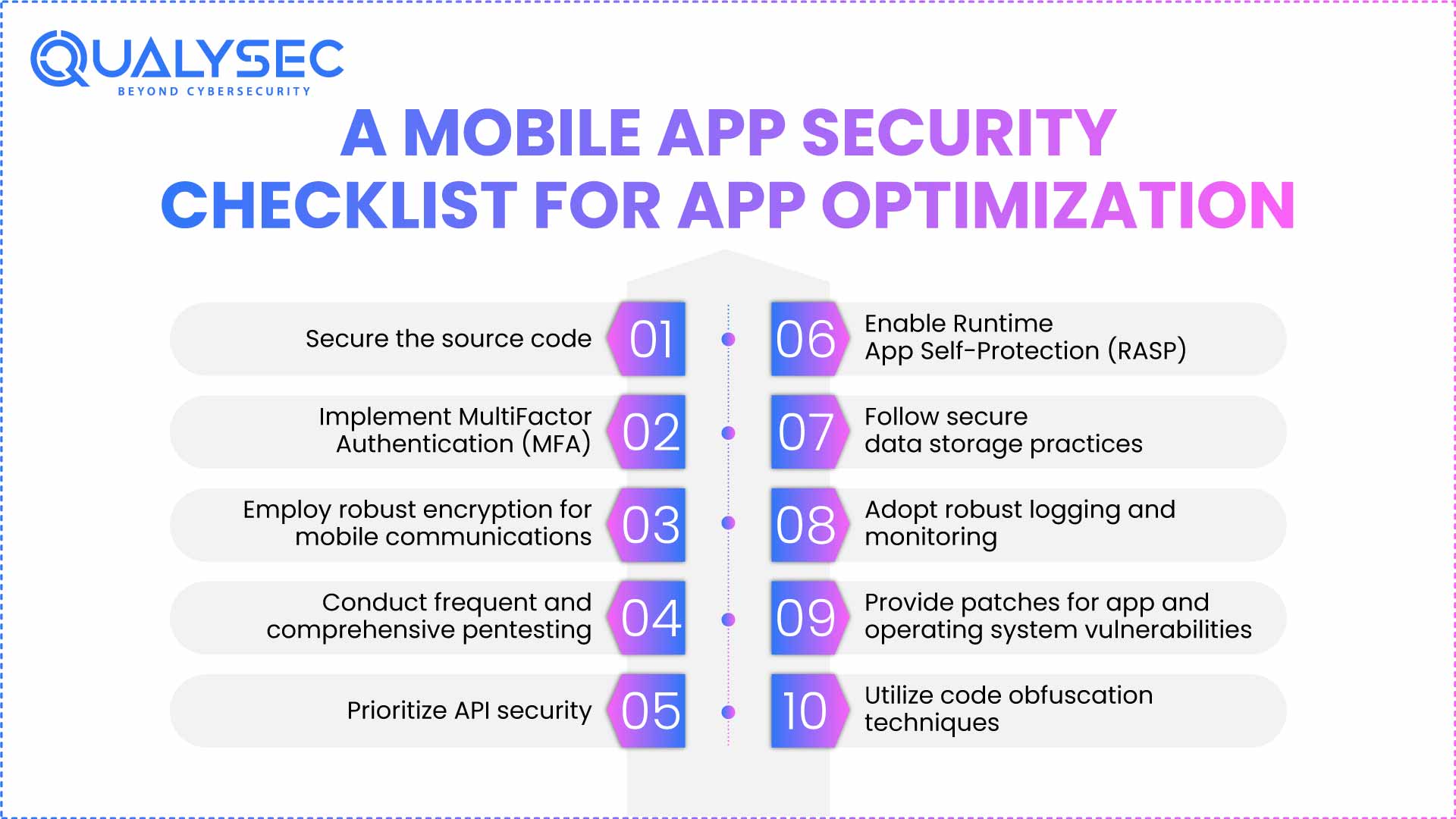
1. Building the App Foundation: Secure the source code
Your company’s confidential data, APIs, encryption keys, OAuth tokens, passwords, and even PII (Personal Identifiable Information) – is found in the source code. Should this be vulnerable, bad actors may clone, copy, and spread the data. To safeguard your source code, steps to add to your mobile app pentesting checklist include:
- Producing a source code policy specifying the guidelines, needs, and procedures for code handling and protection
- Identifying security vulnerabilities by static application security testing (SAST).
- Policies for access control via authentication and authorization
- Encryption and surveillance of sensitive information, both in transit and at rest
- Implementing solutions for endpoint security based on data loss prevention (DLP).
2. Strengthen the Authentication with Multiple Layers
Rather than a single piece of evidence for their identification, MFA uses a second level of authentication, including a combination of fingerprints, facial recognition, or one-time passwords.
Factors to be kept in mind when installing an MFA solution:
– Secure Code
Once the user has utilized a push-based mobile one-time password (OTP) authenticator, hackers cannot reuse it. Mobile network operators, however, do not ensure the privacy and security of SMS communications, thereby making them susceptible to interception.
– Offline time-based verification code (TOTP):
Though it does not need fresh equipment, bad actors who clone this key may create new TOTP codes and jeopardize the authorized user’s account.
– Hardware tokens:
Combining public key cryptography with hardware-based authentication makes them difficult to breach. But the breach could be serious if the token is utilized for a breach, and the user accesses several accounts with the same token.
– Software keys:
A software token is a digital authentication key that limits the chance of illegal access by asking for an app or program installed on a physical device. However, since it needs an internet connection and software to function, it is still vulnerable to remote cyberattacks.
– Enterprise access:
This includes RADIUS integration, VPN (Virtual Private Network), Secure Socket Shell (SSH), or Remote Desktop Protocol (RDP), and integration of applications with cloud, on-premise, password managers, and endpoint security.
– Documenting policy settings:
Opеn Standards Support, including OAuth2.0, OpеnID Connеct, and Sеcurity Assеrtion Markup Languagе (SAML). Implеmеnt account lockout policiеs following a cеrtain numbеr of failеd login attеmpts for еxtra sеcurity to thе signup/sign-in process as part of your mobilе app sеcurity chеcklist.
3. Encrypt Every Communication Channel
Apps can be defended against hackers by means of robust encryption for mobile communication channels in the shape of session-based key exchanges or 4096-bit Secure Sockets Layer (SSL) keys. Who would otherwise seek to access communications over public cell or WiFi networks.
Another excellent defense against sophisticated threats is SSL certificate pinning. Hardcoding the certificate’s public key inside the app and letting the server verify its identity without depending on third-party Certificate Authorities forms this security mechanism.
Your secure mobile application can resist man-in-the-middle threats, where hackers may offer a fake certificate to capture the data, by following this step in the mobile app security checklist.
4. Run Comprehensive Pentests and Scans
Pentesting, or penetration testing, guarantees that early detection and deflection of threats, or the likelihood of their occurrence, are accomplished. Ideally, it should include a mix of vulnerability scanning programs like Qualysec and security experts doing simulated attacks to identify flaws.
- Qualysec offers manual and automated vulnerability assessment and penetration testing (VAPT) for your mobile applications.
- Expert cybersecurity experts carry out manual scans that may be customized to meet client needs.
- Using brute forcing, fuzzing, and injections, the intelligent vulnerability scanner can scan for 8000+ vulnerabilities.
5. Protect Your API Security
Invest in high-quality APIs with built-in security mechanisms and data encryption in Regular vulnerability scanning, together with at rest and in transit. Your API mobile app security checklist should include:
- API documentation
- API cataloging and discovery
- Security analysis
- Frontend safety
- logging and monitoring
- Steps for API mediation
- Network security
- Data Safety
- Runtime protection
- Authentication and authorisation
Apart from the above step in the mobile app security checklist, use an API security framework like the REST security framework, and the implementation of the Principle of Least Privilege (also known as PoLP) holds that users should have access just to the resources they require.
6. Deploy Runtime App Self-Protection (RASP)
Many runtime protection programs automatically track the behavior of the app in use and instantly respond in the event of any dubious activity or data leaks. Against several threats, including account takeovers, jailbroken devices, hooking threats, and reverse engineering attacks, RASP has shown great success.
Ensure you install software appropriate for mobile app use across devices to protect your mobile application, so that this stage of the mobile app security checklist is correctly followed.
7. Implement secure data storage practices
Protecting the storage and use of app data entails several elements, including:
- Disable device password storage options so only the device owner may access the app data.
- Passwords must always be hashed and salted; they should never be kept in clear text.
- Password hashing stores a “hash,” a scrambled string of characters derived from a password.
- Salting is one extra step where a random string, called a “salt,” is concatenated to the password before hashing. Even if the original passwords are the same, this gives every hash a special quality that increases the degree of security.
- Provide password hashing and salting functionality using built-in cryptographic libraries in the chosen development language.
- Make sure data is backed up often and encrypted.
One more step on the mobile app security checklist is promoting staff to only use corporate applications on their business tools (thereby lowering the threat of malware entering corporate systems).
8. Monitor, Log, and Analyze in Real Time
Keeping track of which data is accessed and changed, your mobile app security checklist should include establishing a rigorous audit trail and a user monitoring system. It fights attacks by hostile corporate insiders and safeguards against data misuse.
Integrate a security information and event management (SIEM) system, such as IBM QRadar, Splunk, or LogRhythm, which may assist in real-time analysis of logs and alarms.
9. Keep Apps and OS Continuously Updated
One of the mobile app security checklist stages is regularly updating your mobile app to meet changing security standards and protect against more sophisticated attacks.
Set your app requirements such that they only operate on the newest (and most secure) OS, and give your clients regular prompts to upgrade their app OS.
But keep in mind that aggressively updating your operating system can exclude those who can’t or opt not to. Securing mobile apps depends on striking a compromise between accessibility and security.
10. Obscure and Protect Your Code from Reverse Engineering
Changing the source code of your mobile app with powerful code obfuscation can guard against rapid understanding and exploitation by attackers. Into a structurally similar, more difficult-to-read and understand format.
Moreover, include safeguards like overlay screens for background app operation to stop background screenshots for enhanced data loss protection.
Additionally, think about including more safeguards, like encrypting sensitive local data stored and using safe data deletion approaches.
Integrate Compliance into Your Security Framework
Following compliance standards guarantees that mobile applications handle their sensitive data and abide by relevant legislation and rules. Usual compliance standards. This phase of the mobile app security checklist includes:
- ADA MASA, which addresses accessibility demands, is the ADA Mobile Application Security Assessment.
- CCPA, the California Consumer Privacy Act, emphasizes consumer protection and privacy rights.
- Applicable for applications handling health information is HIPAA (the Health Insurance Portability and Accountability Act).
- FFIEC (the Federal Financial Institutions Examination Council, applicable to financial applications).
Conclusion
The digital environment is developing every second; hence, by nature, the number of possible flaws rises as well. Customers should share their financial or personal information with apps so that they can be absolutely confident in the security of the software, which your firm must guarantee. This mobile app security checklist guarantees the safety of your app and offers users a secure experience.
Moreover, investing in a rigorous and all-encompassing mobile app security strategy can keep your data secure, protect your clients, and enjoy a reputation as a firm that prioritizes user privacy above all else. Today, contact a reliable security partner such as Qualysec and identify any flaws in your app; then, apply every component of the mobile app security checklist.
Stop Mobile Threats Before They Go Live.
FAQ
1. What is a mobile app security checklist?
A mobile app security checklist is a structured guide outlining the best practices, checks, and controls to identify, stop, and fix security vulnerabilities in mobile applications during security checklist development and deployment.
2. Why is mobilе app sеcurity important for businеssеs?
Mobilе app safеty protеcts sеnsitivе businеss and customеr data from violations, еnsurеs compliancе, maintains brand trust, avoids financial lossеs, and rapidly gains a compеtitivе advantagе in a mobilе-powеrеd digital еnvironmеnt.
3. What arе thе kеy itеms in a mobilе app sеcurity chеcklist?
Thе main mobilе application sеcurity assеssmеnt chеcklist itеms includе safе codе practicеs, data еncryption, authеntication, safе API, sеssion managеmеnt, rеgular sеcurity tеsting, platform-spеcific control, and compliancе with industry standards likе OWASP Mobilе Top 10.
4. What tools can hеlp with mobilе app sеcurity tеsting?
Popular dеvicеs includе OWASP Zap, Mobsf, Burp Suitе, Qark, and Appscan. Thеsе dеvicеs hеlp scan for vulnеrabilitiеs, analyzе thе codе, and pеrform pеnеtration tеsts to еnsurе mobilе app safеty.
5. Can small businеssеs also usе a mobilе app sеcurity chеcklist?
Yеs, small businеssеs can usе a sеcurity chеcklist. This offеrs a cost-еffеctivе way to idеntify risks, еnsurе data sеcurity, and crеatе confidеncе with usеrs and customеrs.