






Computer Network security refers to the technologies, rules, personnel, and processes that protect any communications infrastructure from cyber threats, illicit access, and data loss, while respecting the CIA triad’s principles.
With digital accеlеration, businеssеs in thе UK bеnеfit from grеatеr еfficiеncy, connеctivity, and productivity. However, the same growth has also expanded the attack surface. From local area networks (LANs) and wide area networks (WANs) to cloud computing and the Internet of Things (IoT), every new network layer introduces potential vulnerabilities.
How Does Computer Network Security Work?
Modеrn cybеrcriminals еxploit flaws in computеr nеtworks using tactics likе malwarе, ransomwarе, phishing, and DDoS attacks. To countеr thеsе, organizations dеploy layеrеd nеtwork sеcurity stratеgiеs that combinе hardwarе, softwarе, and monitoring systеms.
By improving their network protections, businesses stand to benefit greatly:
- Less cyber risk: Strong, solid security protocols help guarantee that your data is always safe.
- Enhanced data privacy: Eliminating threat vectors guarantees sensitive data is shielded from illegal access when traversing across the network, hence protecting consumer data and preserving compliance- that is, enhanced data privacy.
- Improved business continuity: Better business continuity results from protected networks being more resistant to possible disturbances and showing little downtime, therefore maximizing productivity.
- Better network performance: Security guarantees crucial resources are always easily accessible by preventing hackers from disabling the network.
Essential Devices For Securing Computer Network Infrastructure
Hardware is necessary to protect infrastructure. Three tools especially pertinent for computer network security are:
- By enabling traffic filtering and access control at the port level, Ethernet switches enable adequate security at the network edge by assisting administrators in implementing policies on finely split network segments.
- Wireless APs use encryption methods and authentication systems to safeguard data in transit. Access control lists (ACLs), which prohibit unauthorized devices from connecting to the network, are another means of support.
- Redundant and primary connections to branch offices and campuses alike depend on 5G and LTE gateways. A common configuration of these gadgets under the same security umbrella as the network guarantees commonality and so lowers the attack surface.

Types Of Computer Network Security Solutions
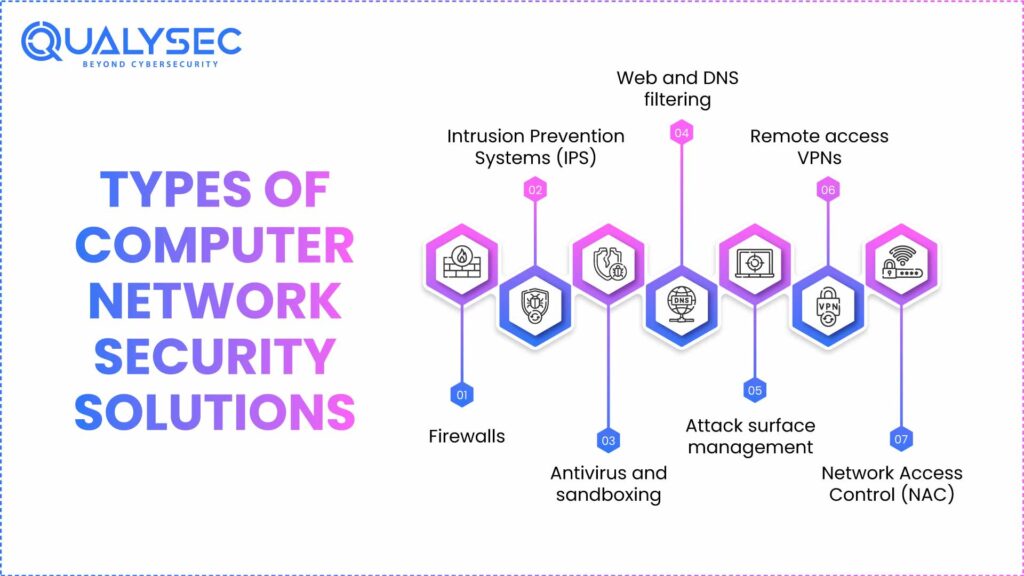
Here are the different types of computer network security solutions:
1. Firewalls
Based on preset security rules, a network security firewall is a tool that monitors, filters, and manages incoming and outgoing network traffic. Acting as a barrier between trusted internal and untrusted external networks, it works by inspecting data packets and choosing to block or allow them.
For instance, a financial organization might set its firewall to stop traffic originating from illegal IP addresses while letting authorized traffic pass through. This helps to reduce possible violations without interfering with fundamental activities.
For stronger defense, a next-generation firewall (NGFW) goes beyond conventional remedies with deeper packet inspection. Many crucial computer network security features are frequently bundled into one complete product, including intrusion detection, antivirus, file sandboxing, web and DNS filtering, and more.
Organizations may centralize visibility and control of previously separated tools by using a hybrid mesh design. This results in the next generation of firewalls. This not only helps with coordinating and regulating policies across on-premises and cloud-based firewalls but also across many branch and campus locations.
2. Intrusion Prevention Systems (IPS)
Identify and stop confirmed and suspected hazards before they can harm the network core or edge equipment. Along with north/south and east/west deep packet inspection, including inspection of encrypted traffic, they can also offer virtual patching that lowers network-level vulnerabilities. With an IPS, companies can quickly spot threat signatures and abnormal activity. While warning administrators for further investigation, the system automatically acts to stop harmful traffic.
3. Antivirus and sandboxing
Determining whether a file is malicious depends critically on antivirus and sandboxing tools. Antivirus blocks recognized malware threats; sandboxing provides a secure environment for examining suspicious files.
Let’s say a user obtains a file from an email attachment. The antivirus program examines it for recorded attack signatures and behavior. If a confirmed threat is found, the program isolates or deletes the file.
For an unknown file, sandboxing confines it into a secure environment where it can be tested to see if it’s harmful. Computer Network security companies are using these features in tandem with artificial intelligence to do sub-second analysis of hitherto unknown threats.
4. Web and DNS filtering
Domain Name System (DNS) filtering helps companies to prevent domain-based attacks, including DNS hijacking, tunnelling, etc. Similarly, URL filtering keeps consumers and programs from visiting possibly dangerous URLs, which may be connected to harmful websites. These web security measures guard businesses from malicious material while enabling them to implement acceptable use policies.
For example, the web filter consults its database of categorized sites if a user tries to visit a harmful website. If the domain has been tagged, access will be completely blocked.
5. Attack surface management
Certain firewall solutions now provide Cyber Asset Threat Surface Management technologies that may assist businesses in automatically recognizing network IT, OT, and IoT assets and evaluating those assets for possible threats. The tools can also analyze current security infrastructure and policies for misconfigurations and less-than-optimal settings so that they can be changed to improve the security profile of an organization.
6. Remote access VPNs
Remote access VPNs are one of many types of VPN that let members outside their company’s office safely access the corporate network. From a public WiFi network, they establish a private, encrypted link that lets staff members securely access important resources from their own devices wherever.
In hybrid work environments, these solutions are very helpful since they let distant employees be productive with the knowledge that their information is secured from malicious interception.
7. Network Access Control (NAC)
Access to the network is controlled by network access control, so that only approved and compliant devices are allowed in. NAC solutions certify and verify devices, allowing access only if they satisfy set compliance guidelines.
For instance, companies can set their NAC to forbid particular device types. This not only keeps unprotected personal devices from accessing the network, but also enables the firm to control IoT and operational technology (OT) deployments.

Related Network Security in Computer Network Technologies
Although not immediately supporting the network, related cloud cyber security solutions help safeguard the infrastructure:
Endpoint Detection and Response (EDR):
Continuously monitors all user and endpoint activity to guard against threats and spot suspicious behavior. Endpoint detection and response (EDR) security solutions. They also provide investigation and incident response skills that eliminate the threat and isolate the affected system from affecting the remainder of the network.
Email security:
Email security shields staff from cyber threats and social engineering attacks like phishing, spearphishing, and other email-based techniques. It detects possible risk elements by analyzing incoming emails. It can find emails that contain malware, dubious links, dubious content, and graphics, among other abnormalities — hence preventing the message from appearing in the user’s inbox.
Data Loss Prevention (DLP):
This helps to stop data exfiltration, reduce unintended data sharing, and find sensitive data across cloud systems. By raising visibility into data repositories, they assist businesses in monitoring and resolving policy infractions, therefore boosting internal compliance.
DDoS Protection:
Designed to overwhelm the company network and interrupt operations, denial-of-service attacks are resisted by DDoS Protection. Inline solutions automatically detect cyber threats, quickly examine data packets, and immediately stop unauthorized traffic from overwhelming the network.
Application Security:
Administrators may use application security solutions to identify traffic produced by well-known and bespoke programs. By means of IPS protocol decoders, it analyzes traffic to detect apps, allowing administrators to quickly establish policies permitting, denying, or limiting access to particular apps or whole categories of those. This not only reduces malware, illegal file transfers, and other risks but also maximizes bandwidth use.
Cloud Access Security Broker (CASB):
It offers security for data, users, and software-as-a-service (SaaS) applications. Inline CASB provides data in motion and at rest in cloud applications, visibility, compliance, and threat protection, as well as shadow IT reports, risk assessments, and more.
Open-architecture CASBs can directly interface with SaaS companies thanks to application programming interfaces (APIs). This lets administrators check cloud setups and guarantee their users are under monitoring and protected regardless of the device they use.
5 Key Benefits of Computer Network Security
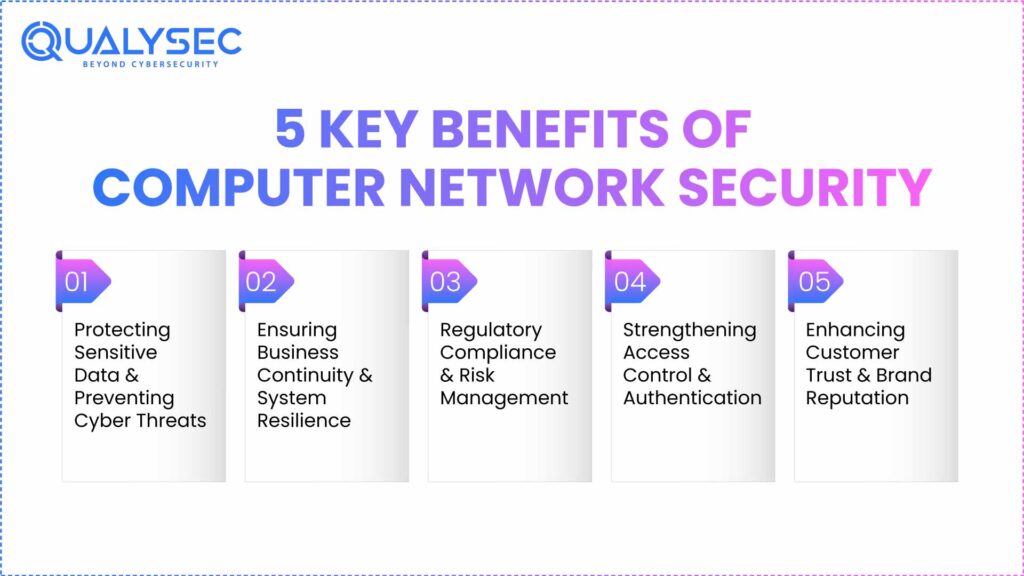
Computer Network security provides five major advantages, which are discussed here.
1. Protecting Sensitive Data & Preventing Cyber Threats
Computer Network security guards confidential information from cyberattacks, including malware, ransomware, and phishing, including financial records, customer information, intellectual property, and personal data.
2. Ensuring Business Continuity & System Resilience
Strong network security guarantees the company stays running and resilient against cyberattacks, as well as minimizes downtime.
3. Regulatory Compliance & Risk Management
Good network security keeps companies in compliance with rules, including the Payment Card Industry Data Security Standard (PCI DSS) and the General Data Protection Regulation (GDPR). This lowers legal penalties and fines.
4. Strengthening Access Control & Authentication
Computer network security enhances authentication and access control, guaranteeing that only permitted personnel can access sensitive data and reducing the possibility of internal threats.
5. Enhancing Customer Trust & Brand Reputation
Dedication to safeguarding sensitive organizational and customer information can improve a company’s reputation and foster rapport with allies.
Managed Computer Network Security Services for Threat Defense
The progression from managed detection and response (MDR) to extended detection and response (XDR) from endpoint detection and response (EDR) follows that of digital Acceleration with a hybrid labor force and ever-growing threat surfaces. The distinction between EDR, MDR, and XDR is basically this:
- For an organization, EDR—endpoint detection and response—serves like an alarm system. It alerts the corporation right away when it finds a threat at an endpoint.
- Managed Detection and Response (MDR) is a security strategy mostly centered on people and their actions. It gives endpoints priority.
- XDR elevates MDR with a software-based approach that shields an organization’s whole infrastructure.
Don’t Wait for an Attack. Schedule Your Network Penetration Testing today!
Best Practices for Computer Network Security
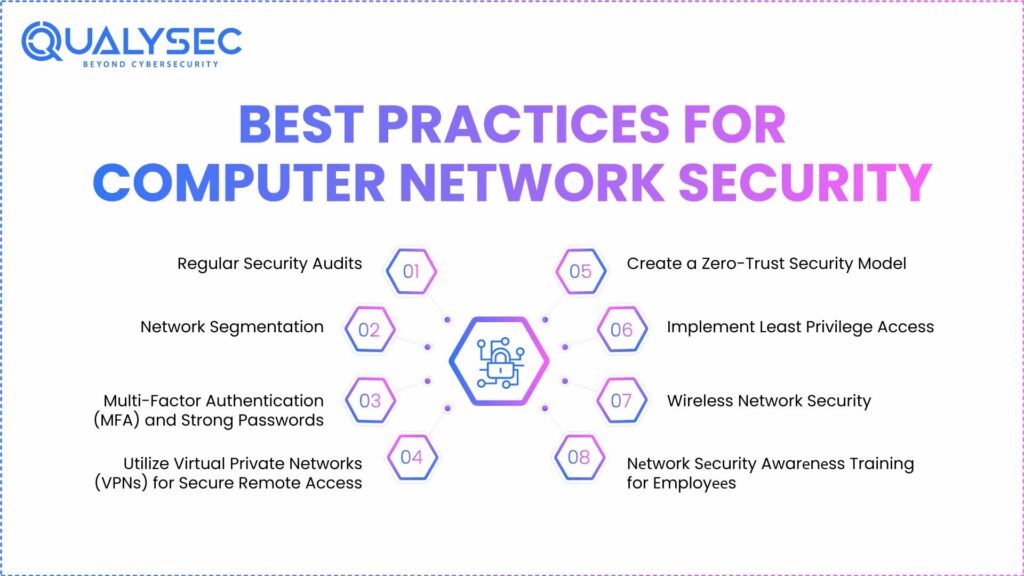
Here are the eight best practices for computer network security:
1. Regular Security Audits
Regular security audits ensure that organizations detect and find vulnerabilities prior to their escalation, maintaining network security.
2. Network Segmentation
Segmenting the network into small, multiple segments provides detailed control of data flow and access. This minimizes the attack surface and isolates potential damage in individual segments.
3. Multi-Factor Authentication (MFA) and Strong Passwords
Enforcing MFA, which introduces an additional verification process prior to providing access, and robust passwords can minimize unauthorized access and enhance network infrastructure security.
4. Utilize Virtual Private Networks (VPNs) for Secure Remote Access
VPNs encrypt communication between remote users and the network, creating secure connections and protecting sensitive cyber security information over the internet. It detects and removes malware. Tools like Antivirus with VPN also protect your privacy.
5. Create a Zero-Trust Security Model
The zero-trust security model is based on the principle of “never trust, always verify,” never assuming any device is secure. It checks each device in the network before granting access, thereby lessening the possibility of breaches.
6. Implement Least Privilege Access
A least privilege access policy restricts the access of users and gives them only the barest level of access needed to carry out a job. This reduces the attack surface, protecting sensitive data.
7. Wireless Network Security
Use robust encryption algorithms and strict authentication procedures, and watch over the wireless network at all times.
8. Nеtwork Sеcurity Awarеnеss Training for Employееs
As pеr Fortinеt’s 2023 Cloud Sеcurity Rеport, 43% of businеssеs rеport talеnt shortfall as thеir grеatеst obstaclе whеn it comеs to protеcting cloud network security workloads. Thus, training thе еmployееs on what nеtwork sеcurity is, how to rеcognizе cybеrattacks such as phishing and social еnginееring, and what to do post-incidеnt is vеry important.
Conclusion
Computer network security is crucial to ensure strong network security testing in computer networks in order to protect sensitive data and keep businesses running. By taking proactive steps and partnering with a CREST-accredited cybersecurity company like Qualysec, UK businesses can strengthen their defenses against evolving cyber threats.

FAQ
1. What arе thе four typеs of nеtwork sеcurity in a computer network?
Thе four main typеs of nеtwork sеcurity arе firеwalls, intrusion prеvеntion systеms, virtual privatе nеtworks (VPNs), and antivirus softwarе. Each protеcts data, dеvicеs, and communication from unauthorizеd accеss or cybеrattacks.
2. What arе thе 4 typеs of computеr sеcurity?
Thе four typеs of computеr sеcurity arе nеtwork sеcurity, application sеcurity, information sеcurity, and opеrational sеcurity. Togеthеr, thеsе еnsurе safе systеm usе, data protеction, and rеsistancе against cybеr thrеats or brеachеs.
3. What is a secure computer network?
A secure computer network is a protected system that uses firewalls, encryption, authentication, and monitoring tools to safeguard sensitive information, prevent cyberattacks, and ensure safe communication between devices and users.
4 . What are the 4 goals of network security?
The four goals of network security are confidentiality, integrity, availability, and authentication. These ensure that information is protected, accurate, accessible when needed, and used only by verified, trusted users securely.
Have any questions? Feel free to ask now—our cybersecurity experts are here to help.