







Cloud computing has changed everything in the way companies do business, enabling teams to deploy, scale, and innovate faster than ever before. In the case of AWS security best practices, which is a cloud infrastructure leader, there are potent capabilities that enable the storage, management, and processing of large volumes of data. However, powerful potentiality is accompanied by many responsibilities, especially in matters of security.
The inappropriate configuration in AWS might have acute results: authorised access to files, problems with services, or even intrusion on a grand scale. However, according to the 2024 Cost of a Data Breach Report, provided by IBM, the global average data breach cost increased to 4.88 million, and cloud misconfigurations have been one of the leading contributors to the phenomenon. AWS provides robust security tools, but it ultimately depends on you, your policies, configurations, and processes to ensure that you apply them properly. In this guide, Qualysec Technologies is here to do a deep dive into 10 AWS security best practices that can enable you to protect your cloud security service resources, ensure compliance, and safeguard your organization’s reputation.
Secure your AWS environment today – schedule a free consultation with Qualysec’s security experts.
10 AWS Security Best Practices
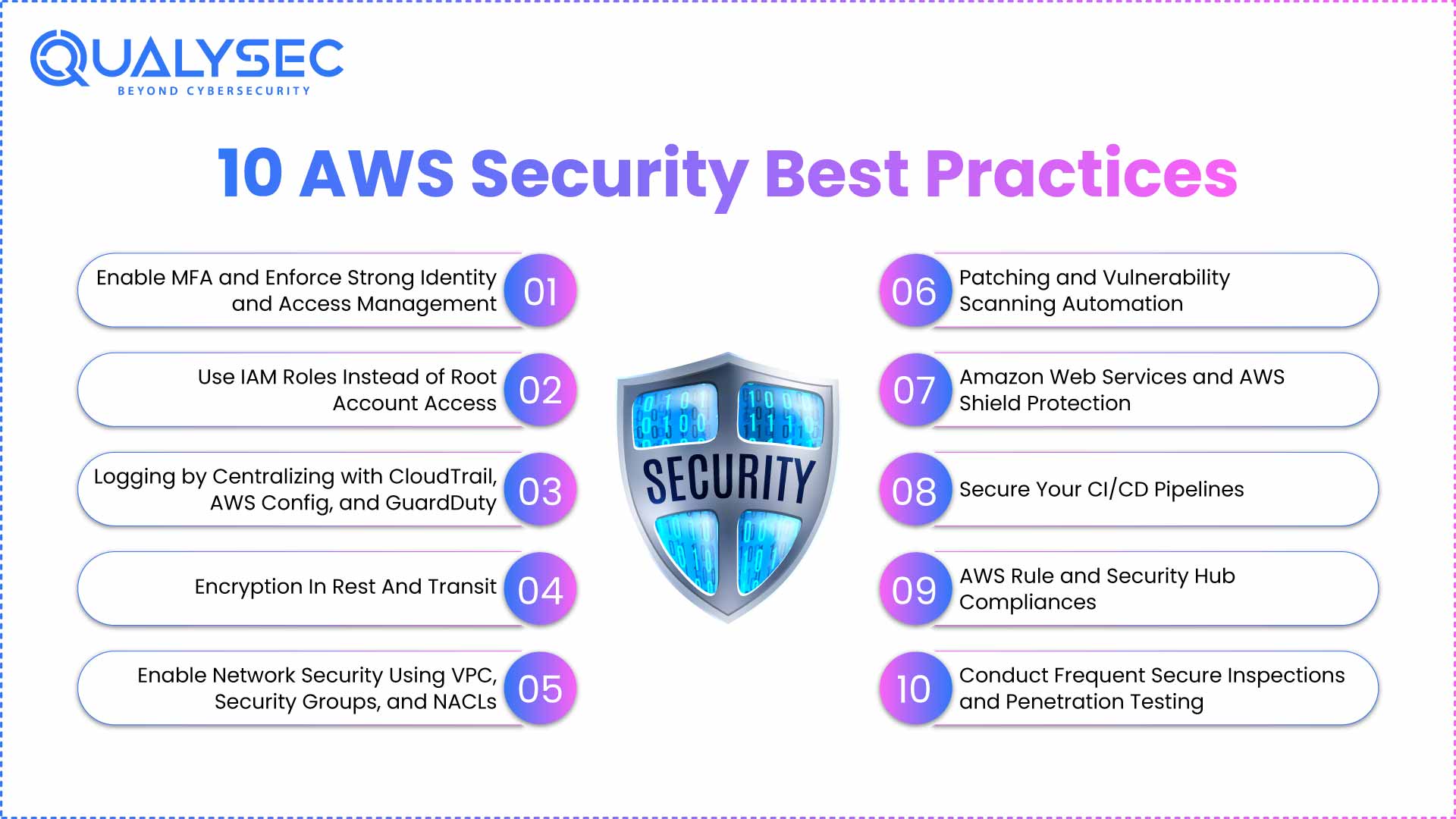
1. Enable MFA and Enforce Strong Identity and Access Management
Identity management is the first line of defense. No matter how strong your firewall or how tight your network rules, a stolen set of credentials can grant an attacker the keys to your entire environment.
Start by enabling Multi-Factor Authentication (MFA) on all accounts, with special priority on the root account and highly privileged IAM users. MFA adds a secondary verification step, such as a mobile authenticator app or hardware token, drastically lowering the chance of account compromise.
Equally important is the principle of least privilege – granting each user only the permissions they need, no more. Overly broad permissions are a silent but common threat. For instance, an intern needing to read data from a single S3 bucket should not have full administrative rights over EC2 instances.
Example – A mid-sized financial services firm once faced a phishing attempt targeting an employee’s AWS login. Because the team enforced MFA, the attacker couldn’t get in, even after obtaining the password. That single control blocked what could have been a multi-million-dollar incident.
2. Use IAM Roles Instead of Root Account Access
The AWS root account is powerful – perhaps too powerful for daily use. It’s like the master key to your building; you wouldn’t hand it to every employee for regular tasks.
As an alternative, construct IAM roles with access privileges that restrict access to particular job responsibilities, and admins may delegate them when needed. To automate anything (CI/CD pipelines, cron jobs, etc.), do not hard-code credentials do assume a role with creds for a short duration.
Using IAM also allows Single Sign-On (SSO) when paired with your organization’s identity provider (like Azure AD, Okta, or Google Workspace), allowing staff easier access to your systems, but giving administrators centralized control through aws security services.
Example – A big e-retailer service rearranged its sending system by having the e-retailer assume the roles during the push of the applications rather than fixed keys. When someone happened to discover a key in a public GitHub repository, this was not a problem: this was an old, deactivated key from way back.
“Read also: A Comprehensive Guide on AWS Cloud Security Services“
3. Logging by Centralizing with CloudTrail, AWS Config, and GuardDuty
Unless you know what is happening in your environment, you cannot secure it. Centralized logging has the advantage that all API calls, changes in configuration, and security events can logged and reviewed.
Turn on AWS CloudTrail in all geographies to track account activity. Assess resource configurations with AWS Config to help detect resource entities that are out of desired settings. Add Amazon GuardDuty to examine logs to identify abnormal behavior-such as sign-in attempts by foreign IP addresses or API activity surge. Following aws cloud security best practices ensures these measures work together to strengthen your environment.
Example – A SaaS startup discovered unusual access attempts to an S3 bucket over a holiday weekend. GuardDuty’s alert led them to a compromised IAM credential. Since the team centralized CloudTrail logging records, it spotted and removed the credentials before it could transfer any data outside its framework.
4. Encryption In Rest And Transit
Protection of data is not only mandatory in various industries but also ethical to the customers. AWS keeps encryption simple, yet users have to configure it manually.
Encrypt data at rest with AWS Key Management Service (KMS), including S3, EBS volumes, and RDS instances. In the case of data in transit, impose an HTTPS/TLS connection guaranteeing that the traffic between the applications, users, and AWS security best practices services is secret and unforgeable.
Example – A healthcare organization hosting customer data in AWS has applied server-side encryption on all S3 buckets, and APIs must use TLS. This not only fits into the HIPAA compliance, but it also gives the patients confidence that their personal information is secure.
5. Enable Network Security Using VPC, Security Groups, and NACLs
The Virtual Private Cloud (VPC) is your office building in a digital format. It determines who can come in, who can leave, and which rooms are accessible.
Segment workloads by using private and public subnets. Move sensitive databases into secure subnets behind firewalls that have no internet connectivity, and expose only needed endpoints using publicly accessible subnets behind load balancers. Security groups provide instance-level firewalls, whereas network ACLs (NACLs) have subnet-level control of traffic.
Example – An AI company maintained its GPU-based training clusters in the privacy of the subnets and delivered training outcomes to the customers via public endpoints. When a vulnerability scanner tried probing their private systems, it couldn’t even detect them – the network architecture kept them invisible.
6. Patching and Vulnerability Scanning Automation
The easily recognizable vulnerability can easily exploit the longer it is not patch. AWS Systems Manager Patch Manager enables you to automate patching operating system or application updates, eliminating the necessity to make manual interventions.
Patching and frequent vulnerability screening should combined. Automated vulnerability scans are good for identifying common vulnerabilities, whereas when humans conduct them (as in the case of a penetration test provided by Qualysec), it is possible to detect subtle issues like business logic issues, or chains of privilege escalation.
Example – A fintech platform tightened its patching cycle down to less than 48 hours by setting up regular scheduled updates on weekends that are then followed by every quarterly pentests. Doing this eliminated the chances of hackers exploiting fresh discoveries of flaws.
7. Amazon Web Services and AWS Shield Protection
Malicious bots, DDoS attacks, and injection are always the target of public-facing applications. Blocking of suspicious patterns is possible using AWS Web Application Firewall (WAF), and AWS Shield protects against DDoS attacks.
Example – A ticket-seller site got a traffic spike that occurred when a popular event was released. Among real users were bots, which attempted to scrape information and bring servers down. WAF rules and AWS Shield Advanced kept the site responsive, preserving both sales and reputation.
8. Secure Your CI/CD Pipelines
Your code delivery pipeline is part of your attack surface. A compromised build process can inject malicious code into production without detection.
Restrict IAM permissions for build systems, scan code repositories for exposed secrets, and rotate credentials frequently. Integrate security checks – like dependency vulnerability scans and container image analysis directly into the pipeline.
Example – A gaming studio discovered a leaked API key during a pre-deployment scan integrated into their CI/CD process. The team revoked the key before launch, avoiding what could have been a public data leak.
9. AWS Rule and Security Hub Compliances
It is also easy to remain compliant when automatic policies are followed. AWS Config Rules would allow such a check to be in place, i.e., all the S3 buckets should be encrypted to be monitored continuously.
AWS Security Hub collates findings of other services, such as GuardDuty, Inspector, and Macie, into a single dashboard, thus allowing easier resolution of security gaps by prioritizing them.
Example – AWS Security Hub helped a government contractor to stay compliant with NIST 800-53 controls. Manual compliance checks were eliminated and automated alerts were used instead, resulting in audit preparation time being reduced by more than 50 percent.
10. Conduct Frequent Secure Inspections and Penetration Testing
Just like usual security auditing, every company should conduct regular security inspections and penetration tests.
Despite these precautions, there is nothing better than the analysis that can be attained by a simulated attack. The routine pen tests help in revealing weaknesses before the enemies can use the same.
AWS security best practices include penetration testing services by Qualysec Technologies. It is a combination of automated and manual methods that identify not only technical vulnerabilities but also the underlying issues of how the applications are coded.
Example – A transportation company discovered a privilege escalation channel that could have enabled adversaries to delete payloads. In a routine pentest, the problem was detected in a few days.
Secure your cloud with expert AWS Penetration Testing today.







































































0 Comments