

Millions of businesses around the world rely on Amazon Web Services (AWS) to run everything from websites and mobile apps to big data projects and AI tools. AWS offers a wide range of services, including cloud storage, databases, analytics, and automation tools. Because of its wide adoption, keeping AWS secure is more important than ever, and AWS penetration testing is now a key part of cloud security.
One of the most talked-about AWS-related breaches happened in May 2022, when researchers found over 6.5 terabytes of exposed data on servers used by Pegasus Airlines. While the servers were hosted on AWS, the exposure was due to poor security practices by the airline, not AWS itself. More recently, in late 2025, a series of “supply chain” attacks targeting third-party integrations (like Salesforce and Drift) affected major AWS users, once again highlighting a common issue: cloud platforms are only as secure as the way you use and integrate them.
To add to that, global security reports indicate that cybercrime damages officially surpassed $10.5 trillion annually in 2025, with costs projected to climb even higher throughout 2026. That’s why businesses using AWS need to be proactive about finding and fixing security gaps before attackers do.
This blog covers what AWS penetration testing is, why it matters, and how it works—especially considering that AWS has strict rules around how these tests are conducted.
What is AWS Penetration Testing?
AWS penetration testing is a way to test how secure your AWS setup is by simulating real cyberattacks. Security experts (called penetration testers or pentesters) look for weaknesses in your AWS infrastructure just like a real attacker would. The goal is to find and fix problems before they can be exploited.
This type of testing can cover areas like:
- Misconfigured cloud storage (e.g., open S3 buckets)
- Weak access controls or IAM policies
- Exposed databases or services
- Insecure APIs or apps running on AWS
After the test, you get a report that clearly explains:
- What vulnerabilities were found
- How severe they are
- What to do to fix them
It’s important to run these tests regularly—not just once—because cloud environments change often, and new threats pop up all the time.
Also, AWS doesn’t allow unrestricted penetration testing. You don’t need to get approval from AWS for the most common testing activities anymore (since 2019), but there are still boundaries. For example, testing against some AWS-managed services is not allowed. You must follow AWS’s updated Penetration Testing Policy to avoid violating their terms.
Why AWS Penetration Testing is Important for Businesses
Cloud environments are complex, and many security risks can slip past standard security checks. AWS penetration testing helps businesses uncover hidden vulnerabilities before attackers do. Here’s why it’s essential:
1. The Shared Responsibility Model Can’t Be Ignored
AWS follows a shared responsibility model; while AWS secures the cloud infrastructure, customers must protect their data, applications, and configurations. Many businesses overlook their part, leaving security gaps. Penetration testing identifies these weaknesses so you can fix them before hackers exploit them.
New Insight: Misconfigured S3 buckets, open databases, and weak access controls are common issues that pen testing catches early.
2. Weak Authentication, Excessive Permissions, and Poor Network Security
Many AWS breaches happen because of:
- Missing multi-factor authentication (MFA)
- Overly permissive IAM roles (giving users more access than needed)
- Lack of network segmentation (allowing unrestricted traffic between services)
Penetration testing pinpoints these flaws so you can tighten security before an attack happens.
New Insight: Attackers often exploit misconfigured Security Groups and NACLs—pen testing ensures only authorized traffic is allowed.
3. Compliance Requires It
If your business follows PCI DSS, HIPAA, GDPR, or SOC 2, regular penetration testing isn’t just a best practice; it’s mandatory. Auditors require proof that your AWS environment is secure, and pen testing provides documented evidence.
New Insight: Some compliance standards (like PCI DSS) require annual penetration tests, while others (like HIPAA) mandate regular risk assessments; pen testing fulfills both.
4. Real-World Attack Simulation
Automated scans miss sophisticated threats. Penetration testing mimics real hacker tactics, such as:
- Exploiting misconfigured cloud storage (S3 buckets)
- Escalating privileges through weak IAM policies
- Bypassing security controls to access sensitive data
This approach reveals risks that automated tools can’t detect.
5. Prevent Costly Data Breaches
A single AWS misconfiguration can lead to massive data leaks, fines, and reputational damage. Penetration testing helps you:
- Find and fix vulnerabilities before attackers do
- Avoid regulatory penalties
- Protect customer trust
Need Expert AWS Penetration Testing? Qualysec’s certified testers use the latest techniques to uncover hidden risks in your AWS environment. Contact us today for a thorough security assessment.
AWS Shared Responsibility Model: What You Need to Know
When it comes to security in AWS, Amazon follows a shared responsibility model. This means that while AWS takes care of certain security aspects, customers are also responsible for securing their own data and applications. Here’s how it breaks down:
1. Security of the Cloud (Amazon’s Responsibility)
AWS is responsible for securing the underlying cloud infrastructure, including:
- Physical data centers
- Networking hardware
- Host operating systems
- AWS services (like EC2, S3, RDS)
Amazon regularly tests its systems through internal and external security audits. As a customer, you cannot perform penetration testing on AWS’s core infrastructure.
2. Security in the Cloud (Your Responsibility)
You are responsible for securing:
- Your applications and data
- Operating systems on your instances
- Network configurations (firewalls, security groups)
- Access controls (IAM policies, user permissions)
Unlike AWS’s infrastructure, you are allowed to perform penetration testing on your own AWS resources, as long as you follow Amazon’s rules.
What is Allowed to Test in AWS?
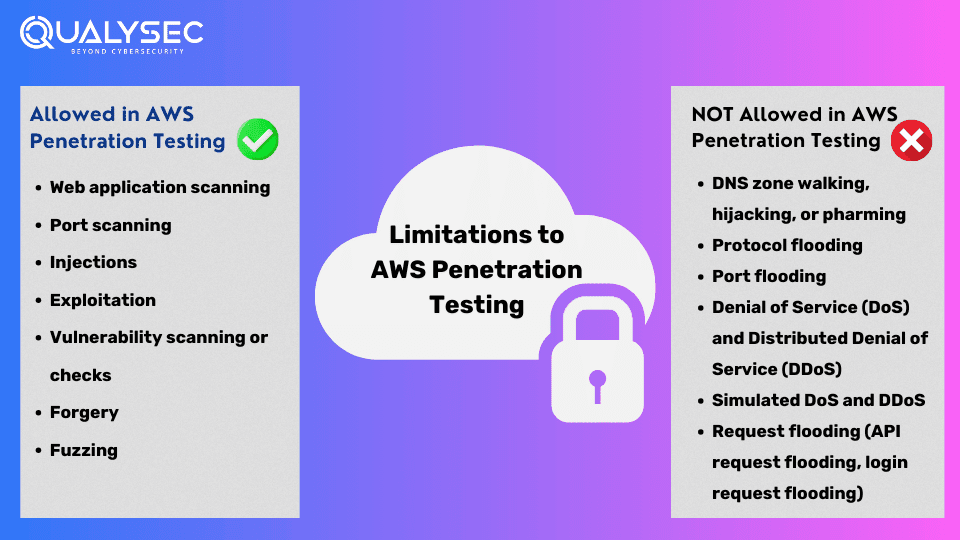
Allowed in AWS Penetration Testing
AWS permits controlled penetration testing on your own assets, but with some restrictions. Here’s what’s allowed:
- Web application scanning – Checking for vulnerabilities in your web apps.
- Port scanning – Identifying open ports on your instances.
- Injections (SQL, XSS, etc.) – Testing for code injection flaws.
- Exploitation – Simulating attacks to verify security weaknesses.
- Vulnerability scanning – Running automated scans for known security issues.
- Forgery (CSRF, SSRF) – Testing for request manipulation vulnerabilities.
- Fuzzing – Sending malformed data to find crashes or security gaps.
Additional Permissions:
- Banner grabbing – Checking software versions to detect outdated (and vulnerable) services.
- Process crash testing – Intentionally crashing a process to test resilience (but not flooding resources).
What is Not Allowed to Test in AWS?
AWS allows penetration testing to help assess and strengthen security, but they have specific guidelines to prevent any negative impact on its platform or other users. The goal is to ensure that security tests don’t disrupt services or other customers’ experiences.
Here’s what is NOT allowed during AWS penetration testing:
- DNS Zone Walking, Hijacking, or Pharming – Unauthorized attempts to alter or manipulate DNS records.
- Protocol Flooding – Overloading a protocol to cause disruption.
- Port Flooding – Excessive attempts to flood open ports, potentially causing service degradation.
- Denial of Service (DoS) and Distributed Denial of Service (DDoS) – Attacks that overwhelm systems to make them unavailable to users.
- Simulated DoS and DDoS Attacks – While simulating these types of attacks for testing is often done, AWS doesn’t allow actual flood attacks.
- Request Flooding – This includes flooding APIs or login pages with excessive requests, which can slow down or disrupt services.
Responsibility and Compliance: It’s important for customers to verify and confirm that any penetration tests they perform, or authorize someone to perform, comply with AWS’s security policies. If these policies are violated, AWS holds the customer accountable for any resulting damage to their infrastructure or that of other AWS customers.
Fundamentals for AWS Penetration Testing
Before starting a penetration test on your AWS assets, make sure you’ve clarified these key elements:
- Test Scope: Clearly define which systems or services you will be testing.
- Test Type: Determine whether it’s a vulnerability scan, a manual penetration test, or a combination.
- Test Requirements: These should be agreed upon by all parties involved, ensuring the scope, tools, and timing are in line with expectations.
- Vulnerability Reporting Protocol: Establish a process for reporting vulnerabilities discovered during testing to minimize risk exposure.
- Testing Schedule: Set a clear timeline for when the tests will be conducted to avoid disruptions to other business operations.
- Written Approval: Ensure system owners provide written consent for the test to take place on their systems.
How to Perform AWS Penetration Testing
It’s essential to test your AWS environment without affecting your production systems. Below are the updated steps for AWS penetration testing, keeping things simple and effective.
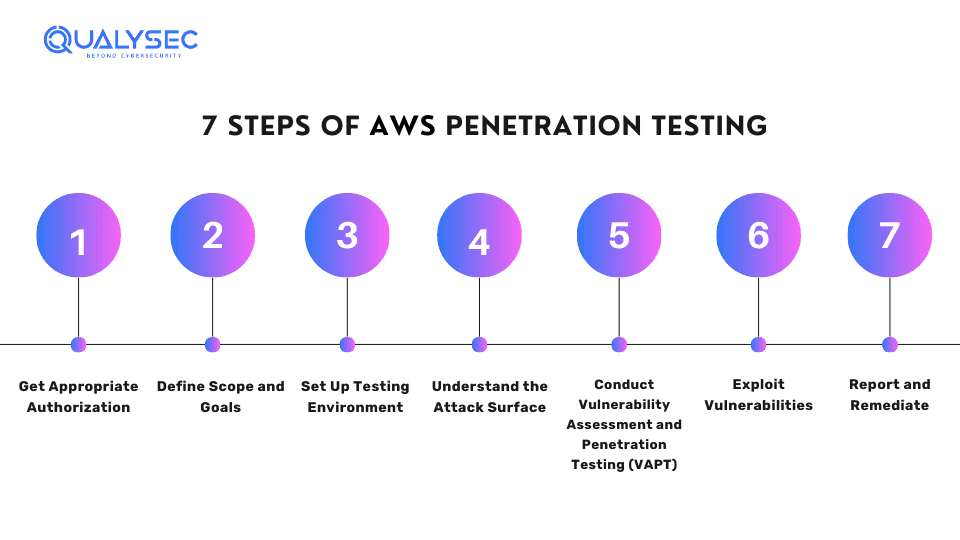
Here are the basic steps of performing penetration testing on AWS:
Step 1: Get Appropriate Authorization
Before conducting any security testing, get written permission from the AWS account owner or organization. This may require you to contact AWS support (if you are seeking to test non-approved services) or follow your organization’s specific security policies.
Step 2: Define Scope and Goals
Define which systems, applications, and AWS services you need to test. Consider any compliance rules or confidential data that needs protection. In addition to that, learn more about how to prepare for a penetration test.
Step 3: Set Up Testing Environment
Make a separate testing environment in AWS, which is different from the production environment, to prevent accidental disruptions. This may include setting up virtual machines, networks, and security groups exclusively for the pen test.
Step 4: Understand the Attack Surface
Gather as much information as you can about the AWS environment you are going to test. This involves identifying services, subnets, instances, S3 buckets, Identity and Access Management (IAM) roles, and other possible weak points. Furthermore, you can use techniques like network scanning, vulnerability scanning, and social engineering.
Step 5: Conduct Vulnerability Assessment and Penetration Testing (VAPT)
The main goal of AWS penetration testing is to find vulnerabilities present in the AWS environment. You can find weaknesses in various areas such as IAM policies, S3 bucket permissions, and EC2 instance configurations. For example, you might examine AWS CloudTrail logs to track user activity and uncover potential security risks. Learn more: Cloud Security VAPT Services
Step 6: Exploit Vulnerabilities
Once you detect the vulnerabilities, you need to exploit them to determine their impact. This might involve exploiting weak access controls, misconfigurations, or vulnerabilities specific to certain AWS services. However, you need to ensure that you target only your resources and do not affect other AWS users.
Step 7: Report and Remediate
The penetration testers make a detailed report that outlines the vulnerabilities found and the steps to remediate them. Further, you can share this report with the system owner or administrator to make the necessary fixes.
Key Focus Areas for AWS Penetration Testing
When performing penetration testing on AWS, testers should examine critical areas to uncover vulnerabilities and security risks. Below are the key focus areas, including updated best practices while keeping the original checks intact.
1. Identity and Access Management (IAM)
IAM controls who can access what in your AWS environment. Testers should verify:
- Overly Permissive Accounts: Ensure service accounts don’t have unnecessary permissions.
- Root Account Risks: Check if root account keys exist and if the root account is used for daily tasks (it shouldn’t be).
- Key Management: Look for users with multiple access keys—rotate or remove unused ones.
- MFA Enforcement: Multi-factor authentication (MFA) should be enabled for all privileged accounts.
- Key Rotation: Confirm SSH and PGP keys are regularly refreshed.
- Inactive Accounts: Identify and remove unused accounts to reduce attack surfaces.
New Check:
Temporary Credentials: Ensure IAM roles (instead of long-term keys) are used where possible for better security.
2. Logical Access Controls
Access controls prevent unauthorized actions within AWS. Testers should assess:
- Least Privilege Principle: Verify users and services only have the permissions they need.
- Secure Credential Storage: Ensure AWS keys and secrets aren’t hardcoded in applications or scripts.
- Restricted Sensitive Access: Critical AWS processes (like modifying security groups) should require strict authentication.
New Check:
Session Timeouts: Check if idle sessions expire quickly to prevent unauthorized access.
3. S3 Buckets
Misconfigured S3 buckets are a common source of data leaks. Testers should confirm:
- Authentication & Encryption: Buckets should enforce encryption (SSE-S3, SSE-KMS) and require authentication.
- Fine-Grained Permissions: Only authorized users should perform actions like GET, PUT, or DELETE.
- Logging & Versioning: Enable logging (AWS CloudTrail) and versioning to track changes and recover data.
New Checks:
- Public Access Blocks: Ensure S3 buckets aren’t accidentally set to “public.”
- Presigned URLs: If used, verify they have short expiration times to limit exposure.
4. Database Services (RDS, DynamoDB, etc.)
Databases store sensitive data, so testers should validate:
- IP Restrictions: Access should be limited to known IP addresses or VPCs.
- Injection Attacks: Test for SQL injection, NoSQL injection, and command injection vulnerabilities.
- Backup & Recovery: Confirm backups exist and can be restored successfully.
- Multi-AZ Deployments: Critical databases should be spread across availability zones for resilience.
New Checks:
- Encryption at Rest & Transit: Ensure databases use TLS for connections and encryption for stored data.
- Database Audit Logs: Verify logging is enabled to monitor suspicious activity.
5. Additional Critical Areas
A. API Gateway & Lambda Security
- Throttling & Rate Limiting: Prevent abuse of APIs.
- Function Permissions: Ensure Lambda functions follow least privilege principles.
B. Network Security (VPC, Security Groups, NACLs)
- Open Ports: Check for unnecessarily exposed ports (e.g., SSH, RDP).
- Default Security Groups: Replace or restrict default security groups.
C. CloudTrail & Monitoring
- Logging Coverage: Ensure CloudTrail logs all regions and critical services.
- Alerts for Anomalies: Set up GuardDuty or CloudWatch alerts for suspicious activity.
Have AWS security questions? Our team is ready to help.
Final Thoughts!
AWS penetration testing should cover IAM, access controls, S3, databases, APIs, and network settings to identify weaknesses. Working with an experienced AWS penetration testing company, along with regular testing and automated monitoring, helps maintain a strong security posture.
Pro Tip: AWS’s Penetration Testing Policy allows simulated attacks, but avoid violating their rules (e.g., no DDoS testing). Always get approval first.
FAQs
Q: What is penetration testing on AWS?
A: Penetration testing on AWS involves simulating attacks on your AWS environment to find and fix any weaknesses that hackers could exploit. The goal is to enhance the security of your cloud setup and ensure that your data and services are protected from potential threats.
Q: Is permission required from AWS for all penetration testing?
A: In most cases, you don’t need approval from AWS to test your own resources. However, there are some things you can’t test without getting permission. For example, certain AWS services like CloudFront or Route 53 require approval first. It’s important to check AWS guidelines to make sure you’re following the rules and not testing something off-limits.
Q: Who conducts AWS penetration testing?
A: AWS penetration testing is usually done by experienced security experts who specialize in cloud security. These experts know how to spot weaknesses and help you fix them to keep your AWS environment safe. Many businesses choose third-party professionals because they bring fresh insights and follow best security practices.