








Azure pentesting, or Azure penetration testing, is the act of running simulated cyber attacks on Microsoft Azure accounts to identify weaknesses in cloud storage, application programming interfaces, identity management, and infrastructure. Being one of the most popular public cloud services, Azure serves billions of users and, therefore, is a profitable target of cybercriminals.
A particularly clear illustration of such a risk was the case in October 2022, where a misconfiguration in the Azure Blob storage of Microsoft was disclosing personal data of more than 548,000 users, which included names, emails, and phone numbers. From a different perspective on the scale, this BlueBleed incident was said to reveal 2.4 terabytes of data, which involved 65,000 organizations in 111 countries. Azure faced a record ~15.7 Tbps DDoS attack in 2025.
In such high-publicity breaches, security testing has become not an option, but a necessity. A 2024 study of the industry indicates that 87 percent of large businesses with a workforce greater than 10,000 perform regular penetration tests, and 64 percent of mid-sized businesses with a workforce between 1,000 and 9,999 employees do the same every year. The trend highlights the growing reliance of organizations on Azure penetration testing as a way of enhancing the resilience of the clouds and securing sensitive data.
This blog will take you through all the details required to know about Azure pen testing, its significance, and methodology, as well as key areas of vulnerability and testing frameworks allowed, best tools, and how to select an expert partner. At the end, you will know precisely how to make Azure penetration testing a core part of your cloud security strategy in your organization.
What is Azure Penetration Testing?
An Azure pentest or Azure pen testing is the act of testing the Microsoft Azure environments in a simulated environment to imitate the actual attacks in the real world to find exploitable vulnerabilities. Such tests extend beyond superficial level testing and determine how an attacker would breach cloud-hosted applications, APIs, storage, and identity management systems.
It is necessary to specify the difference between Azure penetration testing and other security activities:
- Vulnerability scanning is automatic and identifies previously discovered weaknesses, but does not determine how these weaknesses might be exploited.
- Security audits examine the policies and compliance requirements, but they do not mimic live attacks.
- Azure pentesting is proactive in testing the defenses, testing security controls, and illustrating real-world risks.
Due to the fact that cloud environments are dynamic, it can be suggested that professionals should carry out a process of Azure penetration testing at least once or twice a year, or any other time when the infrastructure is subjected to major changes. A routine tempo will help to spot any misconfiguration, unsecured API or slack authentication procedures before they are leaked into the hands of attackers.
Using the Azure pen testing as part of the overall continuous security strategy, organizations are more resilient, have better protection of sensitive data, and demonstrate high-order cloud security management.
Must read: What are Azure Security Services? A complete guide
Why Azure Penetration Testing is Important in 2026
Microsoft Azure is based on a shared responsibility framework, under which Microsoft owns the underlying infrastructure, but the users are expected to protect applications, workloads and data. This necessitates the need for organizations to implement the use of Azure penetration testing as part of their current cloud security plan.
Compliance and Regulatory Pressure
Sensitive information industries are required to comply with high standards, including GDPR, HIPAA, and PCI DSS. Consistent Azure cloud pentesting is used to make sure that applications and storage hosted in the clouds are compliant and also generate audit-ready reports that could be provided to regulators, clients, and partners.
Lessons from Real-World Breaches
Misconfigurations, insecure APIs, and weak identity controls have been shown to be some of the largest security vulnerabilities in Azure environments, which is evident by high-profile cloud breaches. These attacks demonstrate that it is not sufficient to use built-in security tools. A proactive version of a penetration test can reveal vulnerabilities prior to scale-based exploitation.
Business and Trust Imperatives
Security is not only a technical measure of security but a business differentiator in 2026. Customers, investors and partners would want to see that the cloud environments are secure. Such organizations that are resilient due to Azure pen testing not only curb risks but also earn trust and credibility in competitive markets.
Knowing that making the Azure penetration testing a routine practice will allow companies to secure sensitive workloads, ensure compliance and gain long-term confidence in their cloud operations.
Also read: Azure Cloud Security for Modern Enterprises
Benefits of Azure Penetration Testing
Azure penetration testing does not end with compliance and superficial protection. It enhances operational and business value of cloud adoption directly by sealing blind spots not covered by built-in tools. The key advantages are:
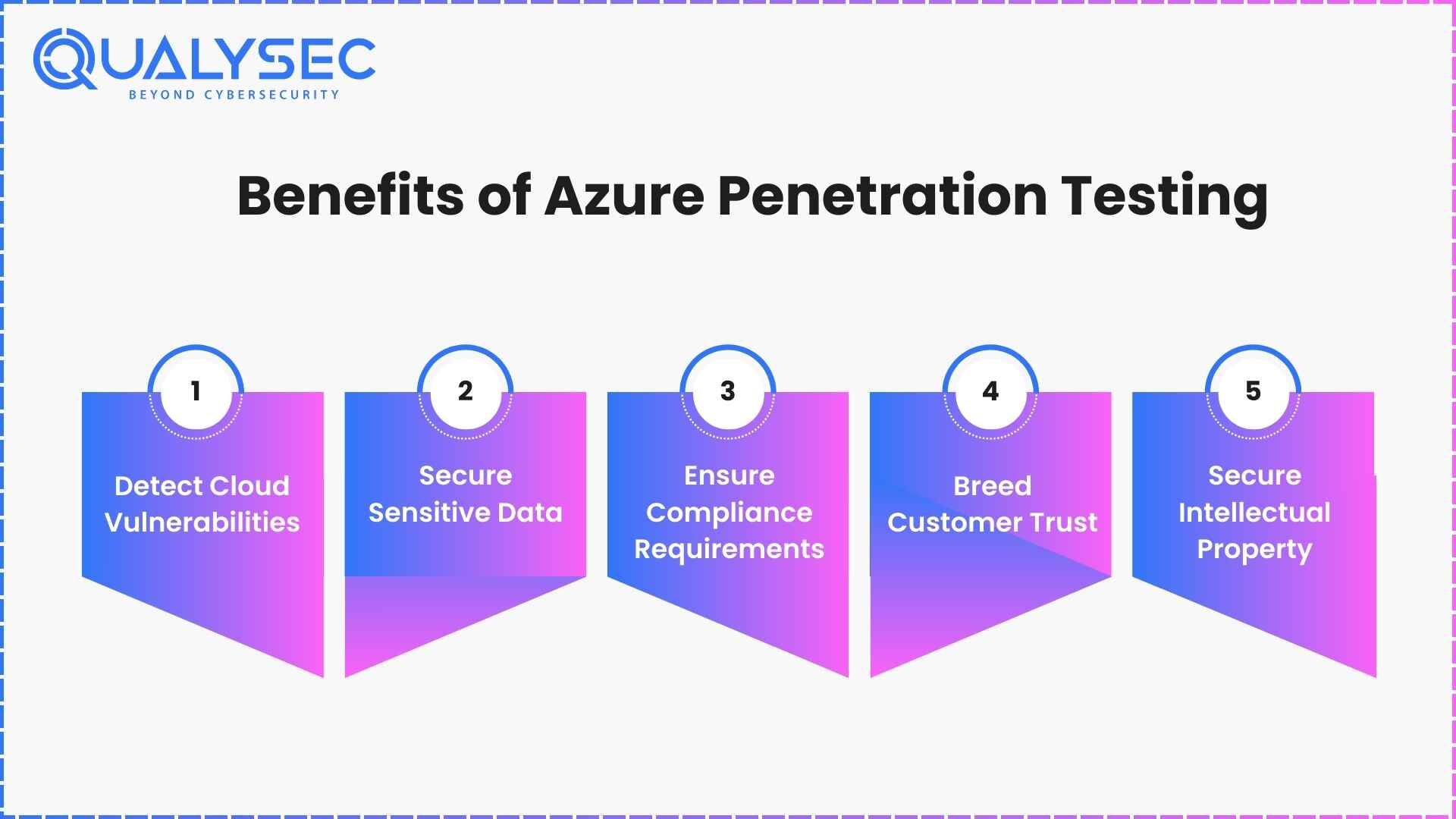
1. Detect Cloud Vulnerabilities
Azure pen testing is used to find misconfigurations, insecure APIs, and weak IAM settings that an attacker may take advantage of. As an example, improperly secured blob containers or inadequately managed role assignments are able to be identified prior to unauthorized access.
2. Secure Sensitive Data
The records on customers, payments, and medical data in Azure are the favorite target of the cybercriminals. Through proactive testing, organizations can fix vulnerabilities before attackers steal sensitive datasets which will mitigate threats of financial fraud or regulatory fines.
3. Ensure Compliance Requirements
GDPR, HIPAA, SOC 2 and PCI DSS are very rigid requirements imposed by many industries. Azure cloud pentesting assists organizations to produce audit-ready reports, ensuring security controls are in line with these requirements to prevent fines or failed audits.
Learn more about cloud security compliance!
4. Breed Customer Trust
The trust of the populace tends to go down following profile breaches. Regular pentesting on the Azure side will ensure that its stakeholders are convinced that their information is being secured and aid in retaining the loyalty in the competitive markets.
5. Secure Intellectual Property
In addition to customer data, businesses store proprietary code, algorithms and business-central apps in Azure. An application-focused pentest is useful to ensure that trade secrets are not stolen or disclosed in a manner that would jeopardize the future competitiveness.
Major Security Threats in Microsoft Azure
Despite the powerful infrastructure security offered by Microsoft, most risks are presented by misconfigurations, ineffective identity controls, and third-party dependencies. The following are the most severe threats that are Azure-specific, but that organizations should be careful of in 2026, and how pentesting Azure environments can mitigate these threats.
1. Access Token Leakage
Access tokens provide direct access to the cloud. When such tokens are revealed through misconfigurations of applications or through insecure storage, attackers may impersonate the users and bypass authentication. Azure pentesting tests token handling and the keys are safely rotated and set.
2. Lateral Movement from Compromised Workloads
When attackers have breached a single Azure virtual machine or container, they tend to have a lateral move to more valuable workloads. They abuse lax network segmentation or permissions that are not monitored. Azure cloud pentesting can simulate this lateral motion to determine the speed at which a breach can spread and evaluate containment measures.
3. Compromised Third-Party APIs
External API tools or SaaS are common to many businesses with an Azure environment. In case such services that belong to third-party are abused, the attackers may indirectly access sensitive information. The Azure penetration testing checks the security of integrations, checking the existence of appropriate limits of privileges and API permissions.
4. Credential Theft
Weak passwords or passwords that were reused and multi-factor authentication are either not available, exposing Azure accounts to credential stuffing or brute force attacks. An intentional Azure pen test also tries to exploit credential-based vulnerability, where accounts are affected and IAM policies are tested in terms of efficiency.
5. Blob Hunting and Misconfigured Storage
Azure Blob storage is an often targeted one due to unintentional public access or weak access controls. Hackers apply tools to find unsecured blobs of personal or corporate data by automated searching. Finding such misconfigurations and testing data exfiltration conditions are all part of pentesting of the Azure environments.
6. Insider Threats
Employees and contractors who have high access may deliberately or unintentionally abuse their access to steal, or otherwise expose sensitive assets. Another aspect of testing during azure penetration testing is the simulation of insider abuse to ensure monitoring and access review prevent abuse.
7. Reconnaissance with Search Engines
Attackers use search engines and dedicated tools to identify cloud resources that are exposed, such as online storage buckets or databases. This reconnaissance process is duplicated in azure pentesting where the information that is publicly visible is identified and minimal exposure is ensured.
Read more: Cloud Penetration Testing Services for AWS, Azure & GCP
Comparison of Major Microsoft Azure Security Threats and Pentesting Use Cases
Threat | How It Is Exploited | Pentesting Focus |
Access Token Leakage | Attackers steal exposed tokens to impersonate users and bypass authentication. | Azure pentesting checks token storage, rotation policies, and API key handling. |
Lateral Movement from Compromised Workloads | Breach in one VM or container lets attackers move to critical assets. | Azure cloud pentesting simulates pivoting techniques to test segmentation and detection. |
Compromised Third-Party APIs | Vulnerable APIs or SaaS integrations expose sensitive internal systems. | Pentesting Azure environments evaluates API permissions, privilege escalation, and integration risks. |
Credential Theft | Weak or reused passwords exploited via credential stuffing or brute force. | Azure pen testing simulates credential-based attacks and validates IAM controls. |
Blob Hunting and Misconfigured Storage | Publicly exposed blob containers leak customer or corporate data. | Pentest searches for misconfigured storage and tests data exfiltration paths. |
Insider Threats | Employees or contractors misuse elevated access. | Simulated insider attacks test access monitoring, logging, and privilege restrictions. |
Reconnaissance with Search Engines | Attackers discover exposed assets via search engines and scanners. | Pentesting reproduces reconnaissance steps to identify publicly accessible Azure resources. |
You might like to read about – What is an Azure Security Assessment? Benefits & Process
What You Can and Cannot Test in Azure
To make sure that Azure pentesting enhances cloud protection without affecting other tenants or breaking the policies, Microsoft formulates the particular rules of engagement. It is important to know what is allowed and what is limited before embarking on any Azure pen test.
What You Can Test in Azure
- Applications and Virtual Machines that are owned by you: You may perform penetration testing on your own Azure VMs, your own applications, your own APIs and your own storage accounts.
- Vulnerability Assessment: security teams may perform scans and manual Azure pen testing methods on their own subscription to identify misconfigurations or poor identity management.
- Load and Stress Testing: Performance of the applications and their ability to handle surge situations can be tested.
- Monitoring and Detection Systems: You can simulate attacks to confirm that Azure Security Center (or other detection tools) drive alerts as they are expected to do.
- Container Escape Attempts: Testing of expected resistance to privilege escalation in Azure Functions or in Kubernetes, or other shared service environments, is permitted, but any success must be reported to Microsoft despite the related risk to confidential data.
- Conditional Access and MAM Policies: Mobile application management and access controls can be checked by penetration testers within Microsoft Intune.
What You Cannot Test in Azure
- Other Tenants or Accounts: You may not scan or attempt to be invasive of an Azure environment outside of your subscription.
- Denial-of-Service Attacks: Stress tests that affect the availability of other customers or interrupt the work of Azure services are forbidden.
- Phishing or Social engineering: It is not allowed to test Microsoft employees or customers with phishing campaigns or social engineering based tests.
- Too much Fuzzing or Traffic Generation: This is not allowed in automated testing where large amounts of traffic are sent out across Azure networks unless limited to your own VM.
- Access to Non-Owned Data: It is not permissible to attempt to access, alter or bring data out of Microsoft systems or the resources of other customers.
- Breaking the Acceptable Use Policy: It is a violation of Acceptable Use Policy: An activity that exceeds the agreed scope or violates the Microsoft Acceptable Use Policy is not within the rules of engagement.
Allowed vs Not Allowed in Azure Pen Testing
Category | Allowed in Azure Pen Testing | Not Allowed in Azure Pen Testing |
Virtual Machines & Apps | Run penetration tests on your own VMs, APIs, apps, and storage accounts. | Testing or scanning any other tenant’s Azure resources. |
Vulnerability Assessments | Perform scans and manual checks within your subscription to uncover misconfigurations. | Attempting to exfiltrate or access data that does not belong to you. |
Performance & Load Testing | Conduct surge capacity and load tests for your own applications. | Denial-of-service style testing that disrupts Azure services. |
Monitoring & Detection | Generate security logs or simulate attacks to test Azure Security Center alerts. | Large-scale fuzzing or automated traffic generation across Azure infrastructure. |
Container & Shared Services | Attempt to escape from shared services (Azure Functions, Kubernetes) but report success immediately. | Going beyond proof-of-concept exploitation or attempting system-wide persistence. |
Access & Policy Enforcement | Validate conditional access and Intune MAM policies for enforcement. | Violating Microsoft’s Acceptable Use Policy or attempting phishing/social engineering against employees. |
Credentials & Keys | Rotate and test token handling within your own accounts. | Extracting credentials, training data, or model weights from Microsoft systems. |
Trending read: How to Perform an Azure Security Audit
Azure Penetration Testing Process (Step by Step)
While different testing companies have different steps for pen testing, this is what Qualysec’s process-based Azure cloud pentesting steps include:
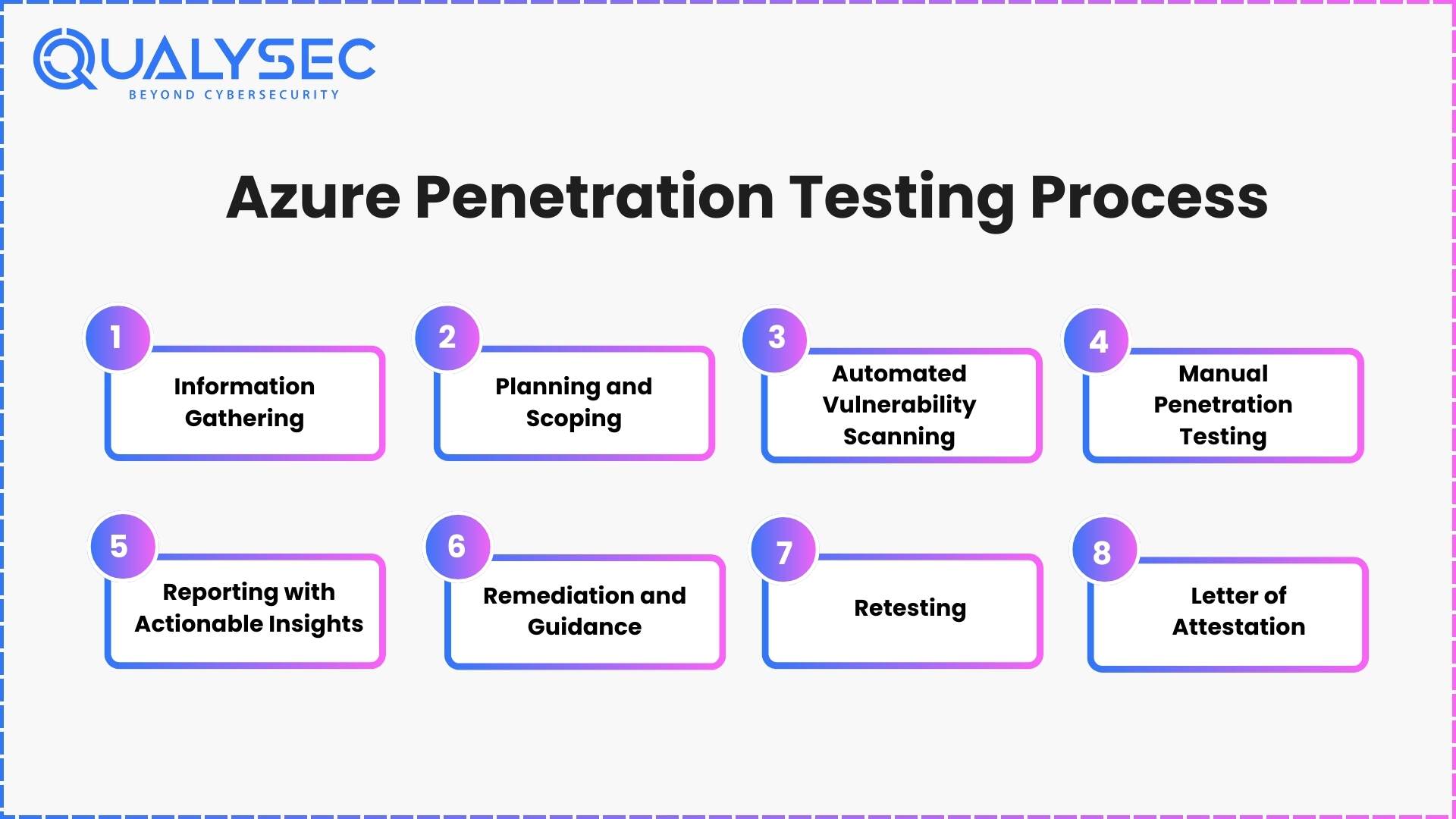
1. Information Gathering
- Inventory subscriptions, resource groups, VNets, NSGs, identities, service principals, Key Vaults, storage, AKS, App Services
- Risk-led pentesting Azure map data flows, business-critical workflow, and compliance scope.
- Outputs: initial cloud threat model, data-flow diagram, asset matrix.
2. Planning and Scoping
- Lock rules of engagement, source IPs, authentication methods, test windows, paths to escalation, and logging plan.
- Give priority to internet-exposed assets, privileged identity paths, and sensitive data stores.
- Outputs: test plan aligned to the MITER ATT&CK (Cloud), OWASP ASVS, CIS Azure Benchmarks.
3. Automated Vulnerability Scanning
- VPN scans of the VMs, containers, PaaS, throttled API APIs to secure production.
- Find and remove duplicates and tunes to minimize noise and false positives.
- Outputs: tuned scan profile, consolidated issues list, driving manual work.
Read more: What Is Vulnerability Scanning? Types, Tools and Benefits
4. Manual Penetration Testing
- Identity and access: Entra ID role escalation, service principal abuse, managed identity abuse, and conditional access holes.
- Application and API Logic: broken authZ, Identity- Denial-of-Resize, SQL- Different to IMDS, mass assignment, multi-tenant isolation bugs.
- Cloud service abuse: weak SAS tokens, Blob/Data Lake access, queue poisoning, Key Vault policy bypass, pod escape attempts on AKS.
- Network and segmentation: lateral movement on spokes, peering and NSG bypass, the exposure of Private Links.
- Techniques allude to OWASP Web/API, OWASP Cloud top 10, SANS; proof-of-concept only.
- Outputs: tested exploit chains that impact businesses and have reproducible measures to use in Azure cloud pentesting.
Read also: What is manual penetration testing and how do they work?
5. Reporting with Actionable Insights
- Rank in order of exploitability and effects on confidentiality, integrity, availability, and compliance.
- Both findings contain evidence, affected assets, root cause and Azure-specific hardening guidance.
- Outputs: executive summary, engineer workbook, evidence pack
6. Remediation and Guidance
- Give fix-first guidance to Entra ID least privilege, NSG/UDR corrections, API auth patterns, secure SAS issuance, storage firewall, Key Vault controls, AKS hardening, CI/CD guardrails
- Match with developers to compensate for controls where design changes are to be made.
- Outputs: step-by-step fixes, reference policies, optional IaC snippets/PRs
7. Retesting
- Once again revalidate all fixes and ensure no regressions; logging and alerting now identify the same TTPs.
- Outputs: fixed or accepted risk or reopened with proof differential report marking.
8. Letter of Attestation
- Issue LoA with scope, dates and methodologies to support GDPR, HIPAA, PCI DSS, SOC 2 due diligence.
- Outputs: LoA and control crosswalk that indicates how pentesting Azure can support audit requirements.
Curious to see a real Azure pen test report? Check out how we document and how it can help with security!



















































































































































































































































































































































































































































































































0 Comments