






Every Microsoft 365 tenant starts life with the same problem: the security defaults Microsoft ships are designed for usability, not for the threat environment most organisations actually face. According to the Identity Theft Resource Centre’s 2025 Annual Data Breach Report, data compromises hit a record high of 3,322 tracked events. Microsoft 365 is a primary target specifically because of its scale. Attackers do not need novel zero-days when misconfigured Office 365 email security settings provide working entry points via password spraying, legacy authentication bypass, and OAuth token abuse. Office 365 security standards are the codified answer to this problem.
They define what a properly configured Microsoft 365 environment looks like, which controls must be active, how access must be managed, what must be logged, and how sensitive data must be protected. This guide covers the major frameworks that apply to Microsoft 365 deployments, what each one requires at a practical configuration level, how Microsoft 365 cyber security licensing determines which controls you can implement, and how Qualysec helps organisations verify that their M365 environment actually meets the standard it is supposed to meet.
Don’t let misconfigured defaults become your biggest vulnerability – contact Qualysec for an M365 security assessment today.
At A Glance
- Documented controls and compliance benchmarks that protect an organisation’s cloud environment from industrial-scale credential attacks, phishing, and data exfiltration.
- Microsoft blocks over 600 million identity attacks daily, making unguided configurations entirely insufficient for defence.
- Leading security frameworks (CIS, NIST, ISO, and Secure Score) all demand proactive configuration rather than passive reliance on platform defaults.
- A properly hardened Microsoft cloud environment outperforms traditional on-premise security, but it requires continuous verification against established standards.
What Are Office 365 Security Standards?
Office 365 security standards are structured sets of security requirements that define the minimum and recommended configuration states for Microsoft 365 tenants. They exist because Microsoft provides the platform and its built-in controls, but it does not configure those controls for each customer’s threat model, compliance obligations, or risk tolerance. The customer is responsible for the configuration. Standards give organisations a concrete specification of what a correct configuration looks like within a broader Microsoft 365 security strategy.
There are three reasons organisations engage with these standards:
- Compliance requirements – Organisations subject to GDPR, HIPAA, PCI-DSS, ISO 27001, or SOC 2 need to demonstrate that their cloud environments meet specific control requirements. Microsoft 365 deployments are in scope for all of these, and each framework has direct implications for tenant configuration.
- Breach prevention – Credential attacks, phishing, and data exfiltration through misconfigured sharing permissions are not theoretical risks for M365 tenants. They are the documented causes of the majority of Microsoft 365 breaches. Implementing security standards closes the specific configuration gaps that attackers exploit most reliably.
- Audit and verification – An organisation cannot demonstrate its M365 security posture to an auditor, a board, or a customer without a standard to measure against. The frameworks provide the benchmark; assessment against that benchmark produces the evidence.
The important distinction is between the standard and the implementation. A framework document is not a secure tenant. A A team that configures, verifies, and continuously monitors a tenant against a framework creates a significantly more defensible environment.
The Major Frameworks That Apply to Microsoft 365
Several overlapping frameworks govern Microsoft security solutions deployments. Understanding which applies to your organisation, and where they conflict or reinforce each other, is the prerequisite for any serious M365 security programme.
CIS Microsoft 365 Foundations Benchmark
The Centre for Internet Security (CIS) publishes a dedicated Microsoft 365 Foundations Benchmark, the most operationally detailed standard available for M365 configuration. CIS organises the Benchmark into control sections covering identity and access management, Exchange Online, SharePoint Online, OneDrive, Microsoft Teams, and Microsoft Defender for Office 365. Each control specifies the recommended configuration, the rationale for it, and the steps to implement and verify it.
The CIS Benchmark exists in two profile tiers:
- Level 1 (minimum baseline controls appropriate for most organisations)
- Level 2 (additional controls for environments with higher security requirements or sensitivity).
- Level 3 covers mandatory controls, including MFA enforcement on all accounts, disabling legacy authentication, enabling Unified Audit Log, configuring Safe Links and Safe Attachments in Defender, and restricting administrative role assignments to the minimum required.
These are the controls that distinguish a tenant that has been deliberately secured from one that has not been touched since go-live.
NIST SP 800-53 and the Microsoft 365 Alignment
While NIST SP 800-53 serves federal systems, global enterprise security programmes also reference it as a primary control framework. For M365 deployments, the relevant control families are Access Control (AC), Audit and Accountability (AU), Configuration Management (CM), Identification and Authentication (IA), and System and Communications Protection (SC). M365 security controls map directly to these families: conditional access policies implement AC controls; the Unified Audit Log implements AU controls; the Secure Score baseline implements CM controls; MFA implements IA controls; and transport encryption implements SC controls.
Organisations using NIST SP 800-53 as their enterprise control framework can map Microsoft 365 configuration directly to their existing control catalogue, which simplifies both implementation and audit evidence production considerably.
ISO 27001 and Microsoft 365
ISO 27001 Annex A contains 93 controls across four themes (Organisational, People, Physical, and Technological) in the 2022 revision. Several Annex A controls have direct Microsoft 365 implementation requirements. A.5.15 (Access Control) requires access restriction based on business need – implemented in M365 through conditional access and least-privilege role assignment. A.8.5 (Secure Authentication) requires MFA and secure credential management. A.8.12 (Data Leakage Prevention) requires DLP policies – available in Microsoft 365 Cyber Security through Microsoft Purview. A.8.16 (Monitoring Activities) requires audit logging and anomaly detection – implemented through the Unified Audit Log and Microsoft Sentinel or Defender XDR.
ISO 27001 certification auditors will specifically look at M365 configuration when examining these controls. Evidence of correct configuration is what satisfies the auditor, not policy documentation alone.
Microsoft Secure Score
Microsoft Secure Score is Microsoft’s own continuous measurement of a tenant’s security posture against a set of recommended actions. It is available in the Microsoft 365 Defender portal and provides a numerical score alongside the specific configuration changes that would improve it.
Secure Score is a useful operational tool, but it has important limitations as a compliance benchmark: it measures M365-specific configuration, it does not replace external assessment, and a high Secure Score does not mean the tenant is free of security gaps that Microsoft’s own tooling does not surface. Used alongside the CIS Benchmark and NIST controls, however, it provides continuous visibility into configuration drift—identifying settings that admins or users correctly configured and subsequently changed, either deliberately or accidentally.
The Shared Responsibility Model
Every Microsoft cloud security discussion requires understanding the shared responsibility model. Microsoft is responsible for the security of the cloud – the physical infrastructure, the platform services, and the uptime of Microsoft 365 components. The customer is responsible for security in the cloud—including ongoing Office 365 security management, identity configuration, access controls, data classification, and the security settings applied to the tenant. This division is clear in Microsoft’s documentation and in every major audit framework that covers cloud environments. The security standards described in this guide are all in the customer’s half of the responsibility model.

Key Microsoft 365 Security Controls Required by the Standards
The frameworks converge on a consistent set of priority controls. These are the configurations that appear across CIS, NIST, and ISO 27001 as mandatory or strongly recommended, and that Microsoft security services like Defender for Office 365 and Microsoft Entra ID are specifically designed to implement.
| Control | Framework Requirement | Microsoft 365 Implementation |
| MFA on all accounts | CIS L1, NIST IA-2, ISO A.8.5 | Microsoft Entra ID Conditional Access |
| Disable legacy authentication | CIS L1, NIST IA-2(12) | Authentication policies in Entra ID |
| Unified Audit Log enabled | CIS L1, NIST AU-2 | Microsoft Purview Audit (Standard/Premium) |
| Safe Links and Safe Attachments | CIS L1, NIST SI-3 | Microsoft Defender for Office 365 Plan 1/2 |
| Data Loss Prevention policies | ISO A.8.12, NIST SC-28 | Microsoft Purview DLP |
| Privileged Identity Management | CIS L2, NIST AC-6 | Microsoft Entra PIM (P2 licence) |
| Conditional Access policies | CIS L1, NIST AC-2, AC-17 | Microsoft Entra ID Conditional Access |
| External sharing restrictions | CIS L1, NIST AC-3 | SharePoint admin centre and Entra B2B settings |
Identity and Access Management
Identity is the primary attack surface in Microsoft 365. Office 365 email security controls cannot compensate for compromised credentials – an attacker with valid credentials and no MFA requirement has unrestricted access to everything that the account can reach. The identity controls required by every major framework are: MFA enforced on every account without exception (including service accounts and break-glass admin accounts), legacy authentication protocols blocked tenant-wide, conditional access policies that enforce device compliance and risk-based sign-in requirements, and administrative accounts scoped to least privilege with Privileged Identity Management providing just-in-time elevation for admin tasks.
The most common identity gap Qualysec finds in M365 assessments is not the absence of MFA – most organisations have deployed it. It is the exceptions: accounts excluded from MFA enforcement, legacy authentication left enabled for specific applications or user groups, and service principal permissions that are far broader than the tasks they perform.
Office 365 Email Security
Office 365 email security relies heavily on Office 365 Advanced Threat Protection capabilities within Microsoft Defender for Office 365, which includes several layers that must be explicitly configured. Safe Links rewrites URLs at click time and checks them against Microsoft’s threat intelligence – it requires a policy applied to all users, not just the default policy. Safe Attachments detonates email attachments in a sandbox environment before delivery – again, this requires explicit policy configuration. You must configure anti-phishing policies to enable impersonation protection for domains and executives. Correctly configure DMARC, DKIM, and SPF records for your organisation’s sending domains; otherwise, phishing emails using your domain will pass basic authentication checks.
The default Defender for Office 365 configuration is better than nothing. It is not the same as a properly configured policy set. Organisations that have purchased Defender for Office 365 Plan 1 or Plan 2 and left the configuration at defaults have licensed the capability without deploying the protection.
Data Protection and Compliance Controls
Microsoft Purview provides the data protection and compliance capabilities required by ISO 27001 A.8.12 and most data protection regulations. For Microsoft 365 complianceandcybersecurity, the key Purview controls are: sensitivity labels applied to documents and emails to enforce encryption and access controls based on data classification; Data Loss Prevention policies that prevent sensitive data from leaving the tenant through email, Teams messages, or SharePoint sharing; and Communication Compliance policies for regulated industries that must monitor communications for compliance obligations.
Purview also provides the Unified Audit Log – the record of every administrative action, user activity, and security event in the tenant. The Unified Audit Log is the primary evidence source for incident investigation, compliance audits, and the continuous monitoring requirements of ISO 27001 and NIST. Organisations that do not have the Unified Audit Log enabled cannot reconstruct what happened during a security incident. It should be the first control verified in any M365 security review.
How Microsoft 365 Licensing Affects Security Capability
One of the most practically important aspects of Office 365 security standards is understanding that some of the controls required by major frameworks are not available in all Microsoft 365 licensing tiers. The licence you have determines which security controls you can implement.
The three tiers most relevant to enterprise security are:
- Microsoft 365 Business Premium – includes Defender for Office 365 Plan 1, Microsoft Entra ID P1 (conditional access, MFA, Intune for device management), and Purview DLP. This is the minimum licence level that covers the core controls required by CIS Level 1.
- Microsoft 365 E3 – adds eDiscovery, advanced compliance features, and Entra ID P1. Does not include Defender for Office 365 Plan 2 or Entra ID P2.
- Microsoft 365 E5 – includes Defender for Office 365 Plan 2 (automated investigation and response, advanced hunting, attack simulation training), Microsoft Entra ID P2 (Privileged Identity Management, Identity Protection, access reviews), and Microsoft Sentinel integration. This is the tier that enables full implementation of CIS Level 2 controls and the advanced threat detection capabilities required by NIST controls at higher assurance levels.
Organisations frequently find that their existing licence tier does not include the capabilities required by their compliance frameworks. A HIPAA-regulated organization on Microsoft 365 E3 requires an add-on license to access advanced auditing for compliance controls. Identifying these gaps is a prerequisite for any M365 security programme – you cannot configure what you have not licensed.
Common Microsoft 365 Security Misconfigurations
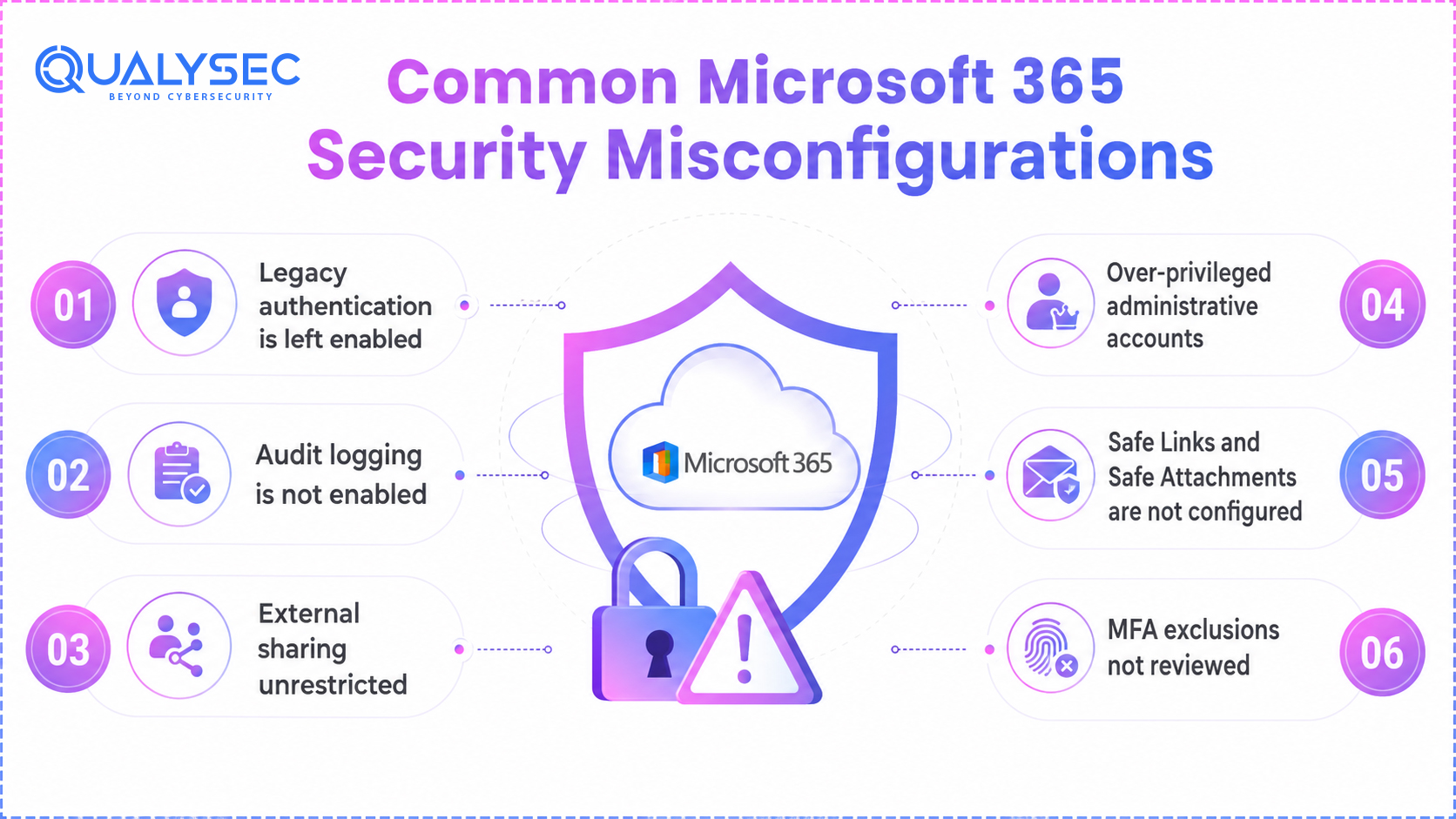
The gap between what Office 365 security standards require and what most tenants are actually configured to do is not a gap of complexity. The most consistently exploited misconfigurations are straightforward to fix once identified. They persist because they require deliberate configuration, and many teams complete Microsoft 365 deployments without a security review.
Legacy authentication is left enabled
Legacy authentication protocols – POP3, IMAP, Basic Auth – do not support MFA. Attackers use them specifically to bypass MFA enforcement. Microsoft has been deprecating these protocols progressively, but many tenants still have them enabled for specific applications or user accounts. CIS Benchmark L1 requires a tenant-wide block via authentication policies.
Audit logging is not enabled
Administrators must explicitly activate the Unified Audit Log, as it is not enabled by default in all tenants. Tenants without audit logging cannot detect account compromise, track administrative changes, or produce evidence for compliance audits.
External sharing unrestricted
SharePoint Online and OneDrive default sharing settings permit external sharing with anyone who has a link, with no authentication requirement. This setting is the direct cause of many M365 data exposure incidents. CIS Benchmark L1 requires restricting external sharing to verified external users or managed guest accounts.
Over-privileged administrative accounts
Global Administrator is the most powerful role in a Microsoft 365 tenant. Many organisations assign it to multiple accounts as a convenience and leave those accounts in permanent elevation. The standard requires scoping admin roles to the minimum necessary and using Privileged Identity Management for just-in-time role elevation.
Safe Links and Safe Attachments are not configured
Purchasing Defender for Office 365 does not automatically apply Safe Links and Safe Attachments protection. Policies must be created and applied to users. The pre-built default policies provide basic coverage, but the standards require explicitly configured policies applied to all users with recommended settings.
MFA exclusions not reviewed
Unreviewed MFA exclusions, including break-glass accounts, service accounts, and legacy access, frequently persist over time and become primary attack paths.
How Qualysec Validates Microsoft 365 Security Standards Compliance
Verifying that a Microsoft 365 tenant meets Office 365 security standards requirements is not the same as reading the framework documentation and deciding that the intent of the controls is being met. Frameworks require evidence of implemented controls, not assertions. Qualysec’s M365 security assessment programme provides that evidence – and identifies the specific configuration gaps between the tenant’s current state and the standard it needs to meet.
M365 Configuration Review
Qualysec’s configuration review covers the full scope of CIS Microsoft 365 Foundations Benchmark Level 1 and Level 2 controls, with additional checks mapped to NIST SP 800-53, ISO 27001, and the organisation’s specific compliance requirements. Every control is verified against the live tenant configuration – not self-reported. The review covers identity and access management, Office 365 email security configuration in Defender for Office 365, SharePoint and OneDrive sharing settings, Teams external access controls, audit logging status, and Data Loss Prevention policy coverage.
We categorize findings by severity and compliance framework mapping, providing specific remediation steps for each gap, not generic recommendations. Each finding shows the current configuration, the required configuration, and the steps to reach it.
Penetration Testing of Microsoft 365 Environments
Configuration review identifies what is misconfigured. The Microsoft 365 Penetration testing environment determines what an attacker can do with those misconfigurations. Qualysec’s M365 penetration testing engagements simulate the attack techniques most commonly used against Microsoft cloud security environments: credential attacks against Entra ID, OAuth token abuse, phishing simulation through the tenant, privilege escalation from compromised user accounts, and data exfiltration through misconfigured sharing and DLP gaps.
The penetration test answers the question that configuration review cannot answer on its own: Does the combination of misconfigurations in this tenant create a viable attack path to sensitive data or administrative control? That answer requires an adversarial perspective, not just a checklist.
Compliance-Mapped Reporting
Qualysec maps assessment findings directly to control requirements across major compliance frameworks, including CIS, NIST, ISO 27001, GDPR, HIPAA, and PCI-DSS. We link each finding to the specific control it violates and the precise remediation that closes the gap. Additionally, this produces structured, control-by-control assessment evidence directly mapped to framework audit requirements, rather than a simple narrative summary.
Qualysec further contextualises findings within the organisation’s broader security ecosystem. You can align deliverables with existing Threat Models to track control gaps against specific threat actors relevant to your sector. Cross-referencing findings with SBOM and VEX data ensures you explicitly resolve M365 security exposure from integrated third-party applications.
Want to know how your M365 tenant measures against the CIS Benchmark and your compliance framework? Request a Microsoft 365 security assessment from Qualysec today.

Conclusion
Office 365 security standards are not aspirational benchmarks. These baseline M365 configurations prevent full tenant compromise from a single leaked credential by directly countering proven attack techniques. Microsoft cloud security environments at scale.
The licensing tier determines what is available. The configuration review determines what has been implemented. The penetration test determines what the misconfigurations actually enable. Qualysec’s Microsoft security services assessment programme covers all three – providing the evidence base that both security teams and compliance programmes require to answer the question definitively: does this M365 tenant meet the standard it is supposed to meet?
If you need to demonstrate M365 compliance or close the configuration gaps before your next audit, contact Qualysec Technologies
Frequently Asked Questions
What is the CIS Microsoft 365 Foundations Benchmark and is it a must-have?
The CIS Microsoft 365 Foundations Benchmark is a collection of security configuration recommendations of the Centre for Internet Security specifically for Microsoft 365 tenants. While it is not a regulation itself, it serves as a reference point for assessing compliance with ISO 27001 and SOC 2. This standard represents the most comprehensive publicly available framework for configuring Microsoft 365. Numerous organizations that are subject to regulation adopt it as the starting point of their M365 security strategy due to the fact that it provides more specific configuration recommendations compared to the documents that describe the respective framework like ISO 27001 Annex A.
How Office 365 Security Standards Differ from Microsoft 365 Security Standards
In 2020, Microsoft changed the branding of Office 365 into Microsoft 365 (M365). The terms refer to the same underlying platform that includes crucial tools such as SharePoint, Exchange Online, Teams, OneDrive, and relevant security and compliance functions. The names used, whether Office 365 security or M365 security, provide reference to the same environment. The security standards, controls, and configuration requirements in this guide apply to all terms used.
Is it correct to say that a high Microsoft Secure Score indicates my Microsoft 365 tenant is secure?
Secure Score assesses how well a particular tenant complies with Microsoft’s recommendations and assigns a corresponding score. A high score signifies that the tenant is configured efficiently.
Which Microsoft 365 License is needed for compliance with ISO 27001?
It’s important to note that the license requirements vary depending on the specific ISO 27001 Annex A controls that an organization implements. In most cases to fulfill access control requirement, authentication requirements, audit logging requirements and email security requirement, the organization will need to possess at least a Microsoft 365 Business Premium license or a Microsoft 365 E3 license with Defender for Office 365 add-on. With the help of Qualysec’s M365 Assessment, the organization is able to find out any missing licenses as well as configuration gaps.
How often is it necessary to do an assessment of security for Microsoft 365?
Microsoft 365 environments are constantly evolving as new users, applications, integration points, and configurations are added or modified. Furthermore, Microsoft security services also keep changing with new Defender capabilities, new Purview perspectives being introduced and new Entra ID features. Therefore, security assessments are necessary to be applied accordingly.