






Office 365 security management is not a side application that anyone protects as an afterthought. Most organizations use it for finance approvals, HR records, legal communications, and interdepartmental file sharing.
Microsoft’s 2025 Digital Defence Report found that more than 97% of identity attacks against Microsoft 365 use password spray techniques rather than sophisticated exploits, and identity-based attacks increased 32% in just the first half of 2025. Separately, Verizon’s Data Breach Investigations Report found that over stolen credentials appear in 39% of all breach attack chains. These are not novel attack techniques. Credential-based attacks persist due to incomplete configurations by tenants despite licensed protection availability.
That is why we are here to cover what Office 365 security management involves, the security controls that distinguish a hardened tenant from a default one, the best practices that reduce breach risk in practice, and a compliance checklist mapped to the frameworks most organisations are audited against.
At A Glance
- Office 365 security management is the ongoing discipline of configuring, monitoring, and governing identity, data, and device controls.
- Most Microsoft 365 tenants already license the security tools they need (Defender, Entra ID Conditional Access, Purview) but never fully configure or enforce them.
- Microsoft Office experienced more than 150 vulnerabilities in 2025, over three times the prior year, with critical vulnerabilities doubling industry-wide – patch cadence and configuration hygiene matter more than ever.
- Effective Office 365 security compliance requires mapping technical controls to regulatory frameworks (ISO 27001, SOC 2, HIPAA, PCI DSS) using tools like Microsoft Purview Compliance Manager; configuration alone is not compliance evidence.
What Is Office 365 Security Management?
Office 365 security management is the continuous process of configuring, monitoring, enforcing, and auditing the security controls available across the Microsoft 365 stack – identity, email, endpoints, data, and collaboration tools – so that the platform’s default configuration becomes an actively defended one.
This is a meaningfully different task from setting up Office 365 security. A tenant can be fully licensed for Microsoft 365 E5, with Defender, Purview, and Entra ID P2 all included in the subscription, and still be operating with legacy authentication enabled, no conditional access policies, default sharing settings on every SharePoint site, and an admin account with no MFA. The license is not the control. The configuration is.
Office 365 security management typically spans four operational layers:
- Identity and access management – authentication strength, conditional access, privileged account governance, and session controls across every user and admin account
- Threat protection – anti-phishing, anti-malware, and safe attachment/link policies that inspect mail and file traffic before it reaches a user
- Data governance – classification, labelling, and loss prevention policies that control where sensitive data can go and who can access it
- Monitoring and compliance – audit logging, alert policies, and compliance scoring that provide ongoing visibility and the evidence auditors require
Treating these as a single coordinated programme, rather than four disconnected admin centres, is what separates effective Office 365 security management from a checklist that was completed once during onboarding and never revisited.
Office 365 Security vs. Microsoft 365 Security: The Practical Distinction
The terms get used interchangeably, and for most security purposes that is fine – Office 365 was Microsoft’s name for the productivity suite before it was rebranded Microsoft 365, and the broader Microsoft 365 security capabilities that protect it (Defender for Office 365, Entra ID, Purview) remain the same regardless of which name appears on the invoice.
The distinction that matters operationally is licensing tier, not branding. Office 365 E3 includes Exchange Online Protection (EOP) – baseline anti-spam and anti-malware filtering. It does not include Defender for Office 365, which adds Safe Links, Safe Attachments, and anti-phishing impersonation protection – the controls that catch the targeted attacks EOP was never designed to stop. Microsoft 365 Business Premium, aimed at small and mid-sized organisations, bundles Defender, Intune device management, and Entra ID P1 conditional access into a single SME-priced tier. Knowing which controls are included in your specific licence, versus available as an add-on, is the first decision point in any Office 365 security management programme.

Core Office 365 Security Management Controls
Identity Protection and Multi-Factor Authentication
Identity is the primary attack surface in Office 365, and MFA is the single highest-leverage control available. Password-based attacks remain the dominant entry vector, which means strong password policies and multi-factor authentication address the vast majority of the threat. MFA should be enforced for every account – including service accounts and break-glass emergency access accounts, which need compensating controls rather than blanket exemptions.
Beyond basic MFA at sign-in, mature identity protection includes:
- Conditional Access policies that evaluate device compliance, location, and sign-in risk at every authentication request.
- Legacy authentication blocking – protocols like POP, IMAP, and older SMTP that do not support modern authentication or MFA are a standing bypass for any attacker with a stolen password.
- Risk-based sign-in policies through Entra ID Protection that automatically challenge or block sign-ins flagged as anomalous (impossible travel, unfamiliar device, leaked credential match)
Email Threat Protection
Exchange Online processes an enormous volume of mail, and email remains the dominant initial access vector for Office 365 compromise. Implementing Defender for Office 365 introduces the advanced threat protection capabilities that EOP alone does not:
- Safe Links rewrites and checks URLs at the time of click, catching malicious links that go live after a message has already landed in an inbox
- Safe Attachments detonates file attachments in an isolated sandbox before delivery
- Anti-phishing policies specifically targeting impersonation of internal executives and frequently-contacted external domains.
- Anti-spoofing enforcement through correctly configured SPF, DKIM, and DMARC records on the sending domain – without these, the domain is trivially spoofable by anyone sending phishing email that appears to come from the organisation
Data Loss Prevention and Information Protection
Microsoft Purview’s DLP and sensitivity label capabilities prevent the accidental or deliberate exfiltration of sensitive data through Exchange, SharePoint, OneDrive, and Teams. Effective configuration includes:
- Sensitivity labels applied automatically based on content inspection (credit card numbers, national ID formats, health information) rather than relying on users to label correctly
- DLP policies that block or warn on sensitive data leaving the tenant via email, chat, or file share, with policies tuned in monitoring mode before enforcement to avoid disrupting legitimate workflows
- External sharing controls at the SharePoint and OneDrive tenant level, scoped to specific domains or requiring authentication rather than defaulting to “anyone with the link”
Endpoint and Device Compliance
Office 365 access does not stop at the browser. Devices accessing Outlook, Teams, and SharePoint need to meet a defined health baseline before access is granted – current OS patch level, disk encryption enabled, and an active endpoint protection agent. Intune Microsoft compliance integrates this device check directly into Conditional Access, so a non-compliant device is blocked from accessing Office 365 resources regardless of whether the user’s credentials are valid.
Audit Logging and Threat Monitoring
Unified Audit Log and Microsoft Sentinel (or an equivalent SIEM) integration provide the visibility layer that turns isolated alerts into a coherent security picture. Without centralised logging, an attacker who has compromised a mailbox can set up a forwarding rule, search for financial data, and exfiltrate it, with no single team member positioned to notice all three actions as related.
Read our complete guide on Office 365 Penetration Testing to enhance your security posture.
Security Controls Comparison: What to Require vs. What to Watch Out For
| Control Area | What to Require | What to Watch Out For |
| Authentication | MFA enforced on every account, including admins and service accounts | MFA optional or exempted for convenience accounts |
| Legacy protocols | Legacy authentication fully blocked tenant-wide | POP/IMAP left enabled just in case |
| Email protection | Defender for Office 365 with Safe Links/Attachments active | EOP-only protection mistaken for full threat protection |
| Domain authentication | SPF, DKIM, and DMARC all correctly configured and enforced | DMARC set to none with no enforcement |
| External sharing | Scoped to named domains or authenticated guests | Tenant-wide anyone with the link” sharing left as default |
| DLP coverage | Policies active across Exchange, SharePoint, Teams, and endpoints | DLP configured for email only, ignoring Teams and OneDrive |
| Admin roles | Just-in-time privileged access via PIM, least privilege | Standing Global Administrator assignments for daily-use accounts |
| Monitoring | Centralised audit log review and SIEM-integrated alerting | Audit logging enabled but never reviewed |
| Compliance mapping | Findings mapped to applicable regulatory frameworks | Generic security report with no compliance context |
Office 365 Security for Small and Mid-Sized Organisations
Small and mid-sized organisations are not a smaller version of the same threat. They face identical attackers – business email compromise and ransomware groups target organisations by opportunity – with a fraction of the in-house resources to detect and respond to an incident.
What this means in practice for Office 365 security management at SME scale:
Use the licence tier that bundles security
Microsoft 365 Business Premium includes Defender for Office 365, Intune, and Entra ID P1 conditional access in a single SME-priced subscription. An organisation running Business Basic or Business Standard with no add-on security licence is operating Exchange Online Protection only – baseline filtering with no behavioural threat detection, no Safe Links, and no Safe Attachments.
Enforce MFA with zero exceptions
The most common SME security gap is not a missing tool. It is an executive or finance account exempted from MFA because someone found it inconvenient during rollout. That account is precisely the one attackers target first.
Configure DMARC enforcement
Business Email Compromise remains one of the most financially damaging categories of cybercrime, and it frequently succeeds specifically because of weak domain authentication. For a small organisation whose clients trust email coming from its domain, an unenforced DMARC record is a direct path to client-targeted fraud carried out under the organisation’s own name.
Treat detection as a managed function
An IT generalist checking the security dashboard once a week is not equivalent to continuous monitoring. Industry data puts the average time to identify a breach at over 200 days without active monitoring – a gap that a managed detection service or co-managed SOC arrangement closes far more reliably than ad hoc internal review.
Check the major security standards and frameworks that apply to microsoft 365.
Office 365 Security Management Best Practices
Enforce Conditional Access Before Anything Else
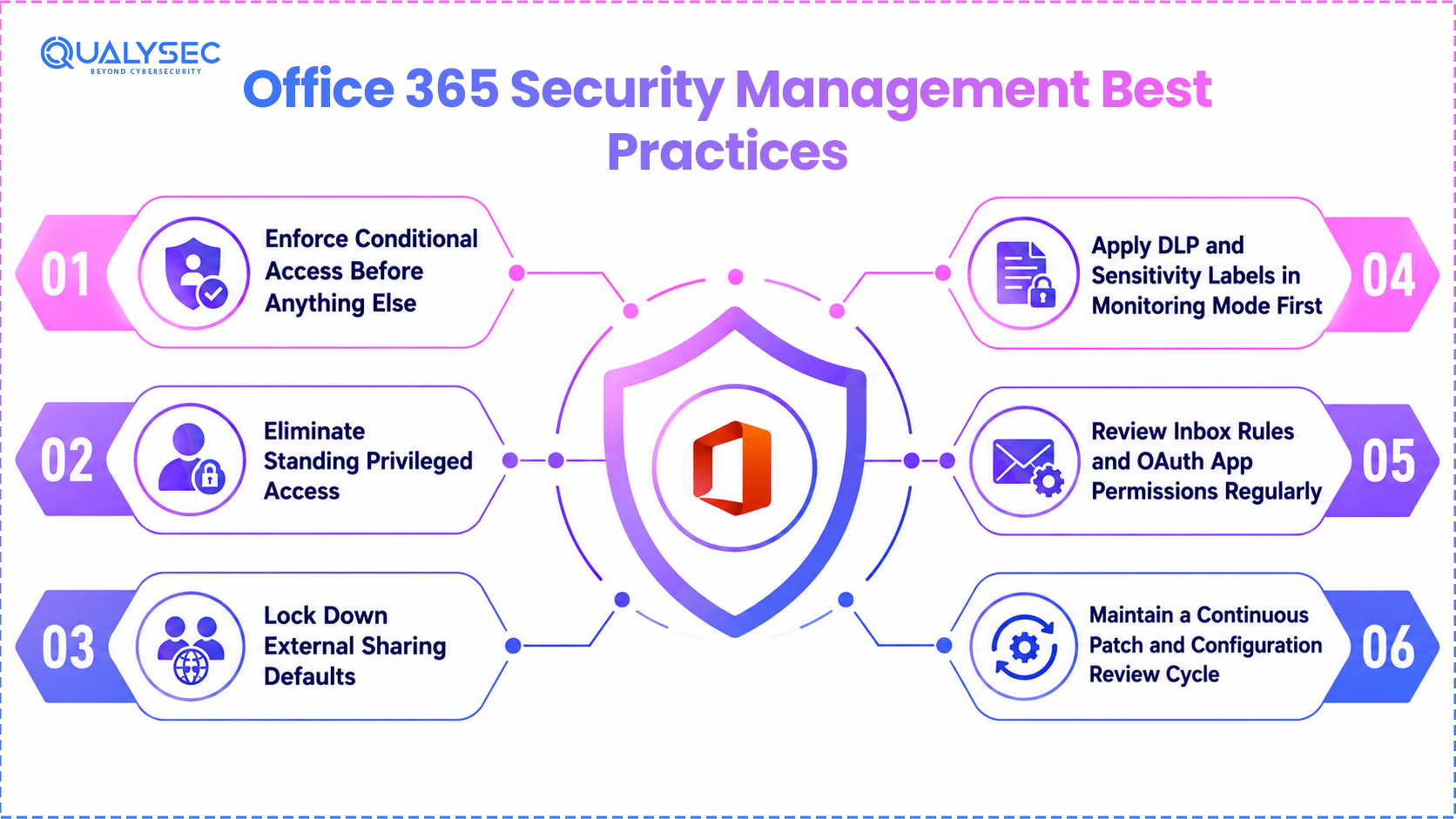
MFA alone stops credential-only attacks. Conditional Access – evaluating device compliance, sign-in risk, and location at every access request – stops the attacker who has a valid stolen credential and a registered MFA bypass method from a non-compliant device. Best practice is to deploy Conditional Access policies in report-only mode first, review the access patterns that would be blocked, then move to enforcement once the policy will not lock out legitimate users.
Eliminate Standing Privileged Access
Global Administrator and other highly privileged roles should not be standing assignments on accounts used for daily email and Teams access. Microsoft Entra Privileged Identity Management (PIM) issues administrative access just-in-time, for a defined task and duration, with automatic expiry. An attacker who compromises a standard user account that happens to also hold standing Global Admin rights has compromised the entire tenant in one step; an attacker who compromises the same account under PIM has compromised a normal mailbox.
Lock Down External Sharing Defaults
SharePoint and OneDrive default sharing settings are permissive out of the box. Audit every site’s sharing configuration, set the tenant default to “specific people” rather than “anyone with the link,” and require authentication for any external guest access. This single configuration change closes one of the most common – and most embarrassing – sources of unintentional data exposure in Office 365 environments.
Apply DLP and Sensitivity Labels in Monitoring Mode First
Deploying DLP policies directly into enforcement mode without first observing what they would have blocked creates immediate business disruption and a flood of help desk tickets, which is precisely the failure mode that gets security policies disabled three weeks later. Run new policies in audit/monitoring mode, review the volume and nature of matches, tune the policy, then enforce.
Review Inbox Rules and OAuth App Permissions Regularly
Attackers who compromise a mailbox routinely create forwarding rules to exfiltrate future correspondence and register malicious OAuth applications with broad mailbox permissions that survive a password reset. Periodic review of inbox forwarding rules and consented third-party app permissions catches persistence mechanisms that a password change alone does not remove.
Maintain a Continuous Patch and Configuration Review Cycle
Microsoft Office experienced over 150 vulnerabilities in 2025, more than three times the prior year’s count, and critical vulnerabilities across the Microsoft ecosystem doubled year over year. Office 365 security management is not a configuration set once during deployment. Tenant settings drift – new SharePoint sites inherit default sharing, new users are added without MFA enrolment being enforced, new OAuth apps get consented – and a recurring review cycle is what catches that drift before an attacker does.
Office 365 Security Management Compliance Checklist
Use this Office 365 best practices checklist as a working baseline. It is not a substitute for a full Compliance Manager assessment against your specific regulatory obligations, but it reflects the controls that most frameworks – ISO 27001, SOC 2, HIPAA, PCI-DSS, and NIST CSF – have in common.
Identity and Access
- MFA enforced on 100% of accounts, including admins and service accounts
- Legacy authentication protocols (POP, IMAP, basic auth SMTP) disabled tenant-wide
- Conditional Access policies enforced based on device compliance and sign-in risk
- Privileged roles managed through just-in-time access (PIM)
- Guest and external user access reviewed and time-bound
Email and Threat Protection
- Defender for Office 365 (not EOP alone) active with Safe Links and Safe Attachments
- Anti-phishing policies configured for executive and domain impersonation protection
- SPF, DKIM, and DMARC configured and enforced
- Inbox forwarding rules audited on a recurring schedule
Data Protection
- Sensitivity labels applied to regulated data categories (PII, PHI, payment data)
- DLP policies active across Exchange, SharePoint, Teams, and endpoint channels
- SharePoint and OneDrive external sharing scoped to specific domains
- Encryption at rest and in transit confirmed for all data classifications
Monitoring and Governance
- Unified Audit Log enabled and retained per regulatory retention requirements
- Alert policies configured for high-risk events (mass file download, mailbox forwarding, admin role changes)
- Microsoft Secure Score and Compliance Manager score reviewed on a defined cadence
- OAuth app registrations reviewed and unused or over-permissioned apps revoked.
Compliance Mapping
- Compliance Manager assessments configured for every applicable framework (ISO 27001, SOC 2, HIPAA, PCI-DSS, GDPR)
- Improvement actions assigned to named owners with documented evidence on completion
- Findings cross-referenced against audit requirements ahead of the actual audit cycle
Microsoft Security Solutions and Services That Support Office 365 Security Management
Microsoft provides the technical controls; operating them effectively is a separate and ongoing discipline. The relevant native tools are:
- Microsoft Defender for Office 365 – threat protection for email and collaboration tools, covering phishing, malware, and impersonation
- Microsoft Entra ID (formerly Azure AD) – identity protection, Conditional Access, and Privileged Identity Management
- Microsoft Purview – data classification, DLP, eDiscovery, insider risk management, and Compliance Manager scoring across more than 300 regulatory templates
- Microsoft Intune – device compliance and conditional access integration for endpoints accessing Office 365
These are genuinely capable Microsoft security services when fully configured and continuously reviewed. The gap that creates breaches is rarely a missing product. It is a licensed capability that was never turned on, a policy that was deployed once and never revisited, or a Secure Score recommendation that has been sitting unaddressed for eighteen months.
How Qualysec Supports Office 365 Security Management
Qualysec’s security testing engagements validate whether the Office 365 controls an organisation believes are protecting it are actually doing so – independent of what the configuration dashboard reports.
Microsoft 365 Configuration and Security Assessment
Qualysec’s team reviews tenant configuration against Microsoft security services baseline benchmarks (CIS Microsoft 365 Foundations Benchmark and Microsoft’s own Secure Score recommendations), identifying gaps between licensed capability and actual enforcement – legacy authentication left enabled, Conditional Access policies in report-only mode indefinitely, DLP policies that exist but do not block.
Phishing and Social Engineering Simulation
Because identity remains the dominant attack vector into Office 365, Qualysec runs controlled phishing and credential-harvesting simulations to test whether Defender for Office 365 policies, user awareness, and Conditional Access controls actually stop a realistic attack chain.
Compliance-Mapped Reporting
Qualysec aligns Office 365 assessment results with ISO 27001, SOC 2, HIPAA, and PCI-DSS controls, offering audit-ready evidence. It contextualizes findings within the organization’s identity and data risks, integrating email and collaboration risks into the security framework.
Stop assuming your Office 365 security controls work as configured. Schedule a Microsoft 365 security assessment with Qualysec Technologies today!

Conclusion
Office 365 security management is not the act of buying a Microsoft 365 licence tier with security features included. Ongoing work involves configuring features, enforcing them, monitoring results, and revisiting configurations as tenants, threats, and regulations evolve.
The organisations that get breached through Office 365 in 2026 are rarely the ones missing Microsoft security solutions.MFA exemptions lack approval, Conditional Access policies remain in report-only mode, and Secure Score recommendations have been pending since provisioning.Closing that gap is a continuous management discipline.
Want to know whether your Office 365 tenant actually enforces what it’s licensed for? Qualysec’s team will test it.
Frequently Asked Questions
Q. What is the difference between Office 365 Security Management and Microsoft 365 security?
The terms refer to the same underlying productivity suite under different branding – Office 365 was renamed Microsoft 365 in 2020, and the security capabilities (Defender, Entra ID, Purview) apply identically regardless of which name appears on the subscription. The distinction that matters in practice is licensing tier: Office 365 E3 includes only Exchange Online Protection, while Microsoft 365 E5 or an add-on licence is required for Defender for Office 365’s advanced threat protection, Entra ID P2’s risk-based conditional access, and Purview’s full compliance suite.
Q. Is Microsoft 365 secure by default?
No. Microsoft 365 ships with permissive defaults designed for ease of adoption. Microsoft cloud security, external sharing is enabled by default on SharePoint and OneDrive, legacy authentication protocols remain available unless explicitly disabled, and Conditional Access policies must be created and enforced manually. The platform provides extensive security capability, but realising it requires deliberate configuration.
Q.What is Microsoft Secure Score, and how should organisations use it?
Microsoft Secure Score measures the extent to which an organization has implemented recommended security configurations across identity, devices, apps, and data, presented as a percentage, serving as a prioritization tool without being a compliance certification.
Pairing Secure Score improvement with independent security testing closes the gap between configured and proven effective.
Q.How does Office 365 security map to compliance frameworks like SOC 2 or ISO 27001?
Microsoft Purview Compliance Manager provides 300+ templates for regulatory frameworks, scoring controls like SOC 2 and HIPAA.
While it aids audit preparation, Microsoft states that organizations must independently validate control effectiveness, necessitating independent assessments and penetration testing.
Q.How often should Office 365 security configuration be reviewed?
Tenant configuration drifts occur continuously due to user additions, SharePoint sites creation, and OAuth consents. Full reviews are essential after significant security changes, new regulations, or security incidents involving email, SharePoint, or Teams. Mature programs pair these reviews with annual independent security assessments to validate configurations against attack techniques.