

Testing a Jira extension starts with understanding what the app is allowed to do inside Jira. Some extensions can read or change project data, act through granted permissions, process user information, or send data to services outside Atlassian. A security flaw in any of those paths can create risk for the Jira environment that relies on the app.
The concern is not limited to Atlassian products. Verizon’s 2026 DBIR found third-party involvement in 48% of breaches, following a 60 percent increase from the previous year.
For security testing for Jira extensions, app architecture matters as much as the vulnerability itself. Forge, Forge Remote, Connect, OAuth integrations, and Jira Data Center expose different trust boundaries and security responsibilities.
This guide looks at what should actually be tested, which Jira-specific weaknesses deserve attention, and what a meaningful security assessment should prove.
Atlassian Connect vs. Forge: Understanding the Architectural Security Differences
Before testing a Jira app, you need to know how it is built. A Forge app and a Connect app do not expose the same components, so applying one security checklist to both can leave important gaps in Atlassian Marketplace security.
Forge places more of the runtime and platform security under Atlassian’s control. Connect gives the vendor greater responsibility for the infrastructure and application environment. The architecture therefore determines which controls belong to Atlassian and which ones need to be tested in the app itself.
Forge Security Model
Forge runs core application functions on Atlassian infrastructure, but testers still need to examine the controls managed by the app developer.
Key areas include:
- asUser() and asApp() permission handling
- Jira scopes and unnecessary privileges
- Custom UI and web triggers
- Storage, egress, and external fetch requests
- Forge Remote and tenant separation
- Third-party dependencies
asUser() follows the user’s Jira permissions. asApp() uses app permissions, so testers should check whether a low-privilege user can trigger restricted actions indirectly.
Web triggers also need authentication because Forge does not protect them automatically.
Forge Remote Changes the Threat Surface
Forge Remote adds systems that sit outside the standard Forge runtime, so the assessment needs to cover the vendor-managed environment as well.
Check:
- Remote endpoint protection and TLS
- Secrets and database controls
- Tenant separation
- Forge Invocation Token validation
- OAuth token handling
Every remote request should reject missing, altered, expired, or incorrect FITs. Testers should also confirm the token signature, audience, and relevant claims.
App user and app system OAuth tokens must stay protected. They should never be exposed in logs or returned to the client.
Atlassian Connect Security Model
Connect apps usually place more of the attack surface under the vendor’s control because the backend runs outside Atlassian infrastructure. For Atlassian Marketplace Security Compliance, that means the assessment has to look closely at both request validation and the app’s own hosted environment.
Key checks include:
- JWT signature and expiry validation
- QSH handling for request integrity
- Context JWT restrictions
- Descriptor and lifecycle endpoint configuration
- Shared secret storage
- Tenant and host identifiers
- Webhook verification
- Session controls
- Iframe security, CSP, and CORS
- Server-side authorization
A valid JWT signature alone is not enough. The app must also confirm that the token is valid for that endpoint, request, tenant, and authorization context. Atlassian specifically requires server-side JWT validation and separate permission checks before protected actions are allowed.
Jira Data Center Extensions
Jira Data Center apps run alongside the product code and use Jira’s Java APIs, so a Forge checklist does not fit this environment.
Testing should cover:
- Authentication and authorization
- XSS and SQL injection
- XXE, XSRF, and SSRF
- Server-side template injection
- Insecure deserialization
- Vulnerable third-party libraries
Critical Security Vulnerabilities Common in Jira Extensions
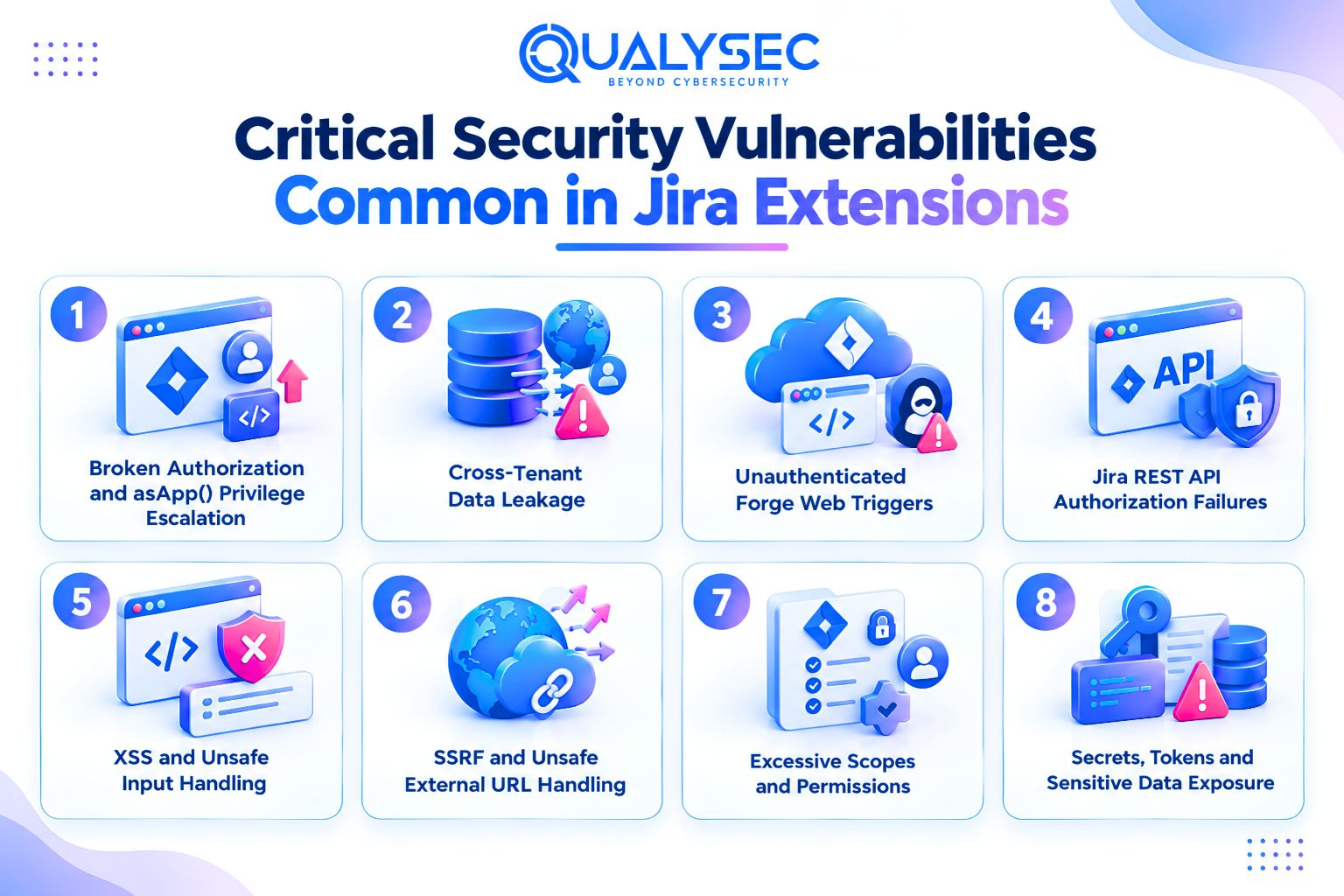
Broken Authorization and asApp() Privilege Escalation
Jira permissions can differ by project, issue, role, and user. Testers should therefore check whether changing identifiers or calling restricted functions bypasses those boundaries.
Also test cross-user resources, cross-project access, admin functions, and anonymous or unlicensed users. These paths closely map to OWASP BOLA and broken function-level authorization risks.
Cross-Tenant Data Leakage
Tenant isolation needs separate testing because the same Jira identifiers can exist on different sites. Atlassian specifically warns against using issue keys alone for shared cache entries.
Use two Jira Cloud sites and create the same key, such as TEST1, on both. Alternate requests and check:
- Cloud IDs and installation IDs
- Database and storage partitioning
- Redis or cache keys
- Queues and background jobs
- Webhook state and scheduled processes
- Shared runtime variables
Any tenant data returned across sites indicates an isolation failure.
Unauthenticated Forge Web Triggers
Forge web trigger URLs do not receive built-in authentication by default, so any sensitive function behind them needs its own request validation.
Testing should cover:
- Requests with no authentication
- Forged or malformed authorization headers
- Replay attempts where relevant
- Manipulated request parameters
- Privileged Jira actions triggered through asApp()
Pay particular attention when user-controlled input reaches privileged Jira API calls. If the trigger accepts identifiers, actions, or other sensitive parameters, verify that an unauthenticated caller cannot influence what the app does inside Jira.
Jira REST API Authorization Failures
A valid Jira object ID does not prove that the caller is allowed to use it. During Jira app security testing, the extension should be checked for its own permission logic before it reads, changes, or triggers actions against Jira resources.
Test altered or substituted:
- Issue keys and IDs
- Project and attachment IDs
- Account IDs
- Comments, worklogs, and transitions
- Custom field IDs
- Issue and app properties
- Administrative endpoints
- Bulk API requests
This is especially important for apps distributed through the Jira Marketplace, where predictable identifiers can expose object-level authorization flaws if access checks are weak.
XSS and Unsafe Input Handling
Test both app inputs and Jira-supplied values, including summaries, comments, project names, custom fields, attachment filenames, and imported content.
Cover Custom UI, dashboards, modals, configuration pages, and admin screens. Data returned from Jira should still be treated as untrusted and encoded correctly for the rendering context to prevent XSS.
SSRF and Unsafe External URL Handling
Test any feature that fetches user-supplied URLs, images, previews, webhooks, or external APIs.
Try requests targeting:
- Localhost and private networks
- Cloud metadata services
- IPv6 loopback addresses
- Redirected URLs
- URL parsing bypasses
The extension should restrict outbound destinations and prevent user-controlled URLs from reaching internal or sensitive services.
Excessive Scopes and Permissions
Apps listed in the Jira Marketplace should not request broader access than their features actually need. Review Forge permissions, OAuth and 3LO scopes, external egress declarations, and any write or administrative access attached to read-only functions.
A simple feature-to-permission map helps reveal unnecessary privileges. If a feature works with narrower access, the broader permission should be removed.
Secrets, Tokens and Sensitive Data Exposure
Test API keys, OAuth tokens, shared secrets, webhook credentials, encryption keys, and third-party credentials for exposure through JavaScript, repositories, URLs, logs, stack traces, Jira properties, environment endpoints, and CI/CD artifacts.
What a Comprehensive Security Test for a Jira Extension Includes
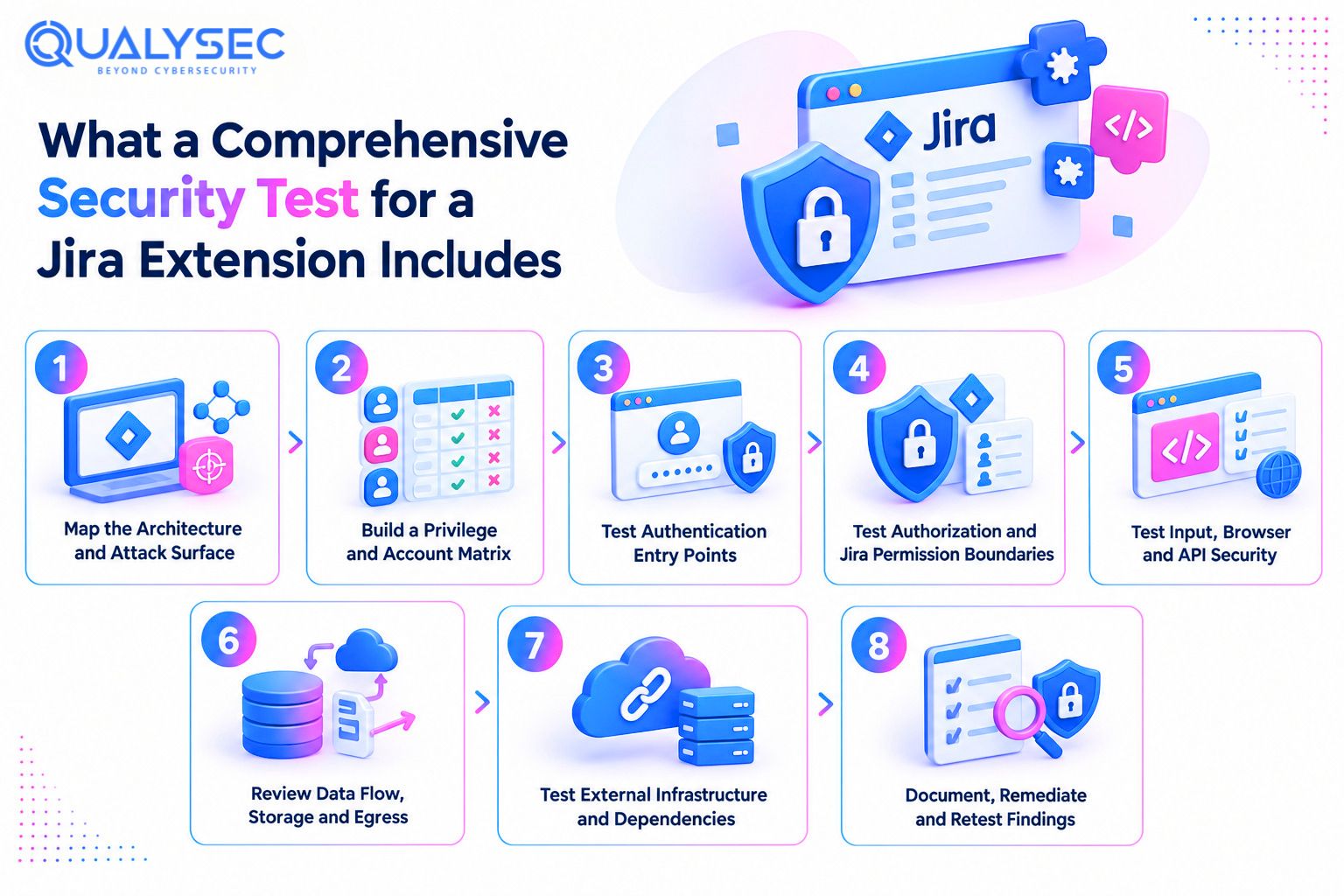
Step 1: Map the Architecture and Attack Surface
Start by documenting the extension’s structure, connected systems, data movement, and privilege levels. The scope should record the app framework, hosting model, user interface, remote services, databases, Jira permissions, authentication methods, storage, external integrations, attachment handling, and user roles.
For CREST pentesting for Atlassian apps, this scoping stage helps ensure the assessment reflects the application that is actually deployed rather than a generic checklist.
The tester should identify every trust boundary between users, Jira, the extension, stored data, vendor infrastructure, and external services. Those boundaries determine which test cases belong in scope.
Step 2: Build a Privilege and Account Matrix
Do not run the assessment from a single administrator account. Prepare accounts with different permission levels so each sensitive action can be tested against the users who should and should not be allowed to perform it.
| Account | Main Testing Purpose |
| Site admin | Highest site privileges |
| Jira admin | Jira administrative functions |
| Project admin | Project permission boundaries |
| Standard user A | Normal authorised behaviour |
| Standard user B | Horizontal access testing |
| Restricted project user | Limited project permissions |
| Unprivileged or unlicensed user | Unauthorised access testing |
| User on Tenant B | Tenant isolation testing |
Step 3: Test Authentication Entry Points
Test every route that accepts an authenticated or signed request, including external endpoints, Forge web triggers, Forge Remote FITs, OAuth callbacks, Connect JWT and QSH validation, webhooks, and custom application sessions.
The objective is to confirm that invalid, missing, expired, or manipulated credentials are rejected consistently.
Keep authentication and authorization as separate checks. A request may prove who the caller is and still need to be denied because that caller does not have permission to perform the requested action.
Step 4: Test Authorization and Jira Permission Boundaries
Test sensitive actions across object, project, administrative, licence, tenant, user-owned data, and Jira API permission boundaries. Forge apps using asApp() should also verify the current user’s permissions before privileged API calls.
Do not rely on disabled buttons or hidden UI elements. Modify request parameters and send direct API requests to confirm that access controls are enforced on the server for every protected operation.
Step 5: Test Input, Browser and API Security
Test how the extension handles data in the browser, API layer, and external integrations. Cover stored and reflected XSS, injection paths, DOM manipulation, postMessage, CORS, CSP, browser storage, unsafe API responses, information leakage, rate limiting, resource exhaustion, and third-party API consumption.
For Custom UI, review whether CSP permissions have been weakened unnecessarily and whether client-side context or storage is trusted for security decisions. Forge applies restrictive defaults, but app configuration can expand what the browser is allowed to load or execute.
API testing should also check whether expensive operations can be repeatedly triggered, malformed responses expose internal details, or external API data reaches sensitive application logic without adequate validation.
Step 6: Review Data Flow, Storage and Egress
Trace sensitive information from Jira into every system that receives, stores, or processes it. Record which fields leave Jira, where they are stored, whether analytics or AI services receive issue content, and whether personal data reaches application logs.
Also check:
- Unnecessary field transmission
- Storage location and retention
- Tenant separation outside Jira
- Third-party processing
- Uninstall and deletion behaviour
A Forge app should not automatically be treated as zero egress. Forge apps can communicate with external APIs, storage, compute services, analytics platforms, and remote backends when those destinations are declared and configured.
Step 7: Test External Infrastructure and Dependencies
Connect and Forge Remote environments need infrastructure testing beyond the application itself. Check TLS configuration, certificates, HSTS, DNS records, exposed ports, public storage, cloud permissions, administrative interfaces, debug services, patch levels, container images, and CI/CD components. Atlassian requires Marketplace cloud apps to use TLS 1.2 or later and HSTS with a minimum age of one year.
Dependency testing should include direct and transitive libraries. A scanner alert alone does not prove that the Jira extension is exploitable. Confirm whether the affected component is actually present, reachable, and used in a way that exposes the vulnerable code path.
Step 8: Document, Remediate and Retest Findings
A useful report should show exactly what was tested and what the tester found. Each finding needs enough detail for the development team to reproduce it.
Record the affected module, required Jira role, prerequisites, severity, evidence, impact, fix guidance, and retest result. Include CVSS only where it adds value.
Screenshots or request and response evidence should support the finding. Scanner output on its own is not enough. After the fix is applied, retest the issue and record whether any risk remains. For Marketplace testing, unresolved findings may also need to follow the applicable security bug fix timelines.
Why NHS Integrations and Enterprise Buyers May Require CREST-Accredited Security Vetting
Atlassian Marketplace Security Assurance
For self-managed testing, Atlassian provides a scoping template for vendors working with a CREST-accredited provider. The template captures the app framework, privileges, integrations, routes, and testing environment so the assessment reflects the actual application.
Marketplace Partners can also use Atlassian’s managed Bugcrowd programme instead of arranging every part of the engagement independently. Both routes assess the application itself, which is different from relying only on Marketplace controls or platform-level Atlassian security features.
NHS and Regulated Healthcare Requirements
NHS requirements depend on the product and integration route. General DSPT guidance expects annual penetration testing and recognises CREST, The Cyber Scheme, and CHECK qualified expertise when selecting a commercial provider.
For IM1, a third-party CHECK- or CREST-accredited test is required before go-live and annually after that. Retesting is also required after significant security changes, and Critical or High findings must be fixed or mitigated before onboarding.
If a Jira extension forms part of that product or integration, its Jira functions, APIs, and data flows may need to be included in scope.
Why Independent Testing Matters to Enterprise Procurement
Independent testing gives enterprise buyers evidence that security claims have been checked by a qualified third party rather than only by the app vendor. Procurement teams can use the report to review what was tested, remaining risks, remediation work, retest results, and whether sensitive Jira workflows or tenant isolation were included. CREST accreditation is one recognised way to show provider competence and independence.
Best Practices for Developing Secure Jira Extensions
1. Design Authorization Around Jira’s Native Permission Model
Build permission checks around the Jira user who initiated the action. Use asUser() when the app is performing work for that user.
When asApp() is necessary, verify the user’s required Jira permissions before making the privileged request. Do the same check on the server for every sensitive action rather than relying on hidden buttons or disabled controls in the interface.
2. Apply Least Privilege to Scopes and Integrations
Request only the Jira scopes needed for features that actually exist. Forge documentation explicitly calls for the minimum required scope set.
Review those permissions whenever functionality changes or is removed. External communication should follow the same rule. Declare only the domains the app needs to contact, and avoid broad wildcard egress when specific destinations can be defined.
3. Treat Web Triggers and Remote Services as External Trust Boundaries
Anything reachable from outside the Forge runtime should be treated as untrusted from the first request. Sensitive web triggers need their own authentication, while Forge Remote services should validate every incoming Forge Invocation Token before processing it.
OAuth tokens used by the app should never end up in logs or client-facing responses. Public endpoints also need sensible rate limits and abuse protection to reduce automated misuse.
4. Build Tenant Identity Into Data Storage and Caching
Tenant identity should be part of every storage, cache, and queue lookup that can hold customer data. Use identifiers such as cloudId or installationId rather than Jira issue keys or other values that can repeat across sites. Forge hosted storage is already scoped by app installation.
Avoid keeping customer data in global or module-level memory because Forge runtime processes can be reused across tenant requests. Where feasible, add regression tests with two tenants to release validation so isolation failures are caught before deployment.
5. Secure Untrusted Jira and External Data
Treat Jira data and third-party responses as untrusted input. Validate parameters before use, check external API responses, and encode output for the context in which it appears.
User-generated Jira values such as comments, descriptions, and custom fields should be rendered safely rather than inserted directly into the interface. URLs also need validation before the server fetches them. Data coming from a Jira REST API should not bypass these checks simply because the source is Jira.
6. Integrate Security Into the Release Lifecycle
Build security into each release using:
- SAST
- SCA
- Secrets scanning
- API and DAST testing
- Manual penetration testing
- Vulnerability management
- Retesting after material changes
- Bug bounty where applicable
How Qualysec Helps You Validate Your Jira Extensions
Qualysec helps you validate whether your Jira extension contains exploitable security weaknesses before those issues reach customers or enterprise environments. The assessment is scoped around the application areas you want reviewed, with testing focused on the attack paths that could affect sensitive data, permissions, integrations, and user actions.
Qualysec is a specialized penetration testing company that combines automated checks with manual assessment. This helps uncover issues that scanners may miss, including:
- Authorization weaknesses
- Business logic flaws
- Token handling problems
- Tenant isolation issues
- Chained vulnerabilities
After testing, you receive a report with severity-ranked findings, reproduction evidence, technical impact, and practical remediation guidance. Your development team can use those findings to fix the identified weaknesses.
If you are preparing a Jira extension for enterprise deployment, Marketplace assurance, or regulated customer requirements, contact Qualysec for a scoped penetration testing assessment.
Conclusion
The right testing approach depends on how the Jira extension is built. Forge can reduce some infrastructure responsibilities, but application-level risks remain around authorization, privileged actions, external services, tenant isolation, and customer data. Security testing for Jira extensions helps identify these application-level risks before they affect customers.
A strong security assessment should show which weaknesses are actually exploitable and give developers enough evidence to fix them properly. The value comes from clear findings and verified remediation, not from a scanner report alone.

FAQs
1. Why is security testing important for Jira extensions?
A Jira extension may access issues, projects, users, permissions, admin functions, or external systems. Platform security protects part of the environment, but weaknesses in the extension’s own code or logic still need separate testing.
2. What security vulnerabilities should be tested in Jira extensions?
Focus on broken authorization, asApp() abuse, tenant leakage, XSS, injection, SSRF, excessive permissions, insecure web triggers, token or JWT flaws, exposed secrets, and vulnerable dependencies. Priorities change depending on whether the app uses Forge, Connect, or Data Center.
3. How is penetration testing performed on a Jira extension?
Testing usually starts with architecture and user roles, then moves through authentication, authorization, APIs, UI, tenant isolation, data flows, and external infrastructure. Findings are documented, fixed, and retested to confirm the weakness is no longer exploitable.
4. What security testing standards apply to Jira Marketplace apps?
Marketplace apps must follow Atlassian’s security requirements and vulnerability remediation policies. OWASP web and API guidance can support the technical methodology. CREST relates to provider assurance rather than replacing the testing methodology itself.
5. What should a Jira extension security testing report include?
A useful report should record the scope, architecture, environment, testing method, affected component, severity, required Jira privileges, reproduction evidence, impact, remediation advice, limitations, and retest status. The information should be detailed enough for developers to reproduce and fix each finding.
6. How often should we conduct security testing on our Jira extensions?
There is no single schedule for every Jira extension. Retest after significant changes to permissions, authentication, integrations, infrastructure, or trust boundaries. Specific customers or programmes may set stricter requirements. NHS DSPT guidance, for example, expects penetration testing at least annually.