






Jira and Confluence are no longer used only for basic project tracking or internal notes. Many businesses now rely on them for day-to-day operations, sensitive information, approvals, development work, and customer-related processes. Marketplace apps can add even more access to that environment.
Because of this, Atlassian security compliance cannot be judged by Atlassian’s certifications alone. Your own settings matter. So do user permissions, identity controls, connected apps, and the way third-party vendors handle your data.
A secure Atlassian platform can still become a compliance problem if an app requests too much access, credentials are exposed, or data moves through systems you have not properly reviewed.
The sections ahead break down where these risks come from, what Atlassian expects from organisations and app vendors, and where security testing becomes important.
The Core Security Requirements for Atlassian Deployments
The requirements are different for customers and app developers. If you use Jira or Confluence, you need to review how the environment is configured, who can access it, and what third-party apps can do. Marketplace developers need to meet Atlassian Marketplace security requirements for the apps they build.
Atlassian works against recognised standards and assurance programmes such as ISO 27001, SOC 2, and CSA CCM. It also publishes guidance for GDPR, HIPAA, and FedRAMP. Coverage is not identical across every product or plan, so the exact scope should always be checked first.
| Framework or regulation | What Atlassian provides | What organisations still need to verify |
| ISO/IEC 27001 | ISO 27001 certification for products included in Atlassian’s published scope. | Whether your product is covered and whether third-party apps have been reviewed separately. |
| SOC 2 | Independent SOC 2 reports for covered services. | Whether the service you use is included and whether your own controls meet the required standard. |
| GDPR | A Data Processing Addendum, privacy features, and security measures. | How personal data is collected, accessed, stored, and handled by connected apps. |
| HIPAA | Support for eligible workloads on certain Atlassian Cloud products and plans. | Product eligibility, BAA requirements, required settings, and app access to PHI. |
| FedRAMP | Government Cloud services with a defined FedRAMP scope. | Whether the required service is covered and whether external apps need separate assessment. |
| CSA CCM / STAR | Published cloud control assessments against CSA frameworks. | Whether those controls match your own risks and data handling requirements. |
For UK organisations, Atlassian gdpr compliance also involves your own use of the platform. Atlassian can provide supporting controls, but your organisation must still manage personal data lawfully and review how connected apps process it.
Atlassian’s Shared Responsibility Model
Security in Atlassian Cloud is divided between three parties:
- Atlassian protects the cloud platform and provides the security controls used across its services.
- The customer or admin manages users, permissions, configuration, data, installed apps, and internal compliance requirements.
- Marketplace partner secures its app code, authentication, data handling, tenancy controls, external infrastructure, and security operations.
| Control | Atlassian | Customer/admin | Marketplace partner |
| Cloud infrastructure | Operates and protects the platform | Reviews available assurance | Secures any external infrastructure |
| User lifecycle | Provides access management tools | Manages accounts and access | Controls app-specific access where needed |
| Jira and Confluence permissions | Provides permission controls | Configures them | Must respect platform permissions |
| Marketplace app selection | Provides trust information | Reviews each app before use | Supplies accurate security information |
| App authentication | Provides supported mechanisms | Approves integrations | Implements authentication securely |
| App scopes | Defines the scope model | Reviews requested access | Requests only necessary permissions |
| App vulnerabilities | Runs Marketplace security processes | Reviews vendor security | Fixes issues within required timelines |
Installing a Marketplace app also creates a separate relationship with that vendor. Atlassian expects customers to assess whether the app meets their own security, privacy, and compliance requirements.
Authentication and Authorization
Every protected app endpoint should verify who made the request and whether that user can access the requested tenant or resource.
For Connect apps, this includes validating JWTs and request integrity controls such as the query string hash. For Forge, use asUser() when actions should follow the user’s permissions. When using asApp(), check permissions separately before allowing access.
Testing should cover:
- Horizontal and vertical privilege escalation
- Project and Confluence space boundaries
- Object-level access
- Administrator-only functions
- Client-controlled issue, project, space, account, and cloud identifiers
These checks directly relate to OWASP Top 10:2025 A01 Broken Access Control.
Least Privilege and App Scopes
Atlassian requires Marketplace apps to request only the scopes their features actually need. Broad permissions increase the damage possible if a token is stolen, vendor infrastructure is compromised, or an app contains an authorization flaw.
Customers should review requested scopes before approving an app. Developers should revisit them whenever features or integrations change.
Atlassian’s Privacy & Security tab shows integration permissions and lets partners explain why each scope is required.
Encryption and Secure Data Handling
Data protection needs to cover more than stored files.
- Data in transit: Atlassian requires cloud apps to use TLS 1.2 or higher and HSTS. HTTPS should be enforced, certificates must remain valid, and outbound traffic should use secure connections.
- Data at rest: End User Data kept outside Atlassian or the user’s browser must use full disk encryption. Reviews should include external databases, object storage, backups, and temporary storage. Atlassian asks about this directly in the Marketplace Privacy & Security information.
- Secrets: OAuth tokens, API keys, shared secrets, and encryption keys need separate protection. They should not appear in source code, public repositories, URLs, Referer headers, client-side code, or logs. Use protected platform storage or a dedicated secrets management system instead.
Atlassian API Tokens and OAuth
A key 2026 Atlassian security compliance change affects Marketplace apps that rely on users’ Atlassian account API tokens. Atlassian’s current enforcement policy says existing affected apps were expected to move away from collecting, sending, or storing these tokens by the end of Q2 2026.
Extensions may apply where the required API capability is not yet available through a supported alternative. New apps using this approach will not pass the relevant security review.
OAuth still needs careful implementation. For 3LO integrations:
- Validate the state value to protect the authorization flow.
- Keep redirect URIs tightly controlled.
- Protect client secrets, access tokens, and refresh tokens.
- Request only the scopes the app actually needs.
- Handle token expiry and revocation correctly.
- Never expose OAuth secrets in browser-side code.
Tenant Isolation
Marketplace apps can serve many customer sites, so one tenant must never be able to reach another tenant’s data. Atlassian requires strict separation during runtime.
Testing should cover:
- Modified cloudId and site identifiers
- Cross-tenant object access
- Shared caches and queues
- Scheduled jobs and webhooks
- Temporary files and exports
- Logs and support interfaces
Automated scanning alone cannot confirm that these boundaries hold under real access attempts.
Input Validation and Injection Protection
Treat Jira fields, comments, Confluence content, webhook payloads, filenames, API parameters, and external URLs as untrusted input.
Testing should cover:
- XSS
- SQL and NoSQL injection
- Template injection
- Command injection
- XXE where relevant
- SSRF
- Malicious file uploads
Validation and sanitisation should happen on the server. UI restrictions alone do not prevent a crafted request from reaching the application.
Dependency and Software Supply Chain Security
A secure Marketplace app can still be exposed through vulnerable packages, compromised build tools, or weak release controls. Atlassian does not allow relevant app configurations to use dependencies with known Critical or High severity vulnerabilities.
Teams should keep dependency risk visible throughout development by tracking component versions and known CVEs. An SBOM helps show what is actually included in the application, while software composition analysis can flag newly disclosed issues.
Build and release controls matter just as much. Use trusted registries, pin dependencies, restrict CI/CD access, protect branches, scan for secrets, verify artifacts, and apply security updates without unnecessary delay.
Vulnerability Management and Incident Response
Publishing an app is not the final security checkpoint. Marketplace partners still need to track new findings, respond to AMS tickets, and fix vulnerabilities within Atlassian’s required timelines. This is an ongoing part of Atlassian compliance, not a one-time review.
From September 1, 2026, cloud app remediation deadlines are:
| Severity | CVSS | Cloud app remediation deadline |
| Critical | ≥ 9.0 | 10 days |
| High | ≥ 7.0 | 4 weeks |
| Medium | ≥ 4.0 | 12 weeks |
| Low | < 4.0 | 25 weeks |
For Data Center apps, Critical, High, and Medium issues remain on a 12-week deadline. Low severity issues remain at 25 weeks.
Partners should keep security contacts current, monitor AMS tickets, and escalate serious incidents through ECOHELP where required. Incident handling should also cover evidence preservation, remediation coordination, and a review of the root cause after containment.
Atlassian’s 2026 enforcement policy also covers OAuth, partner verification, bug bounty participation, token handling, app maintenance, vulnerability management, and incident response.
High Stakes Compliance Risks of Poor Atlassian Security
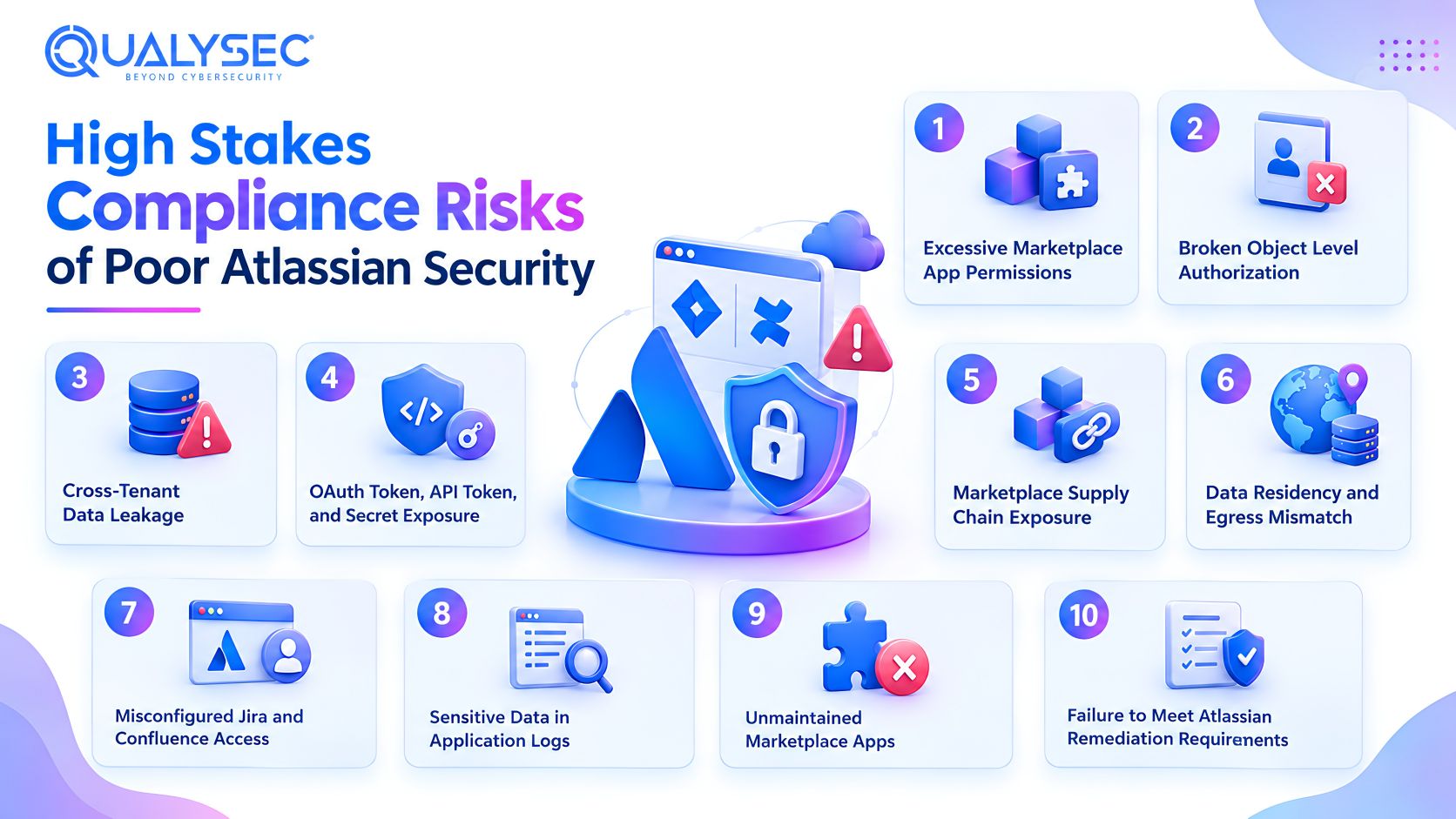
I. Excessive Marketplace App Permissions
Broad Jira or Confluence scopes give an app more access than its function may justify. An app that only needs issue metadata, for example, should not receive wider project access without a clear reason. If that app is compromised, excessive scopes can increase privilege escalation risk and expose more customer data through a third party.
II. Broken Object Level Authorization
An authenticated user can still access data they should not see if an app trusts identifiers without checking ownership or permissions. Attackers may change issue, project, space, account, attachment, or site IDs in a request to target another resource. Atlassian requires authorization checks on protected application resources, not authentication alone.
III. Cross-Tenant Data Leakage
A tenant isolation failure can expose one customer’s data to another through cache errors, mixed identifiers, background workers, exports, or support tools. Because these faults may only appear when several tenants interact with the same app, they need explicit multi-tenant testing rather than standard vulnerability scanning alone.
IV. OAuth Token, API Token, and Secret Exposure
Credentials can escape through code repositories, CI/CD settings, URLs, support tickets, or application logs. Once exposed, a valid token or secret may give an attacker continued API access, allow user impersonation, and reveal information available to the affected account or integration.
V. Marketplace Supply Chain Exposure
Adding a Marketplace app introduces another vendor, its infrastructure, software dependencies, and sometimes additional subprocessors. That extra chain creates risks outside Atlassian’s direct control. For that reason, third-party app security should be assessed separately rather than assumed to be covered by Atlassian’s own certifications.
VI. Data Residency and Egress Mismatch
Choosing a region for Jira or Confluence does not mean every Marketplace app keeps data there. Apps may use external storage, logs, APIs, or subprocessors in other locations. For jira gdpr compliance, review the app’s full data handling path and check its Privacy & Security tab for residency support and external processing details.
VII. Misconfigured Jira and Confluence Access
Access problems usually come from poor configuration, not the Atlassian platform itself. Common examples include oversized groups, broad project roles, incorrect Confluence space permissions, anonymous access, and old admin accounts that were never removed.
These mistakes can expose sensitive content even when Atlassian’s underlying cloud controls are working as intended.
VIII. Sensitive Data in Application Logs
Logs may contain tokens, issue content, personal data, or debugging payloads. Review what is recorded, who can access it, retention periods, and whether third-party logging services receive sensitive information.
IX. Unmaintained Marketplace Apps
An app that goes too long without updates can fall behind on dependencies, APIs, and current security rules. In 2026, Atlassian classifies a cloud app as unmaintained if it has gone more than 18 months without a version update. That can trigger review under the Cloud App Compliance program.
X. Failure to Meet Atlassian Remediation Requirements
Missing remediation deadlines can trigger Marketplace enforcement. Depending on the issue, Atlassian may restrict app visibility, remove trust indicators, or require customer communication. Marketplace approval is therefore not permanent proof of compliance. Vendors must continue fixing reported vulnerabilities within the required timelines.
How to Validate Your Atlassian Security Posture: The CREST Mandate
Why Independent Penetration Testing Matters
Automated checks are useful, but they only go so far. Ecoscanner, SAST, DAST, SCA, and vulnerability scanners can catch known patterns and common weaknesses.
Manual penetration testing is better suited to problems such as:
- Broken authorization and privilege escalation
- Tenant isolation and business logic flaws
- Weak OAuth, JWT, and chained attack paths
These issues depend on context, user roles, and how the app behaves across different tenants. A scanner cannot reliably prove those boundaries are secure.
Atlassian Managed Testing Through Bugcrowd
Atlassian’s managed penetration testing route is run with Bugcrowd. Researchers perform grey box testing against the production Marketplace version of the app, giving them some product knowledge without access to the source code.
Self-Managed Testing With a CREST Accredited Provider
Vendors can arrange their own independent penetration test instead of using Atlassian’s managed Bugcrowd service. If they want that assessment recognised for Atlassian program credit, the testing company must be CREST Accredited.
The process is straightforward:
- Define the scope using Atlassian’s penetration testing template.
- Share Atlassian’s security testing guidance with the provider where needed.
- Complete the assessment and fix identified issues within the applicable deadlines.
- Submit the report or security attestation through ECOHELP for Atlassian review.
- Create AMS tickets for Medium, High, and Critical findings using CVSS 4.0.
Provider selection matters before testing begins. A capable security company without the required CREST accreditation may still find valid vulnerabilities, but its report will not qualify for this self-managed program route.
Qualysec is CREST Accredited for penetration testing, which means it can support vendors choosing this recognised testing option.
Key Scope Areas for an Atlassian Security Penetration Test
An Atlassian pentest should reflect the way the app actually uses identities, permissions, tenant boundaries, APIs, customer data, and external services. Atlassian’s scoping material asks vendors to define the framework, functionality, privilege levels, integrations, and access needed for testing.
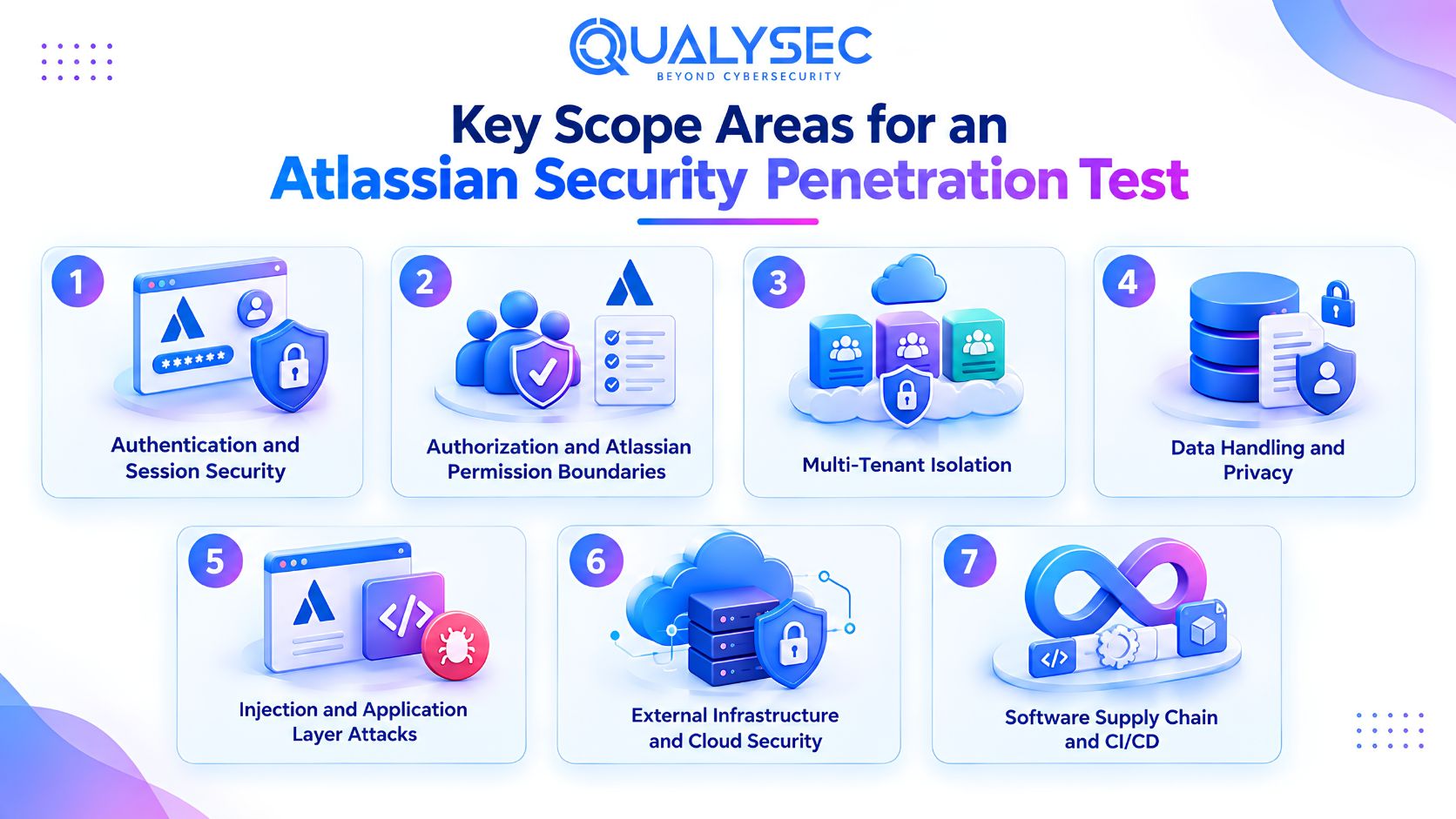
1. Authentication and Session Security
Testing should cover lifecycle endpoint authentication, token replay, redirect manipulation, session invalidation, and authentication behaviour specific to Forge or Connect.
2. Authorization and Atlassian Permission Boundaries
Test direct API access, modified Atlassian identifiers, project and space boundaries, privileged functions, and Forge operations that rely on app-level access.
For Jira SOX compliance, these checks can also help confirm whether restricted functions and privileged actions follow the organisation’s intended access model.
3. Multi-Tenant Isolation
Use separate tenant environments wherever the architecture allows it.
Test whether data or actions can cross tenant boundaries through API requests, background processing, webhooks, queues, exports, or shared application state.
4. Data Handling and Privacy
Verify whether the app’s documented data flow matches its actual behaviour.
A useful question for the tester is:
Can the team account for every place Jira or Confluence information goes after it leaves Atlassian-controlled infrastructure?
For Jira HIPAA compliance, this becomes especially important when a Marketplace app can receive protected health information.
5. Injection and Application Layer Attacks
Apply attack testing to Jira fields, comments, Confluence content, attachment metadata, API parameters, and webhook payloads.
6. External Infrastructure and Cloud Security
For Connect apps and Forge apps using remotes, review:
- Cloud storage exposure
- IAM permissions
- Administrative interfaces
- TLS and security headers
- DNS and subdomain takeover risk
- Cloud metadata access
- Exposed secrets
- External APIs
7. Software Supply Chain and CI/CD
Review repository access, CI/CD permissions, build secrets, package provenance, branch protection, release approval, and whether application artifacts can be changed without detection.
Forge vs Connect: How the Pentest Scope Changes
| Security area | Forge | Connect |
| Runtime | More infrastructure managed by Atlassian | Vendor manages most runtime components |
| Authentication | Uses Forge platform mechanisms | JWT implementation needs closer vendor review |
| Storage | Forge storage may be used | External vendor storage is common |
| External infrastructure | Depends on remotes and egress | Usually part of the scope |
| Data egress | Review manifest and remote services | Trace vendor systems and processors |
| Business logic | Requires testing | Requires testing |
| Tenant boundaries | Requires testing | Requires testing |
Forge reduces some infrastructure responsibilities, but the app itself still needs testing for permissions, business logic, data handling, and any external services it uses.
Best Practices for Maintaining Continuous Atlassian Compliance
Atlassian’s 2026 enforcement policy treats compliance as an ongoing responsibility. Marketplace approval or a completed pentest does not replace regular review.
For Organisations Using Jira, Confluence and Marketplace Apps
Organisations should keep control of who has access, which apps are approved, and what changes over time.
- Maintain an inventory of Atlassian environments and installed Marketplace apps.
- Centralise identity and domain administration.
- Enforce SSO and MFA based on organisational risk.
- Automate provisioning and deprovisioning where practical.
- Keep administrator accounts to a minimum.
- Review groups, project roles, and Confluence permissions regularly.
- Remove inactive accounts, integrations, and unnecessary public access.
- Review significant administrative activity through audit logs.
- Record security exceptions and accepted risks.
- Reassess apps after changes to ownership, architecture, permissions, or data processing.
Review Every Marketplace App Before Installation
Use the Privacy & Security tab as the starting point, then verify the areas that matter to your organisation.
Check:
- App architecture
- Jira and Confluence data access
- Requested scopes
- Data egress
- Data residency
- Encryption and secret handling
- Tenant separation
- Authentication method
- Latest independent security testing
- Dependency management
- Subprocessors
- Retention and deletion
- Incident notification process
- Relevant assurance reports
- Recent maintenance activity
For Atlassian Marketplace Developers
Before Development
Define the security model before implementation begins.
- Threat model the app.
- Classify the data it will process.
- Define tenant boundaries.
- Limit required scopes.
- Decide whether external data transfer is necessary.
- Identify applicable customer and regulatory requirements.
During Development
Build security checks into the development process through peer review, SAST, SCA, secret scanning, authorization testing, tenant-aware testing, input validation, and controlled logging.
Before Release
Test all supported privilege levels and tenant contexts. Verify OAuth or JWT behaviour, deletion and export functions, TLS settings, and security headers.
Where required, complete independent penetration testing and make sure Marketplace security disclosures match the released version of the app.
After Release
Keep security contacts current, monitor AMS tickets and new CVEs, publish updates, retest major changes, review scopes after feature changes, and keep Marketplace security information accurate.
Keep Evidence Ready for Enterprise Reviews
Enterprise customers usually want proof that controls exist and are maintained.
Keep current copies of:
- Architecture and data flow documentation
- Penetration test reports or attestations
- Remediation and retest evidence
- Relevant ISO certificates and SOC reports
- SBOM or dependency inventory
- Vulnerability management policy
- Secure development policy
- Incident response procedure
- Subprocessor list
- Retention and deletion documentation
- Business continuity and disaster recovery information
- Vulnerability disclosure or bug bounty information
How Qualysec Helps You Pass Your Atlassian Security Audits
Qualysec is a specialised penetration testing company and a CREST Accredited provider. Marketplace vendors using Atlassian’s self-managed testing route can engage Qualysec for the independent assessment required for that route. Atlassian remains responsible for deciding whether the submitted evidence qualifies for programme credit.
Testing can be scoped around the app’s actual architecture, including Forge, Connect, Forge Remote, APIs, external SaaS infrastructure, or mixed deployments.
The assessment can cover authorization weaknesses, business logic flaws, privilege escalation, and multi-tenant issues, with findings validated before reporting to reduce false positives.
Reports can include the affected component, privilege and tenant context, severity, technical evidence, reproduction steps, business impact, remediation guidance, and retest status. Qualysec can also support remediation and retesting after fixes are applied.
Conclusion
Atlassian environments keep changing. New apps are installed, permissions evolve, integrations expand, and vendors release new features. That means no one can treat compliance as something completed once and left untouched.
The safer approach is to keep security tied to change. Review what an app can access, test the areas where trust can break down, and revisit earlier decisions when architecture or data handling changes.
For Marketplace vendors, Atlassian’s 2026 requirements make that discipline even more important. Security evidence now needs to stay current, not simply exist at the time of approval.
Schedule a consultation or request a penetration testing quote from Qualysec for your Atlassian Marketplace assessment.

FAQs
1. Which compliance standards does Atlassian support?
Atlassian maintains assurance and compliance programmes covering ISO 27001, SOC 2, CSA CCM, GDPR, HIPAA, and FedRAMP. Coverage differs across products, plans, and deployments. These programmes support customer compliance but do not automatically extend to each organisation or Marketplace app.
2. What are the main security risks in Atlassian Cloud environments?
Key risks include incorrect permissions, excessive app scopes, broken access controls, tenant data leakage, exposed credentials, vulnerable Marketplace apps, outdated dependencies, and unmanaged integrations. The actual exposure depends heavily on configuration and the third-party apps connected to Atlassian.
3. How can organisations secure Jira and Confluence for compliance?
Centralise identity management, apply suitable MFA and SSO controls, limit privileged access, review project and space permissions, remove inactive accounts and integrations, assess Marketplace apps separately, and use audit records to investigate important administrative changes.
4. What security documentation should Atlassian Marketplace app vendors maintain?
Vendors should maintain architecture and data flow documentation, threat models, Privacy & Security disclosures, penetration test evidence, remediation records, dependency inventories, vulnerability procedures, incident response plans, subprocessor details, retention policies, and relevant independent assurance documents.
5. Is penetration testing necessary for Atlassian security compliance?
Not every Marketplace app is required to complete the same penetration testing route. Atlassian offers managed testing through Bugcrowd and a self-managed option. For self-managed testing to receive programme credit, the testing provider must be CREST Accredited.
6. How can organisations continuously monitor Atlassian security compliance?
Track identities, privileged access, installed apps, permission changes, data flows, audit activity, dependencies, and current security disclosures. Reassess apps after meaningful changes and keep supporting evidence current. Atlassian’s enforcement policy requires Marketplace partners to maintain ongoing compliance.