






A CREST Penetration Testing Checklist helps you prevent that. It gives your team a practical way to confirm the scope, assets, access, approvals, reporting needs, and follow-up actions before CREST penetration testing begins.
Nobody wants a penetration test report that says half the important systems were never tested. It wastes time, delays compliance work, and leaves your team with findings that do not fully reflect the real risk.
The 2023 MOVEit Transfer breach showed how one exposed third-party application can create serious business risk. Attackers exploited a SQL injection flaw in the MOVEit Transfer web application and gained access to sensitive data. For any business preparing for security testing, the lesson is clear. Internet-facing systems need careful review before attackers find them first.
This guide is for IT managers, founders, compliance teams, procurement heads, CISOs, and security leads who want testing to produce useful results, not just another report in a folder.
Key Takeaways
- A test is only useful when the right systems are included. Unknown assets can create the biggest surprises later.
- Approval matters as much as technical skill. Testing the wrong system or a supplier-owned platform can create legal risk.
- Good reports should help teams fix issues, not just prove that testing happened.
- Business impact can change the priority. A medium issue in a payment flow may need faster action than a higher-rated issue in a low-value test area.
- A finding should not be marked closed just because a fix was applied. Retesting shows whether the weakness is actually gone.
Why Your Business Needs a CREST Penetration Testing Checklist
A checklist gives every team a clear job before testing starts. Your IT team knows what access to prepare, while your compliance team knows what evidence to collect. Additionally, your developers know who will fix each issue after the report.
It also helps you link Crest penetration testing to business risk. A SaaS company may focus on tenant isolation. A fintech firm may test payment flows and login security. An e-commerce business may review checkout and customer data. A healthcare company may need stronger checks around sensitive records.
NCSC advises that penetration testing should support vulnerability assessment and management, not replace it. So the checklist should continue after the report through fixes, retesting, and proof of closure.
Pre-Engagement CREST Penetration Testing Checklist
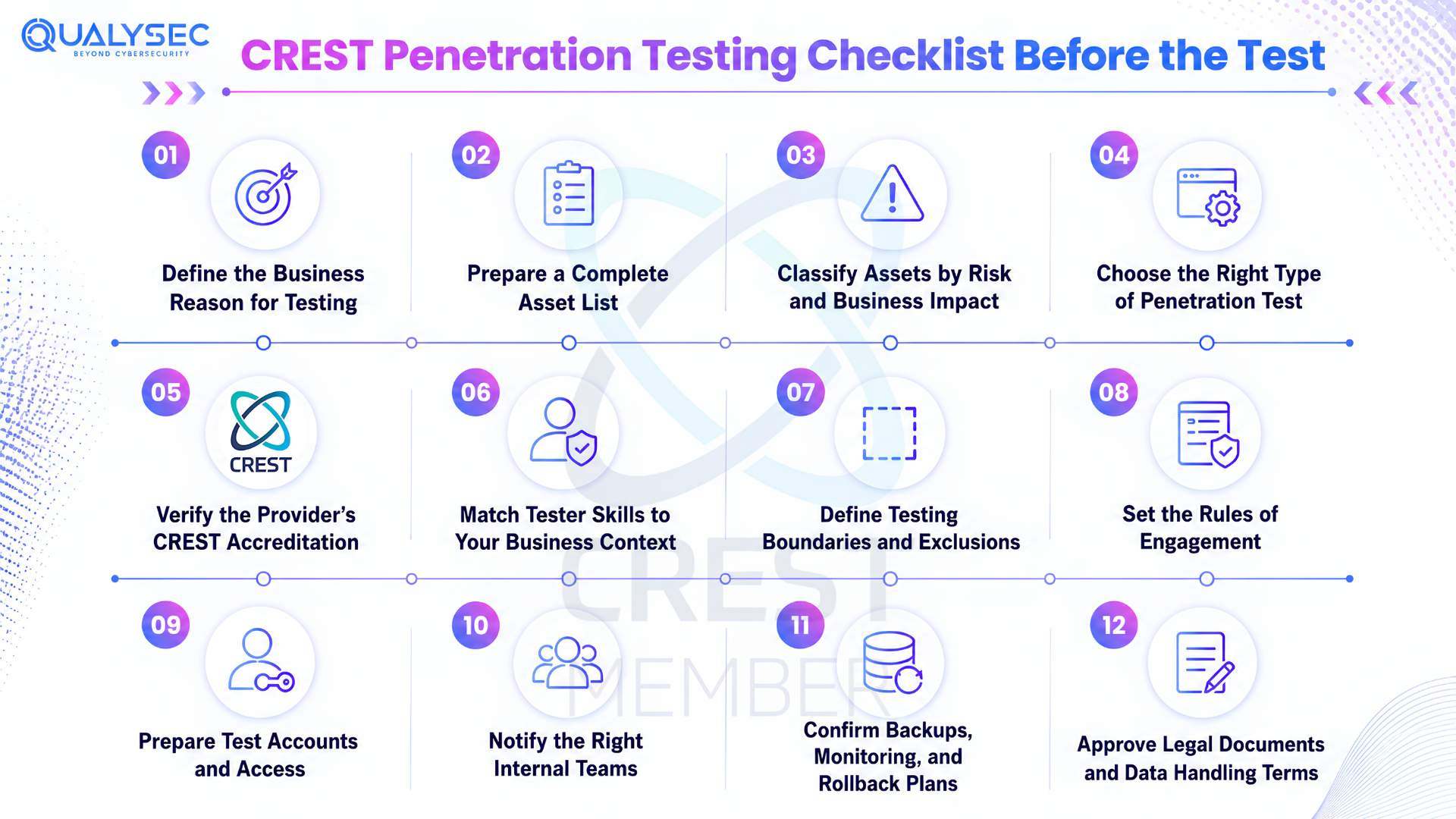
1. Define the Business Reason for Testing
Before you contact a provider, be clear about why you need the test. Are you preparing for compliance, a client audit, a launch, cloud migration, previous fix validation, funding, acquisition, or a major release?
The reason shapes the scope. A SaaS firm may need API and tenant isolation checks. An e-commerce brand may focus on checkout, accounts, plugins, and admin access. A fintech or healthcare company will need testing around sensitive flows and data protection.
2. Prepare a Complete Asset List
Your test scope should cover more than the public website. Forgotten systems can carry real risk, especially when they run old software, hold sensitive data, or sit outside regular monitoring.
Include:
- Websites and business applications
- Mobile apps and exposed APIs
- Public IPs and internal network ranges
- Cloud accounts and hosted workloads
- Admin areas and staff portals
- VPNs and remote login systems
- Firewalls and perimeter devices
- Payment flows and customer databases
- Test sites and retired subdomains
- External integrations and SaaS platforms
- Source code repositories when review is included
- Connected devices across IoT or OT environments
Record who owns each asset, what it supports, where it runs, how sensitive it is, and whether attackers can reach it from the internet.
3. Classify Assets by Risk and Business Impact
Not every asset needs the same testing depth. Sort systems by risk assessment so the provider can plan the right effort, safe testing windows, and reporting priority.
| Asset Type | Why It Matters | Checklist Question |
| Business-critical systems | Downtime can affect revenue or operations | What happens if this system becomes unavailable? |
| Sensitive data systems | They may process personal, financial, health, or client data | What data does this system store or handle? |
| Internet-facing systems | Attackers can find and target them more easily | Can the public access this asset? |
| Privileged access systems | A breach can open access to wider systems | Who has admin rights? |
| Legacy systems | Older platforms are often harder to patch or monitor | Is this system still supported? |
| Recently changed systems | New updates can introduce fresh security issues | What changed in the last few months? |
Risk also depends on the business context. A medium-severity issue on a payment system may need faster action than a higher-severity issue on a low-value test system.
4. Choose the Right Type of Penetration Test
Your checklist should match the test type to the asset and risk. A web app, cloud setup, internal network, and mobile backend all need different access, approvals, and test conditions.
| Test Type | Best For | What the Business Should Prepare |
| Web application penetration test | Websites, portals, SaaS platforms, user accounts | URLs, user roles, test accounts, key workflows |
| API penetration test | Mobile backends, partner integrations, microservices | API documentation, tokens, endpoints, role details |
| External network penetration test | Public IPs, firewalls, VPNs, exposed services | IP ranges, ownership proof, approved testing windows |
| Internal network penetration test | Corporate network, segmentation, internal servers | Network access, test machine, rules of engagement |
| Cloud penetration test | AWS, Azure, GCP environments | Cloud architecture, IAM roles, logging setup |
| Mobile app penetration test | iOS and Android apps | App builds, test accounts, API details |
| Wireless penetration test | Office WiFi, guest networks | Physical location, SSIDs, authorised time window |
| Social engineering assessment | Phishing readiness and human risk | Approved targets, legal approval, communication plan |
| Red team assessment | Mature security teams testing detection and response | Objectives, threat scenarios, escalation process |
| Retest | Validating fixed vulnerabilities | Previous report, fix evidence, updated systems |
Choosing the right test early helps the provider request the correct access and prevents your team from expecting results that the chosen test cannot cover.
5. Verify the Provider’s CREST Accreditation
Do not rely only on a proposal or sales page. Check whether the provider appears on the CREST Marketplace or can share valid proof for the exact service you need. The Marketplace helps buyers search CREST-approved companies that have been independently assessed against professional and technical standards.
Ask:
- Is the company CREST accredited?
- Does the accreditation cover the CREST cybersecurity services you need?
- Who will perform the test?
- Do the testers hold relevant CREST certification?
- Will any subcontractors be involved?
- Have they tested similar businesses before?
- Do they carry suitable insurance?
- Can they share a redacted sample report?
- How do they protect sensitive data and evidence?
- Will senior testers review the findings?
6. Match Tester Skills to Your Business Context
A provider can be strong in one area and still be the wrong fit for your environment. Before you confirm the project, check whether the assigned testers understand systems like yours, not just general testing methods.
Ask:
- Have they tested businesses with similar risks?
- Can they work safely around live systems?
- Do they know how to handle sensitive workflows without disruption?
- Will they verify findings manually before reporting them?
- How do they reduce false positives?
- Can they explain the real business impact behind each issue?
- Will developers receive clear fix guidance instead of vague recommendations?
Good technical skills matter. Relevant experience matters just as much when the test involves customer data, financial activity, regulated information, or complex user roles.
7. Define Testing Boundaries and Exclusions
A penetration test should only cover areas your business has approved in writing. Before work begins, separate the scope into three groups: approved, restricted, and excluded.
Include user roles, test accounts, social engineering targets, physical sites, production limits, and any supplier-owned systems that need separate consent.
Your business cannot approve testing on assets it does not own. If a payment processor, hosting provider, SaaS vendor, or partner environment is involved, get written permission before the provider includes it in the assessment.
8. Set the Rules of Engagement
Rules of engagement tell the provider how testing should run without creating legal, operational, or communication problems. Agree on them before the first activity starts.
Confirm:
- Start and end dates
- Approved testing hours
- Business hour restrictions
- Emergency stop process
- Main technical contact
- Escalation contacts
- Systems that must not be disrupted
- Allowed and restricted methods
- Data access limits
- Evidence handling rules
- Secure communication channels
- Incident process if an active compromise is found
These rules help your security team recognise authorised testing and stop testers from crossing agreed limits. For live OT, CNI, or other critical systems, extra care is needed because availability can be affected. NCSC CAF guidance also notes that live Operational Technology testing should be considered carefully.
9. Prepare Test Accounts and Access
Authenticated testing helps testers find issues that appear after login. Prepare standard, admin, read-only, role-based, expired, and disabled accounts. Add API keys, MFA setup, dummy customer records, sample files, and safe payment data.
This can reveal broken access control, privilege escalation, insecure file access, weak sessions, account takeover paths, business logic flaws, and tenant data leakage.
10. Notify the Right Internal Teams
Tell the right teams that testing is planned, but share details only with people who need them. IT, security, DevOps, developers, compliance, legal, support, management, hosting teams, cloud teams, and key suppliers may need awareness.
Too little communication can cause panic. Too much detail can weaken detection testing.
Confirm:
- Who can approve an emergency pause?
- Who handles critical findings?
- Who informs customers if a disruption occurs?
- Who owns remediation after the report?
11. Confirm Backups, Monitoring, and Rollback Plans
Testing should be controlled, but your business still needs a recovery plan. Confirm that recent backups exist, restores have been tested, rollback steps are documented, and system owners know how to bring services back if needed.
Also, check that critical logs are enabled across WAF, EDR, IAM, firewalls, and cloud platforms. Your monitoring team should know the testing window so alerts can be reviewed properly.
A well-managed test can show whether detection and response processes work, not just whether vulnerabilities exist.
12. Approve Legal Documents and Data Handling Terms
Penetration testing should never begin on verbal approval alone. The provider will use controlled attack techniques, so your business needs written permission before any live activity takes place.
The agreement should clearly cover:
- Approved scope
- Test dates
- Written authorisation
- Confidentiality terms
- Data handling rules
- Evidence retention
- Liability and insurance details
- Third-party permission if needed
- Emergency contact details
Legal and compliance teams should review these terms early.

Checklist During the CREST Penetration Test
1. Confirm the Test Has Started
Before any activity begins, both sides should send a simple start confirmation. The provider should state that testing has begun, and your team should acknowledge it.
For longer assessments, agree on:
- Confirm when the team will share updates.
- Who will receive progress notes?
- Confirm how the team will report validated critical findings.
- Confirm which secure channel your team will use for urgent messages.
This keeps everyone aligned without repeating the full rules of engagement.
2. Monitor Systems During Testing
During the assessment, keep a live record of how your environment responds. Note unusual behaviour, performance changes, alert spikes, and any user-reported issues.
Track:
- What happened
- When it happened
- Which service was affected
- Whether it matched the tester activity
- Who reviewed it internally
This helps your business understand whether your team noticed, ignored, or misunderstood the expected test behaviour.
3. Record High Risk Findings as They Appear
Some findings need a separate live record before the final report is prepared. Use this only for issues that could expose data, weaken payments, bypass login, show admin compromise, or suggest an active breach.
For each high-risk item, note:
- What was found
- Which system is affected
- What business process is at risk
- Whether temporary protection is already in place
- Identify what your team still needs to fix after testing.
4. Track Scope Changes Carefully
A tester may find a connected system that looks relevant to the assessment, but the tester should not test it without approval.
Before you add anything new, check:
- Who owns the asset
- Explain why you need to include it.
- Whether written approval is available
- Whether the timeline changes
- Whether the cost changes
Qualysec is a CREST-certified company that helps businesses prepare for structured security testing with better scope, clearer evidence, and clearer fix planning. Our approach gives businesses wider coverage while maintaining the depth needed to discover real risks.
We use three layers during testing. Our security experts perform manual reviews to find complex issues and business logic flaws. AI-driven agents help simulate realistic attack patterns and identify hidden risks faster. Automated scanners support broad coverage by detecting known weaknesses across systems.
This mix helps reduce false positives and gives your team findings that are easier to verify, understand, and fix. Once your business completes remediation, Qualysec can also support retesting to help you confirm whether you have properly resolved the issues.
Conclusion
A rushed penetration test often creates more questions than answers. A CREST Penetration Testing Checklist keeps the process grounded, from the first scope discussion to the final retest.
It helps your team prepare the right assets, approvals, accounts, monitoring, report review, fix ownership, and closure evidence. More importantly, it turns testing into part of a wider crest cyber security routine, not a one-time file for security audits.
The real outcome is not the report. It is what your business fixes after reading it.
FAQs
Q. Is CREST Penetration Testing Checklist mandatory?
Clients, regulators, insurers, contracts, procurement rules, or sector programmes may request CREST penetration testing, but not every business requires it. Check the exact requirement before you book testing.
Q.How do I verify a CREST-accredited provider?
Check the CREST Marketplace or ask for valid accreditation proof. Make sure the approval covers your required service. Also review tester experience, certifications, insurance, subcontracting, report quality, and senior review.
Q.What systems should be included in the scope?
Scope depends on risk and testing goals. It may include web apps, APIs, mobile apps, external networks, cloud assets, admin dashboards, payment systems, customer databases, subdomains, and third-party integrations.
Q.How long does a CREST Penetration Testing Checklist take?
Timing depends on asset count, complexity, test type, access level, and report depth. A small application may take a few days. Larger environments can take several weeks.
Q.What should a penetration testing report include?
A good report should include scope, methodology summary, affected assets, evidence, risk rating, business impact, remediation steps, limitations, executive summary, and retest guidance.
Q.Is vulnerability scanning the same as penetration testing?
No. Scanning uses automated tools to flag possible issues. Penetration testing includes manual validation and controlled exploitation to confirm whether a weakness creates real business risk.
Q.How often should a business conduct penetration testing?
Many businesses test annually and after major changes. High-risk systems, client audits, product launches, cloud migrations, compliance needs, or sensitive data environments may require more frequent assessments.