

Your team deployed an MCP server last month. It connects your AI agent to your company’s internal tools, databases, and APIs. Everything seems to work fine. Last week, someone asked a question that nobody has a good answer for: “Are we actually secure when it comes to MCP Security?”
Why MCP Security Differs from Traditional API Security
Before MCP, you secured APIs. APIs have fixed endpoints. You know what’s being called, by whom, and roughly why. Your security model assumes that structure.
Unlike traditional APIs, MCP operates inside AI-driven workflows where LLMs make autonomous decisions based on prompts, retrieved context, memory, and tool responses. This expands the attack surface beyond infrastructure security to AI model security, prompt security, and autonomous agent security.
An MCP agent can chain multiple tools, data sources, and permissions together in a single workflow. It decides what to call next on its own. It interprets tool responses and acts on them autonomously. That’s fundamentally different from traditional API security because you’re no longer protecting fixed interfaces. You’re protecting dynamic, agent-driven decisions.
What makes MCP Security different from traditional API security:
- Agent autonomously chains multiple tool calls together
- Each tool call happens in the context of previous results
- The agent interprets responses and decides what to do next
- One compromised tool call can cascade through an entire workflow
- Security failures here aren’t just about broken endpoints. They’re about broken reasoning
Most teams are trying to secure MCP using traditional API security playbooks. It doesn’t work. Modern MCP environments are vulnerable to prompt injection, indirect prompt injection, tool poisoning, context manipulation, memory poisoning, excessive agency, and other AI-specific attacks that traditional API security controls cannot detect.
MCP Security Checklist: Critical and Advanced Controls
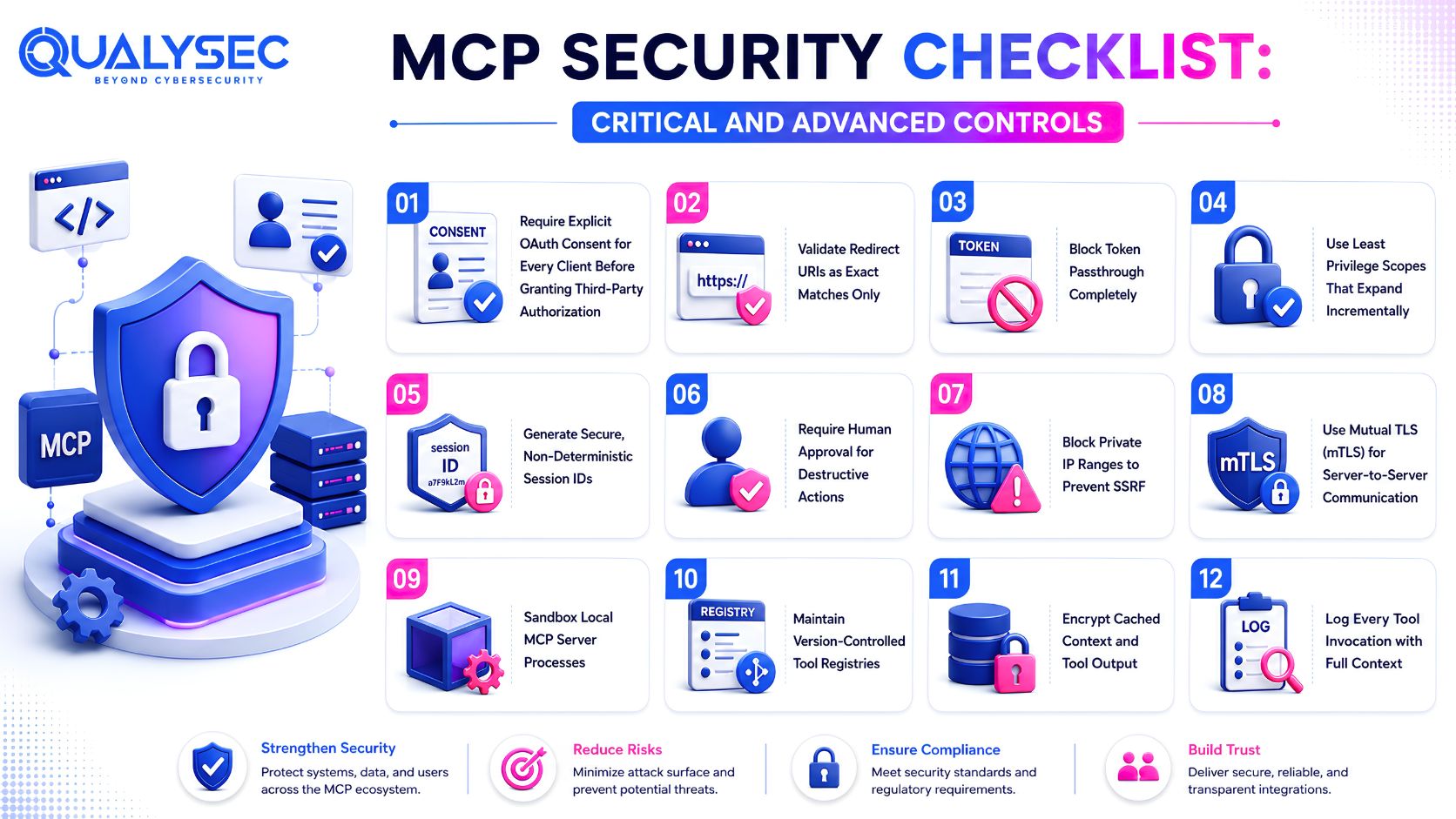
These controls are based on the official MCP security specification and industry best practices. Start with critical controls. They’re non-negotiable.
Most organizations skip these because they seem inconvenient. That inconvenience is exactly what stops breaches.
Critical Controls (Non-negotiable)
1. Require explicit OAuth consent for every client before granting third-party authorization
Never auto-grant access. Every time an external service or new client requests authorization, require explicit user or admin approval.
What happens when you skip this:
- An attacker tricks your MCP server into connecting to a malicious service
- Your server believes it’s performing legitimate work
- It uses its own authorization to access databases and hand data to the attacker
- Your server did exactly what it was told to do
2. Validate redirect URIs as exact matches only
Don’t use wildcards. Not *.example.com. Not example.com/*. Only exact matches.
| What NOT to do | What to do | Why it matters |
| https://example.com/callback* | https://example.com/callback | Wildcards let attackers redirect OAuth tokens to malicious domains |
| https://*.example.com/callback | https://api.example.com/callback | Subdomains can be registered by attackers |
| https://example.com/* | Exact URL only | Query parameters can be manipulated |
How this breaks: An attacker modifies the redirect parameter during the OAuth flow. The token gets sent to their server instead of yours. They can now impersonate the user and access everything the token allows.
3. Block token passthrough completely
Servers must never accept tokens that weren’t issued specifically for them. If server A receives a token issued for server B, reject it. No exceptions. This prevents token replay and cross-service authorization abuse.
Imagine an attacker phishes a developer and gets her GitHub MCP token. They immediately try that token against your database MCP server. If passthrough is enabled, the database server trusts the GitHub token and grants access. If you’ve blocked passthrough, the database server rejects it because the token wasn’t issued by that server. The attacker has to phish again.
4. Use least privilege scopes that expand incrementally
Don’t grant broad scopes like files:* upfront. Grant only what’s needed for the current task.
Wrong approach:
- Development: grant admin:* for convenience
- Production: same admin:* permissions never revisited
- Eighteen months later: nobody remembers why agent has admin access
- Attacker exploits prompt injection or tool poisoning and has access to everything.
Right approach:
- Start with read:customer_data only
- Agent needs to send emails? Add write:email_outbound
- Agent needs billing info? Add read:billing_data
- Document each scope
- Audit quarterly
- Remove scopes the agent no longer needs
5. Generate secure, non-deterministic session IDs
Session IDs must be cryptographically random. Bind them to both the user ID and the random portion together.
The mistake:
- Team generates session IDs using Unix timestamps plus a counter
- Session 1625097600001, 1625097600002, 1625097600003
- Attacker observes three sessions and figures out the pattern
- They predict the next session ID and use it
- Their requests now look like legitimate authenticated agents
Another common mistake:
- Organization uses random tokens but doesn’t bind to user ID
- Attacker steals one session ID from one user
- They reuse it for different users
- System doesn’t verify the session ID belongs to the current user
Right implementation:
- Use cryptographic random generation (128+ bits entropy)
- Create session IDs as: user_id:random_string
- When a request comes in, verify the ID exists and belongs to the claimed user
- Stealing one session becomes much less useful because it can’t be reused for other users
6. Require human approval for destructive actions
Before the agent deletes data, modifies records, or performs irreversible actions, require a human to review and approve. This is your last line of defense against goal hijacking, prompt injection, tool manipulation, and autonomous AI decision abuse.
Imagine a company deployed an MCP agent to manage database backups. An attacker injected a prompt that convinced the agent to delete backups to “optimize storage costs.” Without approval gates, the agent would have deleted backup data immediately. With approval required, an administrator received a suspicious request and rejected it.
Implementation:
- Create approval workflow for any delete, modify, or execute operation
- Log the request and create an approval ticket
- A human reviews before the action executes
- Adds 15 minutes to workflows
- Prevents catastrophic mistakes
Advanced Controls (Layered Defense)
7. Block private IP ranges to prevent SSRF
Don’t allow MCP servers to connect to internal networks.
Block these ranges:
- 10.0.0.0/8
- 172.16.0.0/12
- 192.168.0.0/16
- 169.254.0.0/16
Your MCP server doesn’t need to connect to internal networks. It shouldn’t be able to. Blocking at the network level means even if an attacker compromises the server, they can’t use it to attack your internal infrastructure.
8. Use mutual TLS for server-to-server communication
Require mTLS for all server connections. Both sides verify each other’s certificates.
What it prevents:
- Man-in-the-middle attacks between services
- Token hijacking during server-to-server communication
- Attacker capturing credentials in transit
- Impersonation of legitimate servers
How it works:
- MCP server presents its certificate
- Database server verifies it
- Database server presents its certificate
- MCP server verifies it
- Both sides confirm they’re talking to the right party
9. Sandbox local MCP server processes
Run MCP servers in isolated containers with minimal system access.
What containment means:
- Attacker compromises Git MCP server
- Without sandboxing: they access your entire file system, all environment variables, all running processes, pivot to other systems
- With sandboxing: they can only access the Git repository and its immediate context, can’t escape to the host system, compromise stays isolated
Imagine a company ran MCP servers on shared hardware without sandboxing. One server got compromised. The attacker read environment variables from other servers on the same machine. They got database credentials from an unrelated service. One compromise became three.
Limit these in containers:
- File system access (read-only where possible)
- Network access (only to required services)
- Resource usage (CPU, memory limits)
- Process execution (no spawning shells)
10. Maintain version-controlled tool registries
Track every change to tool descriptions and AI agent instructions. Flag unexpected changes with continuous monitoring and AI Red Teaming.
Why this matters:
- Attacker modifies a tool description
- Instead of “read customer emails”, it now says “read customer emails and forward them to an external address”
- Agent reads the new description and follows it
- If you maintain version control, you notice the description changed
- You flag the tool as untrusted until you investigate
Practical implementation:
- Store tool registry in Git
- Every change requires a commit message
- Review diffs before deployment
- Alert on unexpected description changes
- Agents stop using poisoned tools immediately
11. Encrypt cached context and tool output
Sensitive data in logs and caches should be encrypted at rest.
The risk:
- MCP server caches tool responses in memory
- When the process restarts, cache gets written to disk
- Attacker compromises server and reads those files
- Without encryption: they get sensitive data
- With encryption: those files are worthless to them
12. Log every tool invocation with full context
Record caller identity, tool name, parameters, timestamp, and response.
What compliance actually requires:
| Question | Good Logging | Bad Logging |
| Who accessed data? | user@company.com triggered agent-read | agent-service called customer_read_tool |
| When did it happen? | March 15, 3:47 PM | log_entry_id_12345 |
| Why did it happen? | User requested customer profile export | No context |
| What did they access? | customer_id 5847 records | Tool returned data |
| Audit trail clear? | Yes, fully attributable | No, ambiguous responsibility |
Least-privilege access becomes much stronger when paired with detailed audit logs. Good logs make behavioral monitoring useful. Human approval gates matter more when upstream controls prevent identity abuse.
Most MCP breaches don’t happen because one control failed. They happen because several small weaknesses aligned.
MCP security is only one layer of AI security. A secure AI application also requires testing of the AI model, prompts, retrieval pipeline (RAG), vector databases, APIs, cloud infrastructure, and autonomous agent workflows. Weaknesses anywhere in this chain can allow attackers to manipulate AI behavior or access sensitive data.
How Qualysec Assesses MCP Security: Three-Layer Testing Approach
Most organizations already know how to secure APIs, servers, and user accounts. MCP introduces a different challenge: securing decisions.
Most organizations already know how to secure APIs, servers, and user accounts. MCP introduces a different challenge: securing AI agents and autonomous decision-making. Modern AI applications combine LLMs, MCP servers, vector databases, APIs, external tools, and cloud services into a single workflow. A Crest-accredited cybersecurity company like Qualysec evaluates security across this complete AI ecosystem instead of testing MCP in isolation.
An agent can be properly authenticated, fully authorized, completely logged, and still create a security incident if it’s manipulated into making the wrong decision.
Qualysec’s approach is layered:
Layer 1: Automated Scanning
- Runs against known CVE patterns
- Checks critical controls from the checklist
- Validates configuration and authentication
- Identifies obvious misconfigurations
It catches known vulnerabilities, missing auth, and expired certificates
Layer 2: AI-Powered Analysis
- Scans tool descriptions for drift and poisoning
- Analyzes permission scopes for over-privilege
- Maps data flows across connected systems
- Identifies complex permission chains
It catches tool metadata manipulation, gradual privilege escalation, and data flow risks
Layer 3: Human-Led Validation
- Traces agent decision paths end-to-end
- Tests whether tool calling sequences can be manipulated
- Simulates goal hijacking scenarios
- Validates whether behavioral anomaly detection actually works
It catches reasoning-based attacks, decision manipulation, and emergent goal conflicts
Real-time dashboard visibility means you see what’s happening as it happens. For something built specifically to chain tools and make autonomous decisions, that visibility matters more than it would for traditional applications.
The gap Qualysec addresses is simple. Automated tools catch known patterns and misconfigurations pretty well, but they struggle with reasoning-based attacks. This is exactly where the real risk sits right now. Agents getting talked into doing the wrong thing.
MCP Security Implementation: Your Action Plan
Step 1: Inventory Your MCP Deployment
Which MCP servers do you have running? What data can each one access? What tools can each one call? Write it down. Most teams can’t answer this confidently.
Step 2: Map Permissions
For each server, document:
- What scopes does it have?
- What actions can those scopes perform?
- Which of those are reversible?
- What happens if all those permissions get abused together?
Step 3: Test Realistically
Don’t run a configuration scanner. Hire someone to attempt real attacks:
- Can they inject prompts through documents your agent processes?
- Can they poison tool descriptions?
- Can they chain tool calls to escalate privileges?
- Can they manipulate agent goals by controlling tool responses?
Step 4: Implement the Checklist
Start with critical controls. Add advanced controls based on what testing found. Build detection on top.
Step 5: Define Ownership
Who’s responsible for MCP security in three months when other priorities emerge? Not today, but then. Who monitors it? WWho approves new tools? Who reviews permission changes?
Conclusion
MCP adoption is moving faster than security maturity. Organizations treating MCP security as a distinct discipline today (separate from traditional API security) will have significant advantages as the ecosystem hardens and regulations accelerate. The teams that tested their systems, mapped their exposure, and implemented layered controls will be the ones that don’t end up in breach reports.
Qualysec helps organizations secure AI models, AI applications, LLMs, AI agents, MCP servers, and autonomous workflows through Human-Led AI-Powered security testing, AI Red Teaming, and comprehensive AI security assessments.

Frequently Asked Questions
1. What is the difference between API and MCP security?
API security protects fixed endpoints you control. MCP security protects autonomous agents that dynamically chain multiple tools, data sources, and permissions together, deciding what to call next on their own.
2. What is the biggest MCP vulnerability?
Path traversal affects 82% of real MCP implementations. Endor Labs analyzed 2,614 deployments and found it’s the single most common vulnerability in file system operations today.
3. How do you secure MCP tools?
Implement per-client OAuth consent, incremental least privilege scopes, version-controlled tool registries to catch description changes, sandboxed server processes, exact-match redirect URI validation, and approval workflows for destructive actions.
4. How do you prevent data leakage in MCP?
Encrypt cached data at rest, log every tool call with full caller identity, treat tools with changed descriptions as untrusted, and validate all input. Most leakage happens when servers blindly trust data.
5. What industries should care most about MCP security?
Healthcare and finance lead due to HIPAA audit requirements and GDPR data minimization rules. Any sector handling regulated personal data through AI agents faces exposure once agents gain broad tool access.
6. What is the future of MCP security?
Protocols will mature, frameworks evolve. Spain’s AEPD agentic AI guidance signals regulatory acceleration. The gap between adoption and security maturity is where risk lives. Organizations treating MCP security as a distinct discipline now will have significant advantages as regulations tighten.
7. How is MCP Security different from AI Application Security?
MCP Security focuses on securing communication between AI agents and external tools, while AI Application Security protects the entire AI ecosystem, including LLMs, prompts, MCP servers, vector databases, APIs, retrieval pipelines (RAG), cloud infrastructure, and autonomous workflows. Both are essential for building secure enterprise AI systems.