

An audit, like an endpoint security compliance audits can uncover problems that routine security checks miss. A device may not be enrolled in the approved system. A required control may have stopped working months ago. An exception may still exist even though no one remembers approving it.
These gaps matter because auditors do not judge security by tool ownership alone. They want proof that controls covered the right devices and stayed effective during the period under review. Missing records or inconsistent enforcement can lead to failed audits, fines, contract issues, and avoidable security exposure.
This guide explains what auditors usually examine and what evidence your organisation should have ready. It also covers frequent findings, preparation steps, and ways to address weaknesses before they become larger problems.
Key Takeaways
- A dashboard can look complete even when devices are missing from the inventory. Coverage figures only matter when the full endpoint population is known.
- Auditors need proof from the whole review period. Current settings cannot replace older logs, reports, tickets, or exception records.
- Installed tools do not guarantee compliance. An inactive agent or failed encryption control can leave a device outside protection without anyone noticing.
- Scope often reaches beyond company laptops. Contractor systems may count. So can cloud workloads, virtual machines, mobile devices, and BYOD equipment.
- A finding is not closed when someone updates a ticket. The fix still needs to be checked through a fresh scan, direct testing, an updated report, or retesting.
What are Endpoint Security Compliance Audits?
Endpoint security compliance audits check whether the way your organisation protects devices matches the rules it is expected to follow. Those rules may come from laws, contracts, industry standards, or internal policies.
The audit looks at more than whether a control exists. It checks whether the control was set up correctly, applied to the right devices, and worked as expected. Auditors also review the records used to prove this, along with any exceptions and the action taken to fix identified problems.
A compliance audit tests controls against specific requirements. An endpoint security assessment looks at the wider strength of your security programme. A vulnerability scan finds known technical weaknesses, while a penetration test checks whether those weaknesses can be used to gain access or cause harm.
A point-in-time audit reviews controls on one specific date. A period-of-time audit checks whether they continued to work over several months.
Which Endpoints Are Included in a Compliance Audit?
The audit scope should cover every device that can reach sensitive systems or handle protected information. Limiting the review to employee laptops can leave large parts of the environment unchecked.
Depending on how your organisation works, the scope may include:
- Laptops and desktop computers
- Physical and virtual servers
- Mobile phones and tablets
- Cloud-hosted workloads
- Devices used by developers and administrators
- Contractor-owned equipment
- Personal devices approved under a BYOD policy
- Point of sale systems and kiosks
- IoT and operational technology equipment
- Remote devices that connect only occasionally
- Offline systems used to store or process sensitive data
A network endpoint may need to be included when it accesses regulated records, connects to an important business system, or sends sensitive information elsewhere. The same applies to a data endpoint that stores or processes information covered by privacy, security, or contractual requirements.
One of the first problems auditors often find is an incomplete device inventory. When the organisation cannot account for every relevant endpoint, it also cannot prove that required controls apply across the full audit scope.
Which Compliance Frameworks Cover Endpoint Security?
Endpoint controls rarely fit under a single neat heading. They usually appear across several parts of a framework, such as device management, access, logging, vulnerability handling, and incident response.
| Framework | Endpoint Areas Commonly Reviewed |
| NIST CSF 2.0 | Asset inventory, identity management, platform security, monitoring, and incident response |
| NIST SP 800 53 | Configuration management, access control, logging, system integrity, and incident response |
| CIS Controls v8 | Device inventory, secure configuration, account management, patching, and malware protection |
| ISO 27001:2022 | Endpoint devices, access control, malware protection, vulnerability management, and logging |
| SOC 2 | Logical access, monitoring, system operations, and change management |
| PCI DSS 4.0.1 | Secure configuration, malware protection, security updates, authentication, and logging |
| HIPAA Security Rule | Access control, audit controls, authentication, data integrity, and device safeguards |
| GDPR | Security of personal data processing, access restrictions, breach response, and data protection |
| NIS2 | Asset management, access control, vulnerability handling, and incident response |
| CMMC | Configuration management, access control, audit logging, system integrity, and media protection |
The table gives a general view of what may come under review. It is not a universal checklist. Scope can change based on the data you handle, the systems involved, the type of assessment, and the rules that apply to your organisation.
NIST CSF 2.0 helps organisations organise and manage cyber risk. It does not lead to certification. ISO 27001 takes a wider view and assesses the organisation’s information security management system, so endpoint controls form only one part of the audit.
SOC 2 is also often misunderstood. It results in an independent attestation report, not a certification. GDPR and the HIPAA Security Rule do not tell you to buy a particular endpoint security platform. They require suitable safeguards, but the organisation must decide which controls and technologies are appropriate for its risks.
What Do Auditors Examine During an Endpoint Compliance Security Audits?
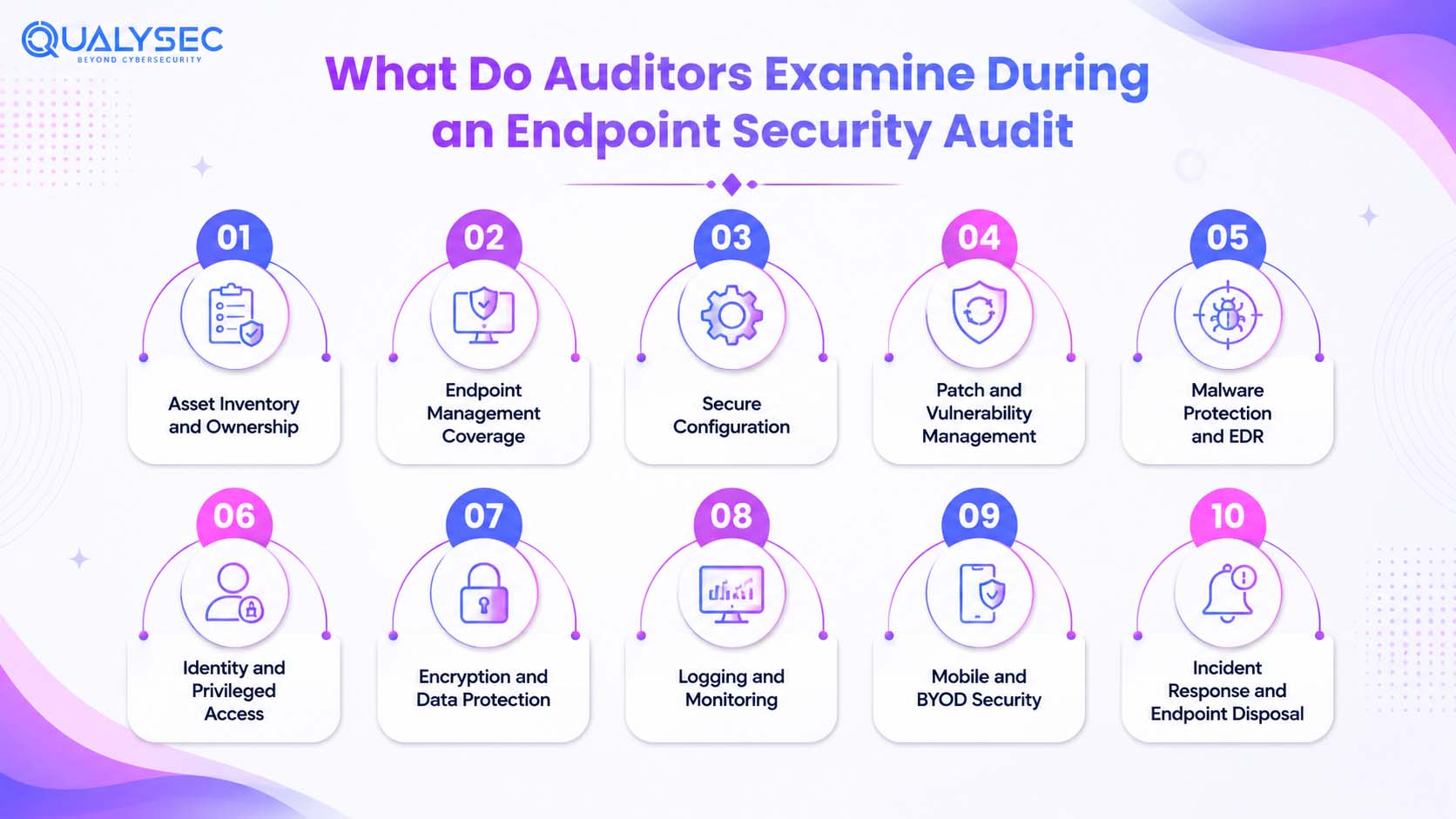
Asset Inventory and Ownership
Auditors check whether every endpoint in scope appears in the official inventory. Each record should show the assigned user, device type, operating system, location, management status, security agent, encryption, and lifecycle stage.
They may compare the inventory with CMDB, EDR, MDM, cloud, network, procurement, and directory records. A common issue is finding devices in one system that do not appear in the main asset list.
Endpoint Management Coverage
Auditors check whether every device in scope is enrolled in the systems required to manage and protect it. Their review may cover:
- EDR coverage
- Encryption coverage
- MDM or UEM enrolment
- Vulnerability scan coverage
- Logging coverage
- Stale or non-reporting agents
A dashboard may show 100% coverage and still be wrong. If the organisation has not identified every endpoint, the percentage only reflects the devices already known to the platform.
Secure Configuration
Approved security settings should exist for every endpoint security service type in scope. These settings usually address:
- Default accounts
- Local administrator access
- Firewall rules
- Remote access
- Screen lock controls
- Password and authentication requirements
- Secure boot
- Macros and scripts
- USB use
- Logging
- Unnecessary services
A baseline has little value if it only exists in a policy document. It should have formal approval, a clear version history, regular monitoring, and a process for handling justified exceptions.
Auditors often find that the required settings are documented but applied unevenly across devices.
Patch and Vulnerability Management
Patch coverage should extend beyond the operating system. It should also include:
- Browsers
- Third-party applications
- Relevant firmware
Auditors look for clear repair deadlines, with shorter timelines for critical vulnerabilities. Failed patches should be investigated, unsupported systems must remain visible, and any delay needs formal approval. A second scan should confirm that the weakness has actually been fixed.
Automatic updates alone do not prove compliance. Devices may be offline, updates may fail, or some software may fall outside the update process. Independent penetration testing can also show whether unresolved weaknesses provide a usable route into systems or sensitive data.
Malware Protection and EDR
Auditors check whether real-time protection and EDR are active across all relevant endpoints. They also look at agent health, tamper protection, signature and engine updates, alert monitoring, host isolation, threat investigation, and escalation procedures.
Deployment numbers alone are not enough. The evidence should show that alerts were reviewed, investigated, and closed properly. A common issue is that EDR appears widely deployed, but some agents no longer report, or security teams do not investigate alerts consistently.
Identity and Privileged Access
Auditors check how access is created, changed, and removed across endpoints. Key areas include:
- Unique user accounts
- Multifactor authentication
- Dormant account removal
- Service account controls
- Conditional access
- Joiner, mover, and leaver processes
- Privileged access management
- Local administrator restrictions
Permanent local administrator access creates unnecessary risk. Elevated privileges should be granted only when needed through approval, temporary access, or a documented exception.
Encryption and Data Protection
Auditors need proof that encryption is active, not simply installed. They usually check:
- Full disk encryption
- Mobile device encryption
- Removable media encryption
- Recovery key escrow
- Lost device handling
- Remote wipe
Any failed or inactive encryption status should be identified and corrected. The records should also show that recovery keys are available and lost devices can be secured without delay.
Logging and Monitoring
Endpoint logs need to be collected in one place so the security team can find them when something goes wrong. These records often show:
- Failed and successful logins
- Changes to user privileges
- Malware alerts
- Attempts to disable the security agent
- Firewall changes
- USB use
- Remote connections
- Changes to encryption
Auditors will also look at whether the system keeps enough history, whether device clocks match, and whether someone actually checks the alerts as part of an Endpoint Security Audit. The retention period should come from the rules that apply to your organisation. There is no single number that works for every audit.
Mobile and BYOD Security
Personal phones and tablets can fall within the audit scope when they connect to sensitive business systems or handle company data. Auditors may look for:
- Device enrolment
- Minimum operating system versions
- Encryption
- Screen locks
- Root or jailbreak detection
- Work profiles or secure containers
- Conditional access
- Remote wipe
- Offboarding controls
BYOD policies should also explain what the organisation can monitor on a personal device. Security controls need to protect business data without collecting more employee information than necessary.
Incident Response and Endpoint Disposal
A compromised device needs a clear path from discovery to closure. The response plan should show how the team handles malware, missing equipment, isolation, forensic work, escalation, and investigation of the cause.
The same level of control should continue when a device reaches the end of its use. Records such as incident tickets, isolation logs, erasure reports, disposal certificates, and closed asset entries help confirm what happened to the device and whether its data was removed safely.
What Evidence Should Organizations Prepare?
Governance Evidence
Policies show what the organisation expects teams to do and who is responsible when something goes wrong. Keep the current approved versions of:
- Endpoint security policy
- Patch and vulnerability management policy
- Access control policy
- Encryption standard
- BYOD policy
- Logging and monitoring policy
- Incident response plan
- Secure disposal procedure
- Exception management procedure
Outdated or unsigned documents can weaken the evidence, especially when daily processes no longer match what the policy says.
Technical Evidence
Technical reports show what is actually happening across the endpoint environment. Useful evidence includes:
- Endpoint inventory
- EDR coverage and agent health reports
- Encryption status reports
- Patch compliance reports
- Vulnerability scan results
- Secure configuration reports
- Local administrator reports
- MDM or UEM reports
- Central logging reports
The data should match the audit period and cover the full device population. Old exports or reports from only one system may leave important gaps.
Operational Evidence
Operational records help show that teams followed the required process, not just that a policy existed. Prepare evidence such as:
- Remediation tickets
- Access reviews
- Alert investigations
- Incident records
- Exception approvals
- Risk acceptance records
- Change approvals
- Offboarding records
- Rescan results
- Disposal certificates
The records should be complete enough to show who took action, when it happened, and whether the issue was properly closed.
Evidence Quality Requirements
Good evidence should be:
- Relevant to the control being tested
- Complete
- Accurate
- Dated
- Linked to its source system
- Representative of the audit period
- Protected from unauthorised changes
- Assigned to a control owner
System-generated reports, logs, and ticket histories usually carry more weight than manually prepared screenshots. They preserve dates, user activity, status changes, and source details, which makes the evidence easier to verify. A screenshot can be cropped, altered, or taken outside the audit period, so it often needs extra support.
How Do Auditors Test Endpoint Controls?
Inquiry
Auditors speak with the people responsible for each control to understand how it is meant to work, who performs the task, and what records are created.
An interview explains the process, but it does not prove the control worked throughout the audit period. Auditors still need supporting records and test results.
Inspection
The auditor then checks the paperwork and system records behind the control. This can include policies, reports, tickets, settings, logs, and approved exceptions in the endpoint security solution.
The main question is whether the process described in the documents matches what is happening across the endpoints.
Observation
Some controls are tested by watching the task being carried out. An auditor may ask a team member to enrol a device, isolate an endpoint, retrieve an encryption key, remove access, or process an exception.
This helps confirm that staff can follow the procedure and use the required tools correctly.
Reperformance
For some tests, the auditor repeats the work instead of relying on the organisation’s result. They may recalculate EDR coverage, confirm encryption on a sampled device, compare the asset inventory with EDR enrolment, or check patch status directly.
Any difference between the original result and the auditor’s result may point to missing devices, outdated records, or unreliable reporting.
Sampling
Auditors do not test only the devices your team chooses. They may select samples by device type, operating system, location, risk level, user privilege, business function, or exception status.
Preparing a small set of clean audit devices will not help if the wider environment has gaps. Any endpoint in the full population may be selected, so the same controls should work across all devices in scope.
Common Endpoint Security Compliance Audit Findings
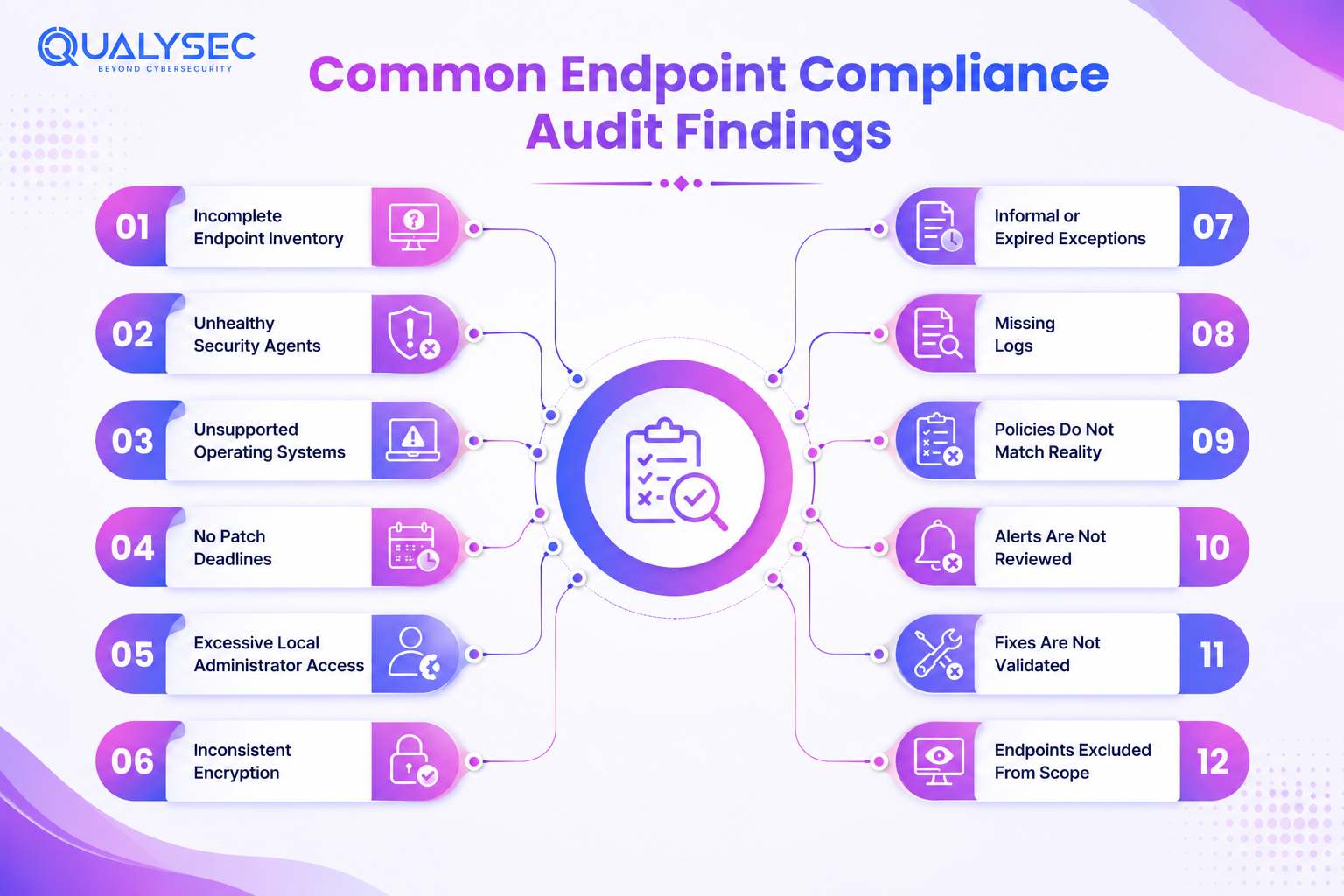
1. Incomplete Endpoint Inventory
Devices appear in EDR or network records but not in the main asset list. Reconcile all source systems and assign ownership.
2. Unhealthy Security Agents
Some agents stop reporting or run outdated versions. Track inactive agents and restore coverage quickly.
3. Unsupported Operating Systems
Older systems may no longer receive security updates. Upgrade or replace them, or document temporary safeguards.
4. No Patch Deadlines
Vulnerabilities remain open because teams have no clear repair timeline. Set deadlines based on severity and confirm fixes through rescans.
5. Excessive Local Administrator Access
Users keep permanent administrator rights without a valid need. Remove unnecessary access and use temporary elevation instead to reduce endpoint protection risks.
6. Inconsistent Encryption
Some devices show failed or inactive encryption. Fix coverage gaps and confirm that recovery keys are stored correctly.
7. Informal or Expired Exceptions
Exceptions may lack approval or remain open past their review date. Record the reason, owner, risk, and expiry date.
8. Missing Logs
Required endpoint logs are unavailable for part of the audit period. Check collection failures and align retention with applicable requirements.
9. Policies Do Not Match Reality
The written process may differ from how controls actually operate. Update the policy or correct the implementation.
10. Alerts Are Not Reviewed
EDR alerts may remain open without investigation. Assign clear responsibility and keep a record of the outcome.
11. Fixes Are Not Validated
Teams close remediation tickets without checking whether the issue is gone. Require a rescan or direct verification before closure.
12. Endpoints Excluded From Scope
Contractor devices, cloud workloads, virtual systems, or BYOD equipment may be overlooked. Include every endpoint that handles sensitive information or reaches protected systems.
How to Prepare for an Endpoint Security Compliance Audits
Step 1: Identify Applicable Requirements
Begin by listing every obligation that affects endpoint security, including:
- Laws and regulations
- Security frameworks
- Customer contracts
- Internal policies
- Industry requirements
Next, map each obligation to the endpoint controls it expects and the evidence needed to prove compliance. This prevents teams from collecting irrelevant records or missing a requirement that applies to only one system or business area.
Step 2: Define the Scope
Set clear boundaries for the audit before collecting evidence. Document:
- Business units
- Locations
- Networks
- Endpoint types
- Data types
- Users
- Third parties
- Audit period
- Any exclusions
Each exclusion should have a clear reason so the auditor can understand what sits outside the assessment and why.
Step 3: Map Requirements to Endpoint Controls
Build a control crosswalk that connects each requirement to the way it is handled across your endpoints. Include:
- Requirement
- Control objective
- Endpoint implementation
- Control owner
- Supporting evidence
- Testing frequency
- Approved exceptions
- Remediation status
This makes it easier to spot requirements that have no clear owner, weak evidence, or unresolved control gaps.
Step 4: Reconcile Endpoint Inventories
Compare records from the CMDB, directory, EDR, MDM, vulnerability scanner, cloud systems, network tools, and procurement data.
Look into any device that appears missing, duplicated, inactive, or already retired. These mismatches often reveal endpoints that were never enrolled, were not removed properly, or no longer have a clear owner.
Step 5: Test Controls Before the Audit
Choose devices from different endpoint groups rather than checking only the easiest ones. Test whether:
- Security agents are healthy
- Encryption is active
- Required patches are installed
- Approved settings are applied
- Local administrator access is justified
- Logs are reaching the central system
Also, confirm that the evidence covers the full audit period. A control that works today may still fail if earlier records are missing.
Step 6: Organize Audit Evidence
Keep one evidence tracker for the whole audit. For every request, note the requirement, related control, document owner, date range, file location, and current review status.
A well-maintained tracker makes it easier to see what is ready, what still needs attention, and who should provide the missing material. It also reduces duplicate requests once the audit begins.
Step 7: Remediate Readiness Gaps
Deal with the gaps that could cause the most harm first. A flaw on an internet-facing administrator device deserves faster attention than a low-risk issue on an isolated system.
Use exploitability, data sensitivity, user privilege, external exposure, affected device count, and regulatory impact to set the order. Existing safeguards may reduce the urgency, but they should not become a reason to leave the underlying problem open.
Step 8: Brief Control Owners
Before the audit begins, make sure each control owner understands:
- How the control works
- Which records support it
- How exceptions are approved
- Who will answer auditor questions
A short briefing helps prevent mixed answers and delays during the review.
How to Remediate Endpoint Audit Findings
Begin with the exact requirement that failed and identify every affected endpoint. Then find out why the control broke. Fixing one visible device will not help if the same issue exists across the wider environment.
Separate the response into:
- Immediate containment
- Permanent corrective action
For each action, record:
- Responsible owner
- Completion date
- Evidence required
- Method used to confirm the fix
Closure may involve a new report, another scan, direct device testing, policy approval, recalculated coverage, or independent retesting. A resolved ticket is not proof that the weakness has disappeared.
When the same finding returns, the problem may sit with unclear ownership, poor monitoring, or a control that teams cannot apply consistently.
How Qualysec Supports Endpoint Compliance Security Audits Readiness
Penetration testing does not replace endpoint compliance security audits. It helps show whether unresolved weaknesses can be exploited and whether current endpoint protection solutions are working as intended. Qualysec combines manual testing with automated methods across:
- External networks
- Cloud systems
- Web applications
- APIs
- Mobile applications
- IoT environments
The final report includes severity ratings, reproduction steps, business impact, remediation guidance, an executive summary, and retesting support. Contact Qualysec for a scoped penetration test before your next compliance assessment and strengthen your endpoint cybersecurity with clearer technical evidence.
Conclusion
Endpoint security compliance audits test whether controls work across the full device environment, not whether a dashboard looks complete. Clear scope, accurate records, reliable evidence, and verified fixes make the difference. Regular monitoring and independent testing can uncover gaps early, reduce audit pressure, and give you stronger confidence in the controls protecting your endpoints.

FAQs
1. Is endpoint security software enough for compliance?
Not on its own. A security product can enforce certain controls, but compliance also depends on what your organisation does around it. Policies must be current, every relevant device needs coverage, exceptions require approval, and teams must keep evidence that shows the controls worked.
2. What is the difference between an endpoint audit and a vulnerability scan?
A vulnerability scan looks for known technical weaknesses. An endpoint audit goes much further. It checks how devices are managed, who has access, whether policies are followed, what evidence exists, and how problems are handled after discovery.
3. What evidence do auditors request for endpoint security?
The request usually starts with the endpoint inventory and technical reports from EDR, encryption, patching, configuration, and device management systems. Auditors may also ask for access reviews, alert tickets, exception approvals, and proof that earlier findings were properly fixed.
4. How long should endpoint logs be retained?
The right period depends on the rules your organisation follows. Legal duties may set one expectation, while contracts, investigations, and operational needs may require longer access. Privacy requirements also matter, so log retention should have a clear business and compliance reason.
5. Does passing an endpoint audit guarantee security?
No audit can promise that an organisation is fully secure. The result only reflects the controls, systems, requirements, and time period that were tested. New weaknesses can appear later, and controls that passed during the review can still fail if they are not maintained.