

Getting through the Crest Cyber Essentials Questionnaire takes more than copying information from an old asset list or relying on general security policies. Your answers need to reflect the systems your organisation actually uses and show that the required controls are working across the selected scope.
This guide is based on the Danzell Question Set and Requirements for IT Infrastructure v3.3, which apply to assessment accounts created from 27 April 2026. It will help you prepare the right information before you begin entering responses into the assessment portal.
You will see how to organise key details, avoid inconsistent answers, and reduce the chance of unnecessary assessor queries. Practical examples and preparation checks will make each stage easier to understand and complete with confidence.
Key Takeaways
- A vague scope creates problems later. It should clearly show which people, systems, locations, and services are covered.
- Device and software records must include exact versions. Broad labels are not enough to confirm support.
- Cloud accounts need separate attention, especially MFA coverage, admin access, and accounts that bypass SSO.
- Security updates must meet the required 14-day window. A monthly routine alone does not prove compliance.
- Before submission, check the full answer set for mismatched numbers, missing platforms, unsupported software, and inconsistent MSP details.
What Is the Cyber Essentials Assessment Questionnaire?
The Crest Cyber Essentials Questionnaire is a verified self-assessment used to confirm that an organisation meets five technical controls: firewalls, secure configuration, security update management, user access control, and malware protection.
You complete the questions and define the certification scope. An authorised assessor then reviews the answers before certification is awarded. A senior representative must approve the final declaration.
Cyber Essentials remains valid for 12 months. Cyber Essentials Plus uses the same controls but also includes independent technical testing. A security assessment can further help identify risks beyond the certification requirements. Question numbers can vary in the portal, so this guide follows the main assessment sections instead.
Which Cyber Essentials Questionnaire Version Should You Use?
Use the question set linked to the date your assessment account was created. Danzell applies to organisations purchasing or registering from 27 April 2026 and follows Requirements for IT Infrastructure v3.3. Accounts created earlier can continue with the previous version during their six-month completion period.
Do not reuse answers prepared for Willow, Evendine, or older requirements without reviewing them. Previous responses may not match current cloud service questions, MFA rules, definitions, marking criteria, or software support requirements.

What You Need Before Completing the Questionnaire
Collect the required information before you purchase the assessment or begin entering answers in the portal. IASME makes the questionnaire available free of charge, so you can prepare a working version first. Transferring finished responses may take about an hour, but checking systems and correcting weaknesses often requires more time.
Keep these materials ready:
- Current Danzell Question Set
- Requirements for IT Infrastructure v3.3
- Guidance for your chosen scope
- Cyber Essentials Readiness Tool action plan
- Device and software inventories
- Cloud service register
- User and administrator account records
- MFA status details
- Patch and update reports
- Firewall and network information
- Details from managed service providers and other technology suppliers
Choose one assessment coordinator to manage the final answers. They can gather information from IT, security teams, cloud administrators, developers, HR, procurement, senior management, and external providers.
The coordinator does not need to operate every system. Their main responsibility is to check that each team describes the same environment and that the final responses remain consistent with your Crest cyber security controls.
How to Complete the Cyber Essentials Assessment Questionnaire Step by Step
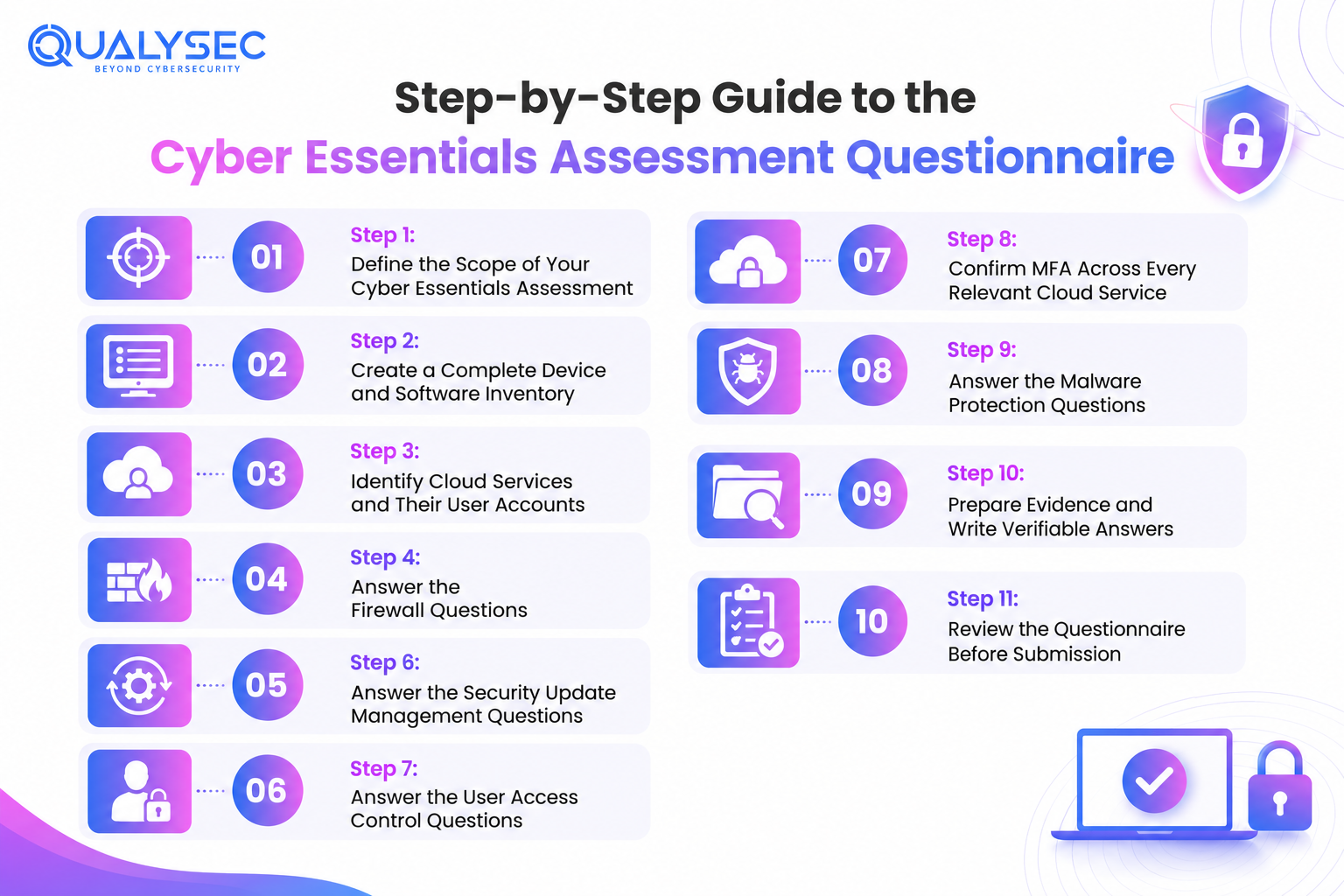
Complete the steps in order because the scope and inventory determine which systems, users, and controls must appear in later answers.
Step 1: Define the Scope of Your Cyber Essentials Assessment
The scope identifies the parts of your organisation covered by the assessment. Every answer must refer to the same defined environment.
Document:
- Legal entities
- Business units
- Office and remote locations
- Overseas staff
- Employees and contractors
- Networks and subnets
- End-user devices
- Servers and virtual machines
- Mobile devices
- Cloud platforms and SaaS applications
- Internet-facing systems
- Externally managed infrastructure
- Exclusions and their technical boundaries
Whole organisation coverage is usually clearer for customers. A partial scope can work when the included area is specific, the boundary is technically enforced, and excluded systems cannot access the data or services being assessed.
Include home workers, overseas employees, cloud services, outsourced infrastructure, development systems, and personally owned devices when they access in-scope organisational data or services. Guest WiFi should only be excluded when it is properly segregated. Difficult-to-manage devices cannot be omitted for convenience.
A CREST Penetration Testing Methodology helps security teams focus testing on the systems and assets that matter most.
Strong Scope Description Example
The assessment covers Example Ltd, including employees working from its London office and remotely. It includes company-managed Windows 11 and macOS laptops, mobile devices used for company access, Microsoft 365, Salesforce, AWS production services, and the office network protected by a Fortinet gateway. The guest wireless network is excluded because it cannot access company systems or data.
Weak Scope Description Example
All company systems are included.
This does not identify the users, locations, devices, services, or boundaries covered by the assessment.
Suggested Scope Template
Organisation:
Locations:
Users:
Devices:
Networks:
Cloud services:
Hosted infrastructure:
Third-party managed systems:
Exclusions:
Technical segregation supporting exclusions:
Step 2: Create a Complete Device and Software Inventory
Prepare the inventory before answering questions about updates, secure configuration, or malware protection.
For each device category, record the exact operating system or firmware version, quantity, ownership, management method, location, user group, update process, and access to company data or services. Include overlooked assets such as personal devices, test systems, virtual machines, thin clients, routers, firewalls, and other connected equipment.
Labels such as “Windows” or “macOS” are not specific enough. Check the exact edition and release against the vendor’s lifecycle information to confirm whether it is still supported.
Keep spare devices, temporarily offline systems, shared terminals, and equipment awaiting disposal in the inventory while they can still be used. For containers, review the host, runtime, images, and software managed by your organisation.
Create a separate software register for:
- Browsers and office applications
- Email and server software
- Plugins and runtime environments
- Remote access and development tools
- Internet-facing applications
- Firewall and router firmware
Mark every product as supported, approaching the end of support, or unsupported.
Suggested Device Inventory
| Asset group | Quantity | OS or firmware | Management | Included? |
| Company laptops | 42 | Windows 11 24H2 | Microsoft Intune | Yes |
| Design laptops | 6 | macOS 15 | Jamf Pro | Yes |
| Company mobiles | 28 | iOS 18 or Android 15 | Microsoft Intune | Yes |
| Guest devices | Variable | User controlled | Segregated guest network | No |
| Office firewall | 1 | Supported release | MSP managed | Yes |
The version numbers are illustrative. Use the versions installed in your own environment and verify their current support status.
Step 3: Identify Cloud Services and Their User Accounts
Treat cloud services as part of the assessed environment, not as separate supplier systems. Review tools used for email, storage, collaboration, CRM, accounting, HR, source code, project management, customer support, marketing, passwords, backups, hosting, identity, and remote access.
Common examples include Microsoft 365, Google Workspace, Salesforce, Xero, Slack, GitHub, AWS, Azure, Google Cloud, HubSpot, Zendesk, and Atlassian.
For each service, record:
- Its business purpose and the data it handles
- User numbers and account types
- Direct login or SSO use
- MFA availability and enforcement
- Administrator accounts and service ownership
- Joiner, leaver, and access review processes
- Provider and customer responsibilities
The provider secures the underlying platform. Your organisation still controls users, permissions, authentication, and configurable security settings.
Do not record only the largest platforms. Compare procurement records, SSO applications, password manager entries, expenses, browser extensions, finance data, and departmental software lists to find smaller tools. Review dormant accounts and unused applications instead of leaving them unexamined.
A CREST Penetration Testing Checklist can also help ensure that cloud services, user accounts, and security controls are reviewed before a comprehensive security assessment.
Step 4: Answer the Firewall Questions
Describe how your organisation protects devices and networks from untrusted connections. Cover office networks, remote workers, public network use, and cloud-hosted systems.
Include:
- Firewall and router details
- Host firewall settings
- Cloud security groups
- Inbound services
- Remote administration methods
- Default credential changes
- Rule approval and review processes
Your answer should show that unnecessary inbound traffic is blocked, exposed administrative access is restricted, and every permitted service has a clear business reason. Remove temporary rules when they are no longer needed.
When an MSP manages the firewall, name the technology, explain what the provider controls, identify who approves changes, and state how your organisation reviews the service.
| Answer type | Example |
| Strong answer | The office uses a FortiGate firewall managed by our MSP. The IT manager blocks inbound traffic unless they approve a documented exception. The MSP records changes and reviews active rules every quarter. Company laptops use Microsoft Defender Firewall on all network profiles. |
| Weak answer | Our IT provider manages the firewall. |
The weak answer does not explain the technology, settings, or review process.
Step 5: Answer the Secure Configuration Questions
Secure configuration means removing insecure defaults and limiting features that create unnecessary risk. Your answer should explain how settings are applied across devices, servers, network equipment, and cloud services.
Cover how your organisation:
- Disables unused accounts and services
- Removes applications that are no longer required
- Prevents unauthorised software installation
- Applies screen locking and authentication settings
- Uses approved builds or configuration baselines
- Checks systems before deployment
- Restricts removable media where required
Name the technology used to enforce these controls. This may include Microsoft Intune, Active Directory Group Policy, Jamf, mobile device management, configuration scripts, standard operating system images, or manual build checklists for a small number of devices.
Avoid relying on policy statements alone. Explain the setting applied, the systems covered, who manages it, and how compliance is checked. Windows devices, Macs, mobiles, servers, and cloud tenants may use different methods.
Do not state that a control covers every device unless reports or checks confirm complete coverage.
Answer formula: Control used + systems covered + enforcement method + responsible owner + review process
Step 6: Answer the Security Update Management Questions
Explain how your organisation identifies, prioritises and installs security updates across all in-scope software and firmware.
High-risk and critical updates covered by the current requirements must be applied within 14 days of release. A routine monthly schedule is only suitable when it still meets that deadline.
Your response should cover:
- Who monitors new security updates
- How urgent fixes are prioritised
- How updates are deployed
- How failed installations are investigated
- How are offline devices followed up
- How firmware updates are handled
- How end-of-support dates are tracked
Unsupported software can cause it to fail. It should be upgraded, replaced, or removed. Excluding it is only acceptable when the revised scope is valid and technically separated.
Step 7: Answer the User Access Control Questions
Access should match each person’s role and end as soon as it is no longer needed. Your answers must show who approves access, who creates or changes accounts, and who removes them.
Normal user accounts
Use individual accounts wherever possible. Cover:
- Access requests and manager approval
- Role-based permissions
- Changes when responsibilities move
- Temporary and contractor access
- Dormant account checks
- Removal after departure
Shared accounts should be avoided. When one is unavoidable, restrict who can use it and keep clear records.
Administrator accounts
List all privileged accounts, including local, tenant, cloud, service, and emergency accounts. Limit administrator rights to approved users and use separate privileged accounts where appropriate.
Do not use administrator accounts for routine email or web browsing. Explain how you remove temporary privileges, review access, and apply MFA.
Joiner, mover, and leaver process
Show how HR, line managers, and IT coordinate account changes. Include account creation, role assignment, changes in responsibility, session revocation, device recovery, data transfer, and account closure or approved retention.
Step 8: Confirm MFA Across Every Relevant Cloud Service
A yes or no response cannot show whether MFA protects the full user population. Check each service in your cloud register and confirm:
- Enforce MFA instead of offering it as an optional setting.
- Cover standard users, contractors, and guests with MFA.
- Protect accounts that bypass SSO with separate MFA.
- Manage emergency accounts and service accounts correctly.
- Identify and justify any exceptions.
User enrolment alone does not prove compliance. The organisation must apply MFA at service level where the platform supports it. Under the Danzell requirements, this also applies when MFA requires a paid subscription.
Where a service does not offer MFA, record the limitation and check its treatment against the current requirements rather than assuming it can remain unchanged.
| Service | Users | MFA available | MFA enforced | Exceptions |
| Microsoft 365 | 54 | Yes | Yes | None |
| Salesforce | 18 | Yes | Yes | None |
| GitHub | 14 | Yes | Yes | None |
| Legacy booking system | 6 | No | Not available | Requires review |
These entries only demonstrate how to structure the register. Use your organisation’s actual services, account numbers and settings.
Step 9: Answer the Malware Protection Questions
Cyber Essentials allows different malware protection methods to be used depending on the device and its purpose. These can include anti-malware software, application allow listing, sandboxing, platform security controls, browser protection, and restrictions on software installation.
Windows Devices
State which supported security product is active and how your organisation confirms that real-time protection, cloud-based detection, signature updates, and tamper controls remain enabled.
macOS Devices
Describe the built-in protections and any additional endpoint security in use. Explain how your organisation blocks untrusted applications and manages settings across company devices.
Mobile Devices
Cover the use of official app stores, mobile device management, and controls that restrict unapproved applications. Administrators should detect and block rooted or jailbroken devices from organisational access.
Development Devices
Development teams may need to compile and run internal code, so one standard allow list may not suit every device. Describe the controls used for package managers, build tools, unsigned code and test environments.
Your answer should also identify:
- The protection method used for each platform
- The devices covered
- Any approved exceptions
- How is disabled protection detected
- Who investigates missing controls
Step 10: Prepare Evidence and Write Verifiable Answers
Cyber Essentials is a verified questionnaire rather than the technical audit used for Cyber Essentials Plus. You do not usually need to submit a large evidence pack, but supporting records help confirm your answers and resolve assessor queries.
Keep essential documents such as:
- Asset and software inventories
- Cloud, account, MFA, and patch records
- Firewall reviews, supplier details, and approved exceptions
Each descriptive answer should identify the control, where it applies, who manages it, and how the organisation handles problems. When an MSP manages part of the environment, confirm what the contract covers and explain how your organisation checks the service.
| Task | Business owner | IT team | MSP | HR |
| Confirm scope | Approves | Advises | Advises | Provides workforce data |
| Device inventory | Reviews | Owns | Supplies managed device data | Confirms assigned devices |
| Patch compliance | Reviews risk | Verifies | Operates where contracted | None |
| Joiners and leavers | Oversees | Changes accounts | Supports | Initiates requests |
| Final declaration | Signs | Confirms technical accuracy | Confirms delivered controls | Confirms people processes |
Step 11: Review the Questionnaire Before Submission
Before submitting, check that every answer describes the same environment. A response can look correct on its own but still conflict with the scope, inventory, or another control section.
Compare:
- Scope with the device and cloud inventories
- Software records with updated responses
- Account lists with access and MFA answers
- Device platforms with malware protection details
- Remote working arrangements with firewall controls
- Exclusions with the stated network segregation
Confirm that all versions are current, remove unsupported products, verify device counts, and include BYOD, contractors, remote staff, and overseas users where relevant. MSP information should also match your internal records.
How to Submit the Cyber Essentials Questionnaire
Portal access is provided after you purchase the assessment through an authorised Certification Body. Transfer the approved responses from your working document and complete the submission within six months of the application date. An expired account may require you to submit a new application and pay the fee again.
Before submitting, check:
- Answers have not been cut off
- Dropdown options are correct
- Conditional fields are complete
- Device numbers match the final inventory
A senior representative must approve the declaration before submitting the questionnaire for assessment. Assessors usually aim to return the first result within three days, although incomplete or complex responses can take longer.
How Qualysec Can Strengthen Security Beyond the Cyber Essentials Baseline
Cyber Essentials helps you put essential technical controls in place, but it does not include penetration testing. It also does not replace the assessment completed by an authorised Cyber Essentials Certification Body.
Some risks sit outside the scope of the questionnaire. These include business logic flaws, API access issues, cloud configuration errors, exposed network services, mobile application weaknesses, and IoT attack paths.
Qualysec tests web applications, mobile applications, APIs, cloud environments, external networks, and IoT systems. Its team uses manual testing alongside automated tools to find issues that basic configuration reviews may overlook. The final report includes:
- Risk-ranked findings
- Clear reproduction steps
- Business impact details
- Practical remediation guidance
- Executive summaries
- Retesting and consultation support
Organisations seeking crest approved pen testing after completing the baseline can contact Qualysec for a consultation and tailored quote.
Conclusion
The questionnaire only works when every answer matches the organisation’s actual setup. Clear scope details, current inventories and consistent control descriptions make the submission easier to assess.
Keep the supporting records for renewal, follow-up questions, and any future move to Cyber Essentials Plus. The certification covers essential protections, while wider security work may still include monitoring, recovery planning, incident response, and a suitable Crest vulnerability assessment.
FAQs
Q. How many questions are in the Cyber Essentials questionnaire?
The portal does not have a reliable fixed number because it can display additional fields based on earlier responses. It is more useful to prepare for the main assessment sections and the five technical controls than to work towards a specific question count.
Q. Can I view the Cyber Essentials questions before paying?
Yes. IASME provides the current question set free of charge so you can review it and prepare responses before buying access to the assessment portal. The materials are available in downloadable formats for advance preparation.
Q. Can I complete the Cyber Essentials questionnaire myself?
You do not have to hire a consultant. Someone within the organisation can complete it, provided they can accurately define the scope and gather reliable details about devices, cloud services, accounts, and technical controls.IT teams or external providers may still need to provide input.
Q. How long does the Cyber Essentials assessment take?
Entering prepared answers may take about an hour. The work completed beforehand, including inventories, checks, and corrective action, often takes much longer. After submission, assessors generally aim to issue the first result within three days.
Q. What happens when an answer is rejected?
The assessor may ask for clarification when an answer lacks detail. A failed control means the current arrangement does not meet the requirement. Applicants can usually amend and resubmit within two working days, but they may not be able to fix larger technical problems within that period.
Q. Is unsupported software allowed under Cyber Essentials?
Software within scope must still receive vendor security support. An unsupported product can lead to failure because newly discovered weaknesses may remain unpatched. The organisation will normally need to upgrade, replace or remove it, or deal with it through a valid scope decision that meets current requirements.